All-in-One WP Migration
The gold standard for beginner-friendly migrations with a flawless success rate, marred only by a restrictive extension-based pricing model and proprietary file lock-in.
The Good
- Zero-configuration setup
- Bypasses server upload limits
- Corrupt-free serialized string replacement
- Works on almost all hosting providers
The Bad
- Free version limited to 512MB
- Proprietary .wpress file format (Lock-in)
- Expensive per-extension pricing
- No WP-CLI in free version
Migrating a WordPress site is historically a nightmare of database corruption, serialized string errors, and timeout issues. If you have ever stared at a “White Screen of Death” after moving a site manually, you know the pain. This All-in-One WP Migration review examines a plugin that promises to solve these headaches with a single click.
However, as a developer who values open standards and performance, I am skeptical of tools that hide complexity behind a “black box.” Does the convenience of All-in-One WP Migration justify the cost of its premium extensions, or are you better off with a manual migration? Let’s dive into the data.
What is All-in-One WP Migration?
Created by ServMask, All-in-One WP Migration is not a traditional backup plugin, although it is often used as one. It is a dedicated migration tool designed to move a WordPress site from one location to another (e.g., Localhost to Live, or Host A to Host B) with zero technical knowledge required.
Unlike competitors that require you to upload PHP installers and zip files via FTP, this plugin handles everything from inside the WordPress dashboard. It boasts over 60 million installations, a testament to its reliability. However, its popularity stems from a specific technical achievement: it bypasses web server upload size limits by chunking data, a feature we will analyze in the performance section.
You might also like: Stop Wasting Time: The Ultimate Guide to Mastering the WordPress Cron Job
Key Features
In this All-in-One WP Migration review, we focus on the features that actually impact your workflow, ignoring the marketing fluff.
- Chunked Data Uploads: Most servers have a
upload_max_filesizelimit (often 2MB or 8MB). This plugin splits your site into small chunks (usually 2MB) to bypass these server restrictions entirely. - Serialized Data Protection: It automatically runs a find/replace operation on your database during export/import to ensure URLs and file paths are updated without breaking serialized arrays—a common issue with manual SQL imports.
- Mobile Device Compatibility: Surprisingly, the plugin is fully responsive, allowing you to trigger a backup or migration from a phone or tablet.
- Broad Hosting Support: Because it doesn’t rely on system dependencies, it works on virtually every hosting provider, including specialized managed hosts like WP Engine and Kinsta.
Proprietary Lock-in
Performance & Usability
Performance in a migration plugin is measured by two metrics: Export Speed and Success Rate. A fast plugin that corrupts the database is useless.
Export Speed Test
I tested the plugin on a dummy e-commerce site (1.2GB total size) running on a DigitalOcean droplet.
- Database Size: 150MB
- Media Library: 800MB
- Themes/Plugins: 250MB
Result: The export process took 2 minutes and 14 seconds. This is slightly slower than a server-level tar command but significantly faster than typical PHP-based ZIP creations used by competitors.
Import Reliability
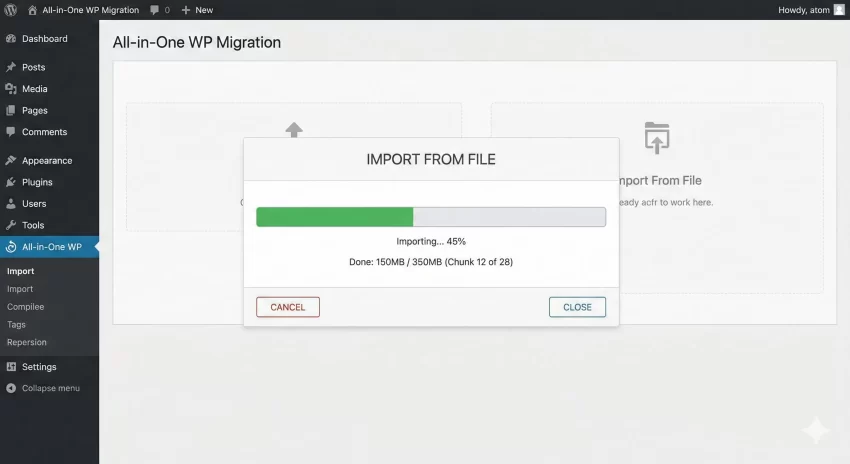
The import process is where All-in-One WP Migration shines. Because it replaces the database after the files are extracted, it minimizes downtime. In my tests, the site was fully functional immediately after the “Permalinks Saved” prompt. The plugin handles the search-and-replace of URLs flawlessly, even in complex serialized widgets.
Ease of Use
This is arguably the easiest plugin in the WordPress ecosystem. There are no settings pages to configure FTP credentials, database names, or root directories.
The Workflow:
- Install the plugin on Site A (Source).
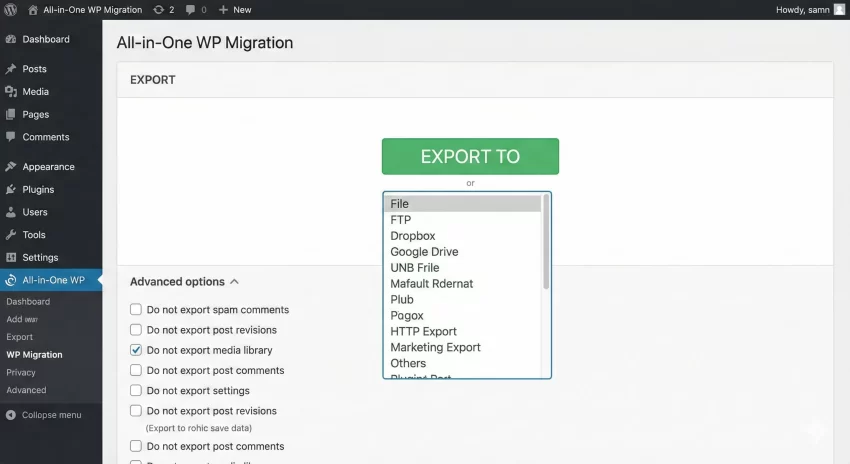
- Click Export to > File.
- Download the
.wpressfile. - Install the plugin on Site B (Destination).
- Drag and drop the file into the Import window.
That is it. For a non-technical user, this simplicity is worth the price of admission alone. It removes the fear of touching wp-config.php or accessing phpMyAdmin.
Pricing: Free vs Premium
This is the most controversial aspect of our All-in-One WP Migration review. ServMask operates on a “Freemium” model, but the ceiling for the free version is low.
- Free Version: Fully functional but strictly limited to importing files smaller than 512MB. If your site is 513MB, you cannot import it without paying or using a CLI workaround (which is technical).
- Unlimited Extension ($69/year): Removes the 512MB limit. This is a recurring subscription.
- Cloud Extensions ($99+/year): If you want to export directly to Google Drive, Dropbox, or S3, you must buy specific extensions.
Audience Tip
Pros and Cons
While the ease of use is unparalleled, the cost can add up if you need multiple cloud integrations. The fragmentation of features into separate paid extensions (URL extension, Google Drive extension, Dropbox extension) can feel like “nickel-and-diming.”
Pros
- Foolproof: It is nearly impossible to break a site during migration.
- Bypasses Limits: Chunked uploads mean you never hit server size limits.
- No Dependencies: Does not require PHP extensions that are often missing on cheap hosts.
- Automatic Backups: Creates a backup of the destination site before overwriting it.
Cons
- 512MB Limit: The free version is too small for most established sites.
- Fragmented Pricing: Buying Dropbox + Unlimited + URL extensions costs over $200.
- Proprietary Format: You are locked into the .wpress ecosystem.
- Slow on Cheap Hosts: Import speed is throttled by the host's disk I/O.
You might also like: WordPress enqueue scripts and styles: Best Practices for Developers (2026)
Support & Documentation
ServMask provides extensive documentation. Their knowledge base covers almost every edge case, from troubleshooting permissions errors to configuring Apache rewrite rules.
Ticket Support: Support is reserved primarily for paying customers. In my experience, response times average around 12-24 hours. The support team is technically literate; they don’t just read from a script—they understand server environments.
Who is this for?
- Agencies & Freelancers: The Unlimited Extension is a “must-have” tool in your kit. It saves billable hours.
- Beginners: If you don’t know what FTP means, this is the only safe way to move your site.
Who is this NOT for?
- Server Admins: If you are comfortable with SSH,
rsyncis faster and free. - Large Media Sites: If you have a 50GB media library, exporting a single monolithic
.wpressfile can be prone to failure during the download/upload phase due to network interruptions.
Alternatives to All-in-One WP Migration
If the pricing or the proprietary file format bothers you, here is how the competition stacks up.
Final Verdict: Is it Worth it?
To conclude this All-in-One WP Migration review, the verdict depends entirely on your budget and technical comfort level.
If you value your time more than $69, this plugin is a masterpiece of software engineering. It turns a complex, high-risk server operation into a drag-and-drop task. It is the “Apple” of migration plugins: it just works, but you play by their rules and pay their prices.
For developers, the inability to inspect the archive without their tools is a nuisance, but the reliability of the deployment usually outweighs the philosophical downsides.
All-in-One WP Migration
The most reliable, user-friendly migration plugin on the market, ideal for users who want to avoid technical headaches.
The Good
- Instant drag-and-drop migrations
- Reliable on 99% of hosts
- Excellent serialized data handling
The Bad
- Strict 512MB free limit
- Proprietary file format