
Are you struggling with poor ad performance and looking to maximize your monetization strategy? Often, placing banner ads manually or relying on default widget areas simply doesn’t yield the click-through rates (CTR) you desire. The problem lies in visibility; users suffer from “banner blindness” when ads are placed in predictable sidebars or headers.
The ultimate solution is to seamlessly insert ads after paragraphs within your main content area. By dynamically injecting your ad code directly into the natural reading flow of your articles, you capture user attention precisely when they are most engaged. This comprehensive guide will walk you through exactly how to harness the power of WordPress hooks to safely and efficiently insert ads after paragraphs without relying on bloated, site-slowing third-party plugins.
When you learn how to programmatically insert ads after paragraphs, you gain absolute control over your website’s layout and ad density. Whether you are running Google AdSense, Mediavine, or custom affiliate banners, manipulating the content dynamically ensures your layout remains responsive and user-friendly. In this tutorial, we will utilize native PHP functions and WordPress API features to cleanly slice up your post content, calculate the optimal insertion points, and inject your ad snippets seamlessly.
Before You Begin: Required Setup
Before we dive into the PHP code required to safely insert ads after paragraphs, ensure you have the appropriate environment and access levels ready. Modifying core behavior requires precision.
- PHP 8.0 or higher installed on your web server.
- Administrator access to your WordPress dashboard.
- A child theme active (to prevent losing changes during theme updates) or a custom functionality plugin.
- A complete backup of your website files and database.
- Basic familiarity with PHP string manipulation and WordPress hooks.
Backup Required
Step 1: Understanding the_content Hook
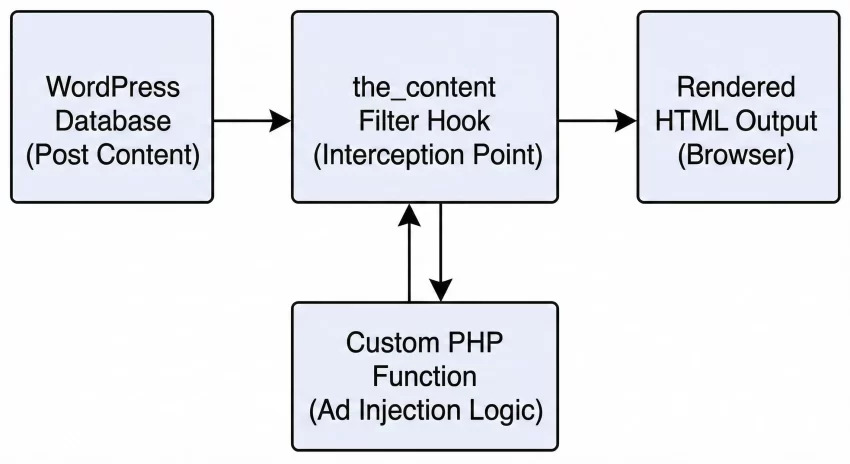
To successfully insert ads after paragraphs in WordPress, you must first understand the underlying architecture of how WordPress renders post content. The core mechanism we will exploit is called a filter hook. Specifically, we will be working with the the_content filter. This hook is triggered right before the post content is printed to the browser screen, allowing developers to intercept, modify, append, or prepend data to the content payload.
When WordPress retrieves a post from the database, the raw text is passed through a series of formatting filters. For instance, the wpautop function automatically converts double line breaks into standard HTML paragraph blocks. Because we want to insert ads after paragraphs gracefully, we must ensure our custom filter runs late enough in the execution priority so that these paragraph tags already exist in the HTML string.
Execution Priorities in WordPress
Filters in WordPress accept a priority argument. The default priority is 10. If we hook into the_content at priority 10, we might interfere with other plugins (like SEO tools or social sharing buttons) that are also modifying the text. To guarantee that our function to insert ads after paragraphs executes at the right moment, we will assign it a priority of 20 or higher. This ensures the raw text has been fully processed into HTML paragraphs before our PHP logic attempts to split it apart.
You might also like: Easily Remove Unused CSS and JS in WordPress for Blazing Fast Speed
Step 2: Preparing Your Ad Snippet Securely
Before writing the insertion logic, we need to prepare the actual ad code that will be injected. It is crucial to handle ad code—which often contains complex JavaScript, external iframes, or tracking pixels—with care. Poorly formatted ad code can break your site’s HTML structure, causing catastrophic layout failures.
When you decide to insert ads after paragraphs, you want the ad to sit neatly within its own styled container. This prevents the ad from floating awkwardly alongside your text or breaking mobile responsiveness. We will create a robust, reusable PHP variable holding our ad string, wrapped in a dedicated CSS class.
Structuring the Ad Container
By wrapping the raw ad script in a designated div, you can apply margin, padding, and text alignment via your theme’s stylesheet. This keeps your PHP logic clean and separates your styling concerns from your functional programming.
$pnet_ad_code = '
<div class="pnet-in-content-ad" style="margin: 20px auto; text-align: center;">
    <span style="color: #999; font-size: 12px;">Advertisement</span>
    <script async src="https://pagead2.googlesyndication.com/pagead/js/adsbygoogle.js"></script>
    <ins class="adsbygoogle"
         style="display:block; text-align:center;"
         data-ad-layout="in-article"
         data-ad-format="fluid"
         data-ad-client="ca-pub-XXXXXXXXXXXXXXX"
         data-ad-slot="XXXXXXXXXX"></ins>
    <script>
         (adsbygoogle = window.adsbygoogle || []).push({});
    </script>
</div>';
Pro Tip
Step 3: Creating the Core PHP Logic
Now we reach the technical heart of the tutorial. To insert ads after paragraphs, we need a reliable way to identify where paragraphs end within a massive string of HTML. While some developers rely on complex Regular Expressions (regex) to parse HTML, this is generally frowned upon due to performance overhead and the unpredictable nature of user-generated content.
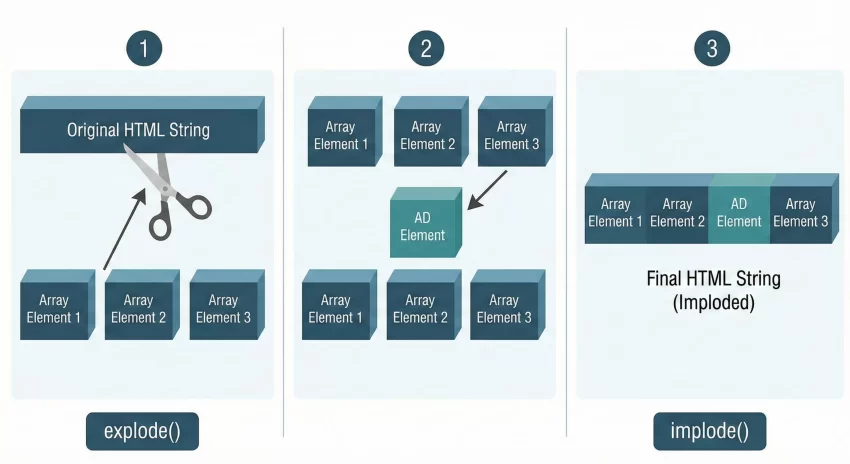
Instead, the safest and most efficient method to insert ads after paragraphs is by utilizing native PHP string splitting functions. We will use explode() to break the entire post content into an array, using the closing paragraph tag as our delimiter. Once the content is an array of paragraph blocks, we can iterate through it, pinpoint the exact paragraph index we wish to target, and inject our ad code at that precise location.
Understanding Explode and Implode
The explode() function takes a string and shatters it into an array based on a separator—in our case, p tag. If a post has ten paragraphs, exploding it will yield an array with ten elements. We can then loop through this array. When the loop counter hits our target (for example, after the third paragraph), we append our $pnet_ad_code to that specific array element. Finally, we use implode() to stitch the array back together into a single, cohesive HTML string, re-attaching the closing p tags in the process.
Step 4: Writing the Snippet Logic
It is time to assemble our function. We will write a custom PHP function named pnet_insert_post_ads and hook it into the_content. This function will check if the content contains enough paragraphs to warrant an ad insertion, perform the split, insert the ad, and return the modified content safely to the browser.
When writing logic to insert ads after paragraphs, we must also account for short content. If you configure the code to insert an ad after the fifth paragraph, but a specific blog post only contains three paragraphs, the code should fail gracefully rather than throwing undefined array key errors. We achieve this by counting the array elements before attempting the injection.
The Complete PHP Function
Below is the fully commented code block. You can place this code at the bottom of your child theme’s functions.php file or inside a dedicated site-specific functionality plugin.
function pnet_insert_post_ads( $content ) {
    // Define the ad code to be injected
    $pnet_ad_code = '<div class="pnet-in-content-ad" style="margin: 30px 0; padding: 15px; background: #f9f9f9; text-align: center;"><strong>Advertisement</strong><br>Your Ad Code Here</div>';

    // Set the target paragraph (e.g., insert after the 3rd paragraph)
    $pnet_insertion_point = 3;

    // Split the content into an array using the closing p tag as the delimiter
    $pnet_paragraphs = explode( '</p>', $content );

    // Iterate through the array to find the target injection point
    foreach ( $pnet_paragraphs as $index => $paragraph ) {

        // Trim whitespace to avoid empty array elements acting as valid paragraphs
        if ( trim( $paragraph ) ) {
            // Re-append the closing p tag that was stripped out by explode
            $pnet_paragraphs[$index] .= '</p>';
        }

        // Check if our current iteration matches our target paragraph
        // Note: array indexes start at 0, so index 2 is the 3rd paragraph
        if ( $index + 1 === $pnet_insertion_point ) {
            // Append the ad code immediately after the closing p tag
            $pnet_paragraphs[$index] .= $pnet_ad_code;
        }
    }

    // Reconstruct the array back into a single string
    $pnet_modified_content = implode( '', $pnet_paragraphs );

    return $pnet_modified_content;
}

// Hook the function to the_content with a priority of 20
add_filter( 'the_content', 'pnet_insert_post_ads', 20 );
For Developers
explode is highly efficient in PHP 8+, but be aware that if your content uses nested block elements (like divs containing p tags), the simple closing p delimiter might place ads inside parent containers unexpectedly. For highly complex DOM trees, utilizing PHP’s DOMDocument class is a heavier but more precise alternative. You might also like: How to Fix WordPress Not Sending Email Issues Instantly : 3 Easy Steps
Step 5: Handling Conditional Logic
A critical mistake many beginners make when trying to insert ads after paragraphs is applying the filter blindly across the entire WordPress site. If you do not restrict where the filter runs, your ad code will end up polluting your WooCommerce product descriptions, your contact pages, your privacy policy, and even your RSS feeds. This is detrimental to both user experience and SEO.
To safely insert ads after paragraphs, we must utilize WordPress conditional tags. These tags check the current context of the page load. We only want to manipulate the string if the user is viewing a single blog post on the front end. Furthermore, we must ensure we are within the main WordPress query to prevent the ad from appearing inside sidebar widgets or footer text blocks that might also process the the_content filter.
Applying is_single() and in_the_loop()
We will update our previously written function to include a strict guard clause at the very beginning. This clause will immediately return the original, unmodified content if the viewing conditions do not match our strict criteria.
function pnet_insert_post_ads_conditional( $content ) {
    // Guard Clause: Only run on single posts, inside the main loop, and not on pages or feeds
    if ( ! is_single() || ! in_the_loop() || is_admin() || ! is_main_query() ) {
        return $content;
    }

    // Define the ad code
    $pnet_ad_code = '<div class="pnet-in-content-ad">Your Ad Code Here</div>';
    $pnet_insertion_point = 2; // Insert after 2nd paragraph

    $pnet_paragraphs = explode( '</p>', $content );

    // Ensure there are enough paragraphs before attempting to insert
    if ( count( $pnet_paragraphs ) <= $pnet_insertion_point ) {
        return $content; // Post is too short, return unmodified
    }

    foreach ( $pnet_paragraphs as $index => $paragraph ) {
        if ( trim( $paragraph ) ) {
            $pnet_paragraphs[$index] .= '</p>';
        }
        if ( $index + 1 === $pnet_insertion_point ) {
            $pnet_paragraphs[$index] .= $pnet_ad_code;
        }
    }

    return implode( '', $pnet_paragraphs );
}
add_filter( 'the_content', 'pnet_insert_post_ads_conditional', 20 );
Troubleshooting: Common Errors
Even with careful implementation, attempting to dynamically insert ads after paragraphs can occasionally lead to unexpected layout shifts or code errors. Below are the most common issues developers face and how to resolve them quickly.
Why are my ads appearing outside of my main content area?
This happens when you fail to check if your function is running inside the main query. Many themes and page builders use apply_filters('the_content', $text) to render sidebars, custom fields, or author bios. If you do not wrap your code in if ( in_the_loop() && is_main_query() ), your ad will be injected into every single text element that uses that filter across the page. Always utilize strict conditional checks.
Why does the code break my images or blockquotes?
If your WordPress site uses Gutenberg blocks, sometimes images or blockquotes are wrapped in paragraph tags, or they sit immediately adjacent to them. If you blindly explode the content at closing p tag, you might inject an iframe right in the middle of a delicate figure/figcaption structure. To fix this, you can upgrade your PHP logic to use preg_match_all to specifically target closing p tags that are not immediately followed by specific elements, or simpler yet, only count paragraphs that contain a minimum character length.
Why is my entire site showing a White Screen of Death (WSOD)?
A WSOD almost always points to a fatal PHP syntax error in your functions.php file. When you copy and paste code to insert ads after paragraphs, ensure you haven’t missed a semicolon, used curly quotes instead of straight single quotes, or redeclared a function name that already exists. To recover, access your site via FTP, navigate to your theme folder, and undo the recent changes to your functions file.
Debugging Mode
define( 'WP_DEBUG', false ); to define( 'WP_DEBUG', true ); in your wp-config.php file. This will print the exact line number causing the fatal error on your screen. You might also like: How to Effortlessly Add Custom Fonts to WordPress (The Performance-First Guide)
Conclusion and Next Steps
Successfully learning how to programmatically insert ads after paragraphs is a massive step forward in taking ownership of your WordPress website’s revenue generation. By bypassing heavy plugins, you keep your site’s codebase lightweight, highly performant, and perfectly tailored to your specific design requirements. We have explored the mechanics of the the_content filter, the efficiency of PHP array manipulation using explode() and implode(), and the absolute necessity of utilizing WordPress conditional logic to protect your site’s broader architecture.
Remember that ad placement is both an art and a science. Now that you have the raw code required to dynamically insert ads after paragraphs, you should A/B test different insertion points. Try injecting ads after the 3rd paragraph for short articles, and dynamically calculating the middle of the document for longer, long-form pillar content. Keep a close eye on your Google Analytics and AdSense CTR metrics to find the sweet spot between monetization and optimal user experience.