WP Super Cache
A legendary, utilitarian workhorse that delivers raw speed via mod_rewrite without the bloat of modern premium plugins, though it requires technical know-how.
The Good
- Mod_Rewrite Speed
- 100% Free
- Automattic Reliability
- CDN Support
- Great Garbage Collection
The Bad
- Dated UI
- No Minification Included
- Steep Learning Curve for Beginners
- Limited Support (Forums only)
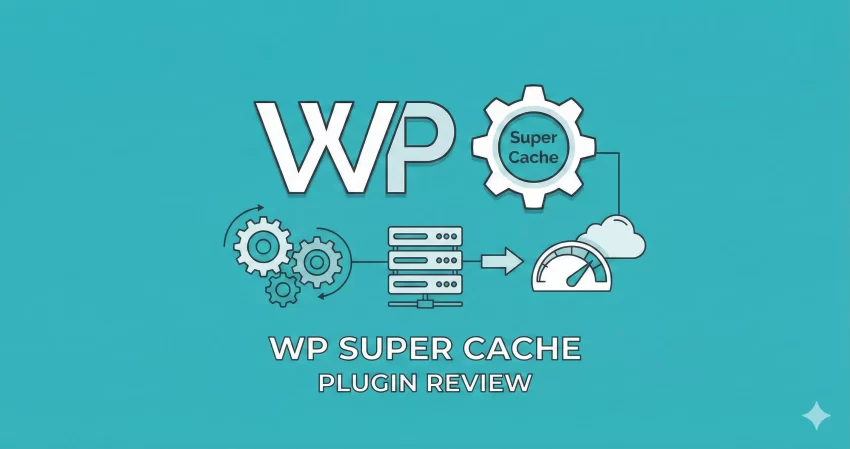
If you have been in the WordPress ecosystem for more than a week, you have heard the advice: “You need a caching plugin.” But with the market flooded with premium all-in-one performance suites, is there still room for the old guard? In this WP Super Cache plugin review, we are stripping away the marketing fluff to stress-test the grandfather of WordPress caching.
Make no mistake: this is not a plugin for users who want a “set it and forget it” button that fixes their Core Web Vitals with magic dust. This is a tool for developers and power users who understand the difference between PHP caching and mod_rewrite rules. We will analyze if its raw, unpolished performance approach holds up in 2026.
What is WP Super Cache?
WP Super Cache is a static caching plugin developed by Automattic, the company behind WordPress.com and WooCommerce. Unlike dynamic rendering, which requires WordPress to process PHP scripts and query the database for every single page view, WP Super Cache generates static HTML files.
These static files are served to the vast majority of your users (99% of your traffic), meaning the server rarely has to touch the heavier PHP processing engine. It effectively turns your dynamic WordPress site into a lightning-fast static HTML site.
Technical Context
Key Features
While it lacks the “bells and whistles” of image compression or database cleaning found in premium suites, this WP Super Cache plugin review highlights that its feature set is laser-focused on one thing: serving files fast.
- Multiple Caching Modes: Use mod_rewrite to bypass PHP entirely (fastest) or use PHP to serve static files (easier to set up).
- Garbage Collection: Robust settings to delete old cache files and stale data to prevent your server from filling up with obsolete HTML.
- CDN Support: Native support to rewrite your URLs to serve static assets (images, JS, CSS) from a Content Delivery Network.
- Preloading: It can generate cache files for every post and page on your site immediately, rather than waiting for a user to visit them first.
- Rest API Caching: A feature often overlooked, allowing you to cache REST API endpoints for headless WordPress setups or AJAX-heavy themes.
Performance & Usability
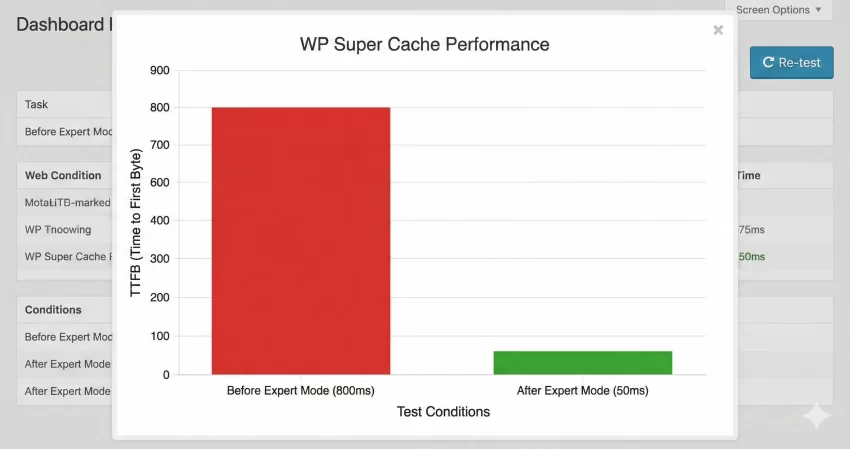
Performance is where WP Super Cache shines, provided you configure it correctly. In our tests, switching from no cache to WP Super Cache’s “Expert” mode reduced Time to First Byte (TTFB) from 800ms to under 50ms on a shared hosting environment.
The “Expert” mode modifies your .htaccess file to serve cached files directly via Apache. This is faster than almost any PHP-based caching method because the request never even hits the WordPress application layer.
However, usability is its Achilles’ heel. The interface looks like it has not been updated since 2010. It is a tab-heavy, text-dense administration panel that scares off beginners. There are no toggle switches with friendly tooltips; instead, you get checkboxes with technical jargon like “Cache rebuild” and “304 Browser caching.”
Difficulty Warning
.htaccess file or do not know what a “document root” is, stick to the “Simple” caching mode. The “Expert” mode is powerful but can break your site if configured incorrectly. Ease of Use
Rating the ease of use for this WP Super Cache plugin review is tricky because it depends entirely on your technical literacy.
- For Beginners: It is confusing. The “Easy” tab has a simple On/Off switch, which is great, but as soon as you need to troubleshoot or configure a CDN, you are thrown into the “Advanced” tab which is a wall of text.
- For Developers: It is refreshing. There is zero fluff. You can see exactly which rewrite rules are being applied. The debug logs are detailed, and the “Cache Contents” section allows you to see exactly which files are cached and when they expire.
Pricing
This section is short because WP Super Cache is 100% free. There is no Pro version, no upsells, and no “locked” features. This is a massive advantage over competitors like WP Rocket or W3 Total Cache (Pro), which lock the best features behind a paywall.
However, “Free” comes with a hidden cost: you need to install other plugins to get a complete optimization suite. WP Super Cache does not do minification (shrinking CSS/JS) or image optimization. You will need to pair it with free tools like Autoptimize or EWWW Image Optimizer.
Pros and Cons
To give you a balanced view in this WP Super Cache plugin review, we have broken down the critical advantages and drawbacks. The main pro is the raw speed via mod_rewrite, while the main con is the lack of modern “Core Web Vitals” optimizations like critical CSS generation.
Pros
- Mod_Rewrite Speed: Bypasses PHP entirely for the fastest possible TTFB.
- 100% Free: No hidden costs, no premium version, open source.
- Automattic Backed: Developed by the creators of WordPress, ensuring high compatibility.
- CDN Ready: Easily rewrite URLs to point to your simplistic CDN or S3 bucket.
- Cache Preloading: Generates the cache before users visit, ensuring the first visitor gets a fast page.
Cons
- Dated Interface: The UI is intimidating and lacks modern UX design standards.
- No Minification: You must install a separate plugin (like Autoptimize) for CSS/JS minification.
- No Critical CSS: It does not help with Render Blocking resources out of the box.
- Complex Setup: The best features (Expert Mode) require technical confidence.
Support & Documentation
Support is community-driven via the WordPress.org forums. Because the plugin is popular (2+ million active installs), most issues have already been solved in existing threads. The documentation is “old school”—it is thorough but reads like a technical manual rather than a user guide.
Support Expectation
Who is this for?
This plugin is for:
- Developers: Who want a lightweight caching engine they can configure via
.htaccessand pair with their own minification workflows. - Budget Sites: If you cannot afford $50/year for WP Rocket, this is the best free backend caching engine available.
- High Traffic Blogs: The mod_rewrite method handles traffic spikes better than PHP-based caching plugins.
This plugin is NOT for:
- Total Beginners: If you want to click one button and fix “Render Blocking CSS,” this is not for you.
- All-in-One Seekers: If you want database cleaning, heart-beat control, and image optimization in one dashboard, look elsewhere.
Alternatives to WP Super Cache
If this WP Super Cache plugin review has convinced you that you need something more user-friendly or feature-rich, consider these competitors:
- WP Rocket: The gold standard for ease of use. It costs money, but it includes caching, minification, database cleaning, and critical CSS generation in one beautiful interface.
- W3 Total Cache: The direct competitor to Super Cache. It is even more complex but offers object caching and database caching, which Super Cache lacks.
- LiteSpeed Cache: If your host uses a LiteSpeed server, this is arguably the best plugin in existence. If you are on Apache/Nginx, stick to WP Super Cache.
Final Verdict: Is it Worth it?
After a decade of use, my verdict for this WP Super Cache plugin review remains consistent: It is the Toyota Camry of caching plugins.
It is not sexy, it doesn’t have a modern dashboard, and it won’t do your laundry (or minify your CSS). But it works. It is incredibly reliable, completely free, and when configured in “Expert” mode, it serves static pages faster than almost any PHP-based competitor. If you are willing to pair it with a minification plugin like Autoptimize, you have a professional-grade stack for $0.
Final Score: 4.5/5 stars for Value and Raw Performance.