
If you have been managing a WordPress site for any length of time, you know that speed is not just a luxury; it is a necessity. Google’s Core Web Vitals update has made performance a direct ranking factor, and user patience is at an all-time low. In the crowded market of caching solutions, one name constantly floats to the top: WP Rocket. But is it really the magic wand everyone claims it to be? Welcome to our detailed WP Rocket review, where we peel back the layers of this premium plugin to see if it justifies the price tag.
In this guide, we will dive deep into its features, test its performance, and look at the code quality to help you decide if this is the right tool for your projects.
What is WP Rocket?
WP Rocket is a premium caching and performance optimization plugin for WordPress. Unlike many of its competitors that offer a free “lite” version and a paid “pro” version, WP Rocket is a strictly premium product. This distinction is important because it allows the developers to focus entirely on a polished, all-in-one experience without nagging upsells.
Launched in 2013, it quickly gained a reputation for being the most user-friendly caching plugin available. But “user-friendly” often implies “basic” in the developer world. As we will see later in this WP Rocket review, that assumption is far from the truth. It packs powerful features under the hood that can satisfy even the most technical developers. In this WP Rocket review, I am trying to tear down the plugin, and discuss every feature it has to offer.
Key Features Breakdown
To understand why this plugin is a market leader, we need to look beyond simple page caching. Here are the standout features that we tested.
1. Page Caching & Cache Preloading
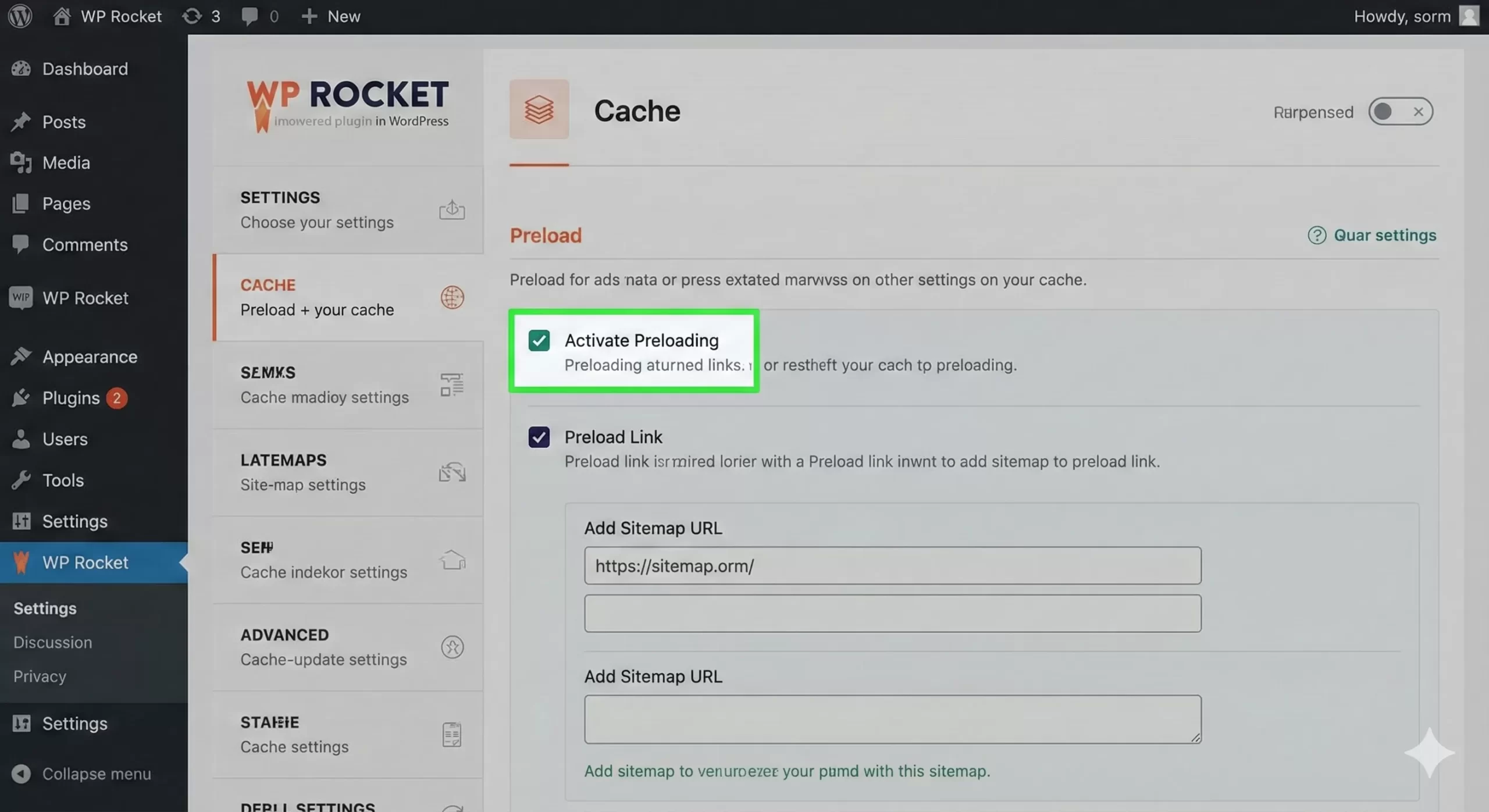
At its core, WP Rocket generates static HTML files of your dynamic WordPress content. This removes the need for WordPress to query the database and process PHP for every single page load. What sets it apart is the “Preloading” feature. Instead of waiting for a user to visit a page to create the cache, WP Rocket simulates a visit to build the cache beforehand. This ensures that even the very first visitor to your site gets a lightning-fast experience.
2. File Optimization (Minification & Combination)
This is where the real speed gains happen. WP Rocket allows you to minify (remove whitespace and comments) and combine CSS and JavaScript files. This reduces the total page size and the number of HTTP requests.
It also offers advanced features like “Load JavaScript Deferred” and “Delay JavaScript Execution.” The latter is a game-changer for Core Web Vitals, as it prevents heavy scripts (like chat widgets or analytics) from loading until the user actually interacts with the page (e.g., moves the mouse or scrolls).
3. Media Optimization (LazyLoad)
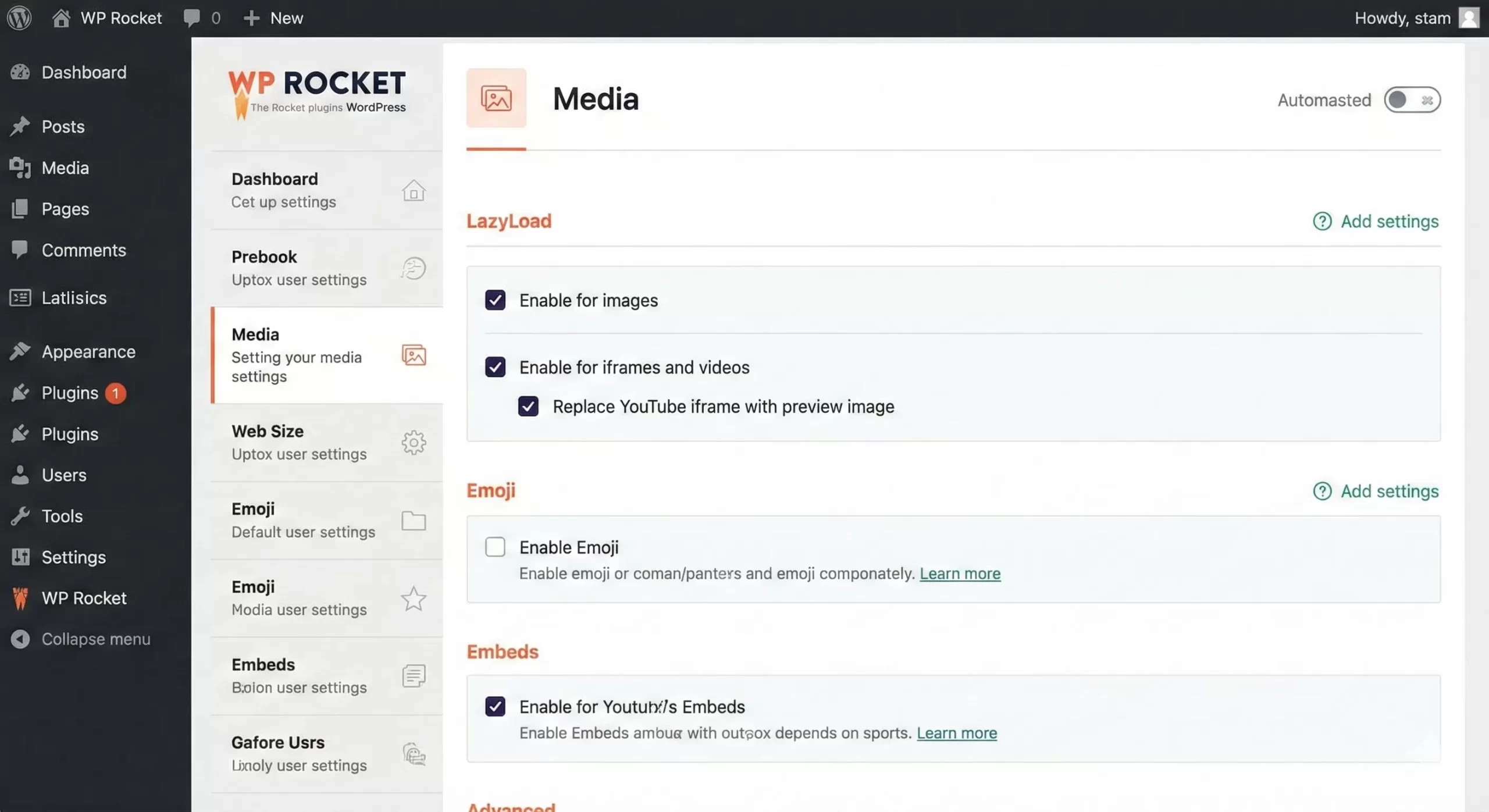
Images are often the heaviest assets on a page. WP Rocket includes a built-in LazyLoad feature that delays the loading of images and iframes until they enter the viewport. It also handles WebP compatibility, ensuring that if you are serving next-gen image formats, they are delivered correctly to supported browsers.
4. Database Optimization
Over time, your WordPress database accumulates bloat—post revisions, spam comments, and transient data. WP Rocket includes a dedicated tab to clean this up. You can run manual cleanups or schedule automatic ones to keep your database lean.
You might also like:
Installation and Setup Guide
One of the biggest selling points we found during this WP Rocket review is the setup process. It is designed to be “plug and play.”
- Purchase and Download: Since there is no free version, you must buy a license from their official site and download the zip file.
- Install: Go to your WordPress Dashboard > Plugins > Add New > Upload Plugin.
- Activate: Once activated, WP Rocket automatically applies 80% of web performance best practices immediately. You do not strictly need to configure anything else to see a speed boost.
However, for maximum performance, you should tweak the “File Optimization” settings. Be careful here—aggregating CSS or JS files can sometimes break complex themes. We recommend enabling these settings one by one and testing your site in an Incognito window.
Performance Test: The Results
No WP Rocket review would be complete without cold, hard data. We tested the plugin on a staging site running a heavy Elementor theme with multiple unoptimized images.
- Hosting: Shared Hosting Environment
- Test Tool: Google PageSpeed Insights & GTMetrix
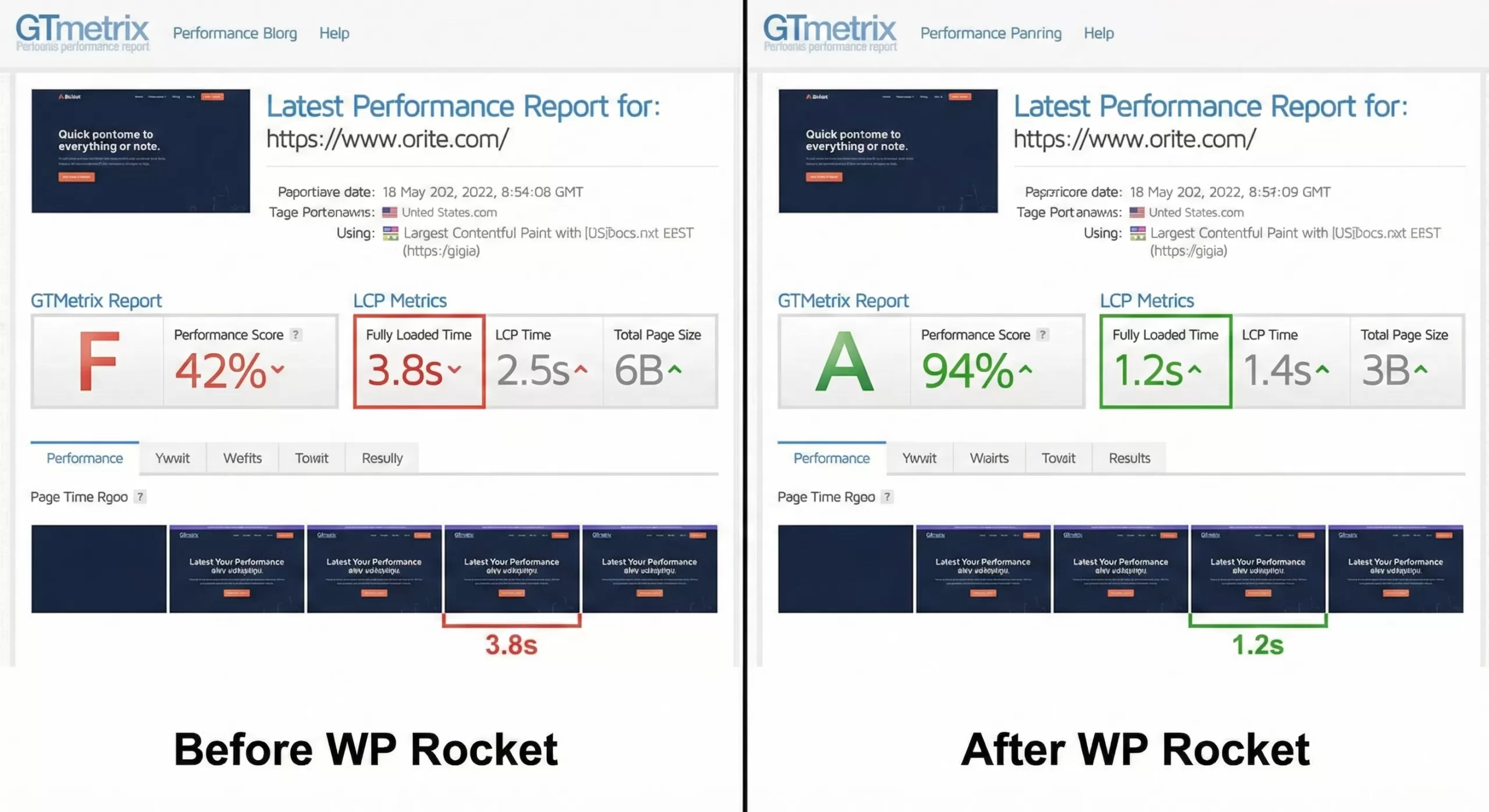
The improvements in LCP and fully loaded time were substantial. The “Remove Unused CSS” feature, which generates a unique CSS file for each page containing only the needed styles, significantly reduced the render-blocking resources.
Pros and Cons
Every tool has its strengths and weaknesses. Here is our balanced take.
Pros
- Instant Results: Significant speed improvements immediately upon activation.
- Great UI: The interface is clean, modern, and explains every feature clearly.
- Excellent Support: Their documentation is vast, and ticket support is responsive.
- eCommerce Friendly: It automatically excludes Cart, Checkout, and My Account pages from caching to prevent issues with WooCommerce.
Cons
- Price: It is not free. For hobbyists with zero budget, this might be a hurdle.
- No Image Compression: While it does LazyLoad, it does not compress images (you need their sister plugin, Imagify, for that).
You might also like:

For Developers: Extending WP Rocket
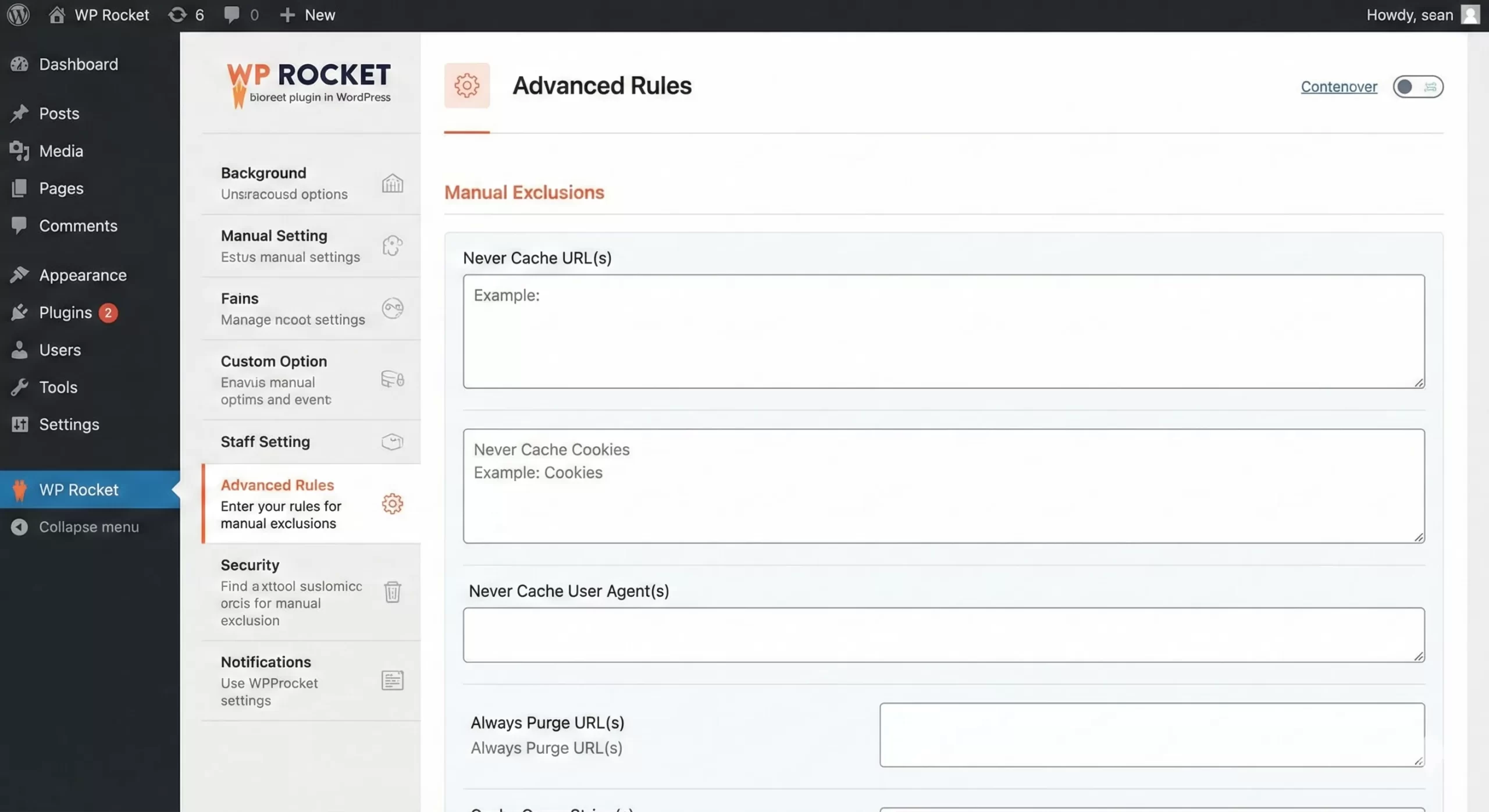
If you are a developer reading this WP Rocket review, you might be wondering about extensibility. WP Rocket is surprisingly developer-friendly. It offers plenty of hooks and filters to customize its behavior.
For example, if you want to programmatically prevent WP Rocket from caching a specific page based on a custom condition, you can use the do_rocket_generate_caching_files filter. Below is an example of a custom function that you might add to your theme’s functions.php file or a custom site-specific plugin.
/**
 * Disable WP Rocket Page Caching on specific conditions.
 *
 * @return boolean True to cache, False to skip.
 */
function pnet_disable_caching_on_custom_post_type( $should_cache ) {
    // Check if we are on a specific custom post type 'portfolio'
    if ( is_singular( 'portfolio' ) ) {
        return false;
    }
    return $should_cache;
}
add_filter( 'do_rocket_generate_caching_files', 'pnet_disable_caching_on_custom_post_type' );
You can find more details on how to use filters in the official documentation or refer to the WordPress Developer Resources for a deeper understanding of how the add_filter function works.
Pricing and Plans
WP Rocket offers three pricing tiers, all of which include the full feature set. The only difference is the number of sites you can use it on.
- Single: $59/year for 1 website.
- Plus: $119/year for 3 websites.
- Infinite: $299/year for unlimited websites.
They offer a 14-day money-back guarantee, which serves as a risk-free trial. Considering the SEO benefits and user experience improvements, the Single plan pays for itself quickly for most serious business sites.
Final Verdict: Is it the Best Choice?
To conclude this WP Rocket review, the answer is a resounding yes. While there are free alternatives like W3 Total Cache or WP Super Cache, none offer the same balance of ease of use and raw power. The “Delay JavaScript Execution” and “Remove Unused CSS” features alone are worth the price of admission for passing Core Web Vitals assessments.
If you value your time and want a solution that works out of the box while still offering deep customization for developers, WP Rocket is the gold standard. For PixelNet readers looking to professionalize their WordPress workflow, this plugin is an essential tool in your arsenal.
Did you find this WP Rocket review useful? Have you used WP Rocket? Let us know your experience in the comments below!



![Slow WordPress Admin Issues? Easily Fix Backend Lag with These 5 Code Snippets [2026 Update]](https://cdn.pixelnet.in/wp-content/uploads/2026/02/07201119/slow-WordPress-admin-768x406.webp)