The Ultimate HEX to RGB Color Converter for Designers & Developers
Color is the backbone of digital design. Whether you are building a website, designing a brand identity for print, or tweaking a CSS stylesheet, you eventually hit that familiar roadblock: you have the color in one format, but the software demands another.
You have a HEX code, but your printer needs CMYK. You have an RGB value, but you want to try the modern OKLCH format for better accessibility.
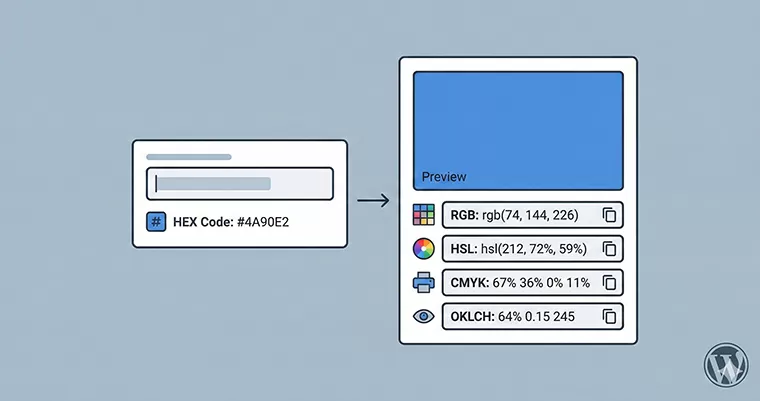
That is exactly why we built this HEX to RGB color converter. We wanted a tool that wasn’t just a simple calculator, but a complete utility belt for modern creators. It takes your standard web HEX codes and instantly generates every format you might need—from the standard RGB and HSL to the print-ready CMYK and the cutting-edge OKLCH.
Why Use This HEX to RGB Color Converter?
There are plenty of tools out there, so what makes this one different?
Most color tools are clunky, loaded with ads, or require the page to reload every time you hit “convert.” If you are working on a deadline, you don’t have time for that.
Our HEX to RGB color converter is built differently. It runs entirely in your browser using lightweight JavaScript. This means:
- Instant Results: As you type, the conversion happens in real-time. No waiting.
- Modern Formats: We include OKLCH, the new standard for CSS color spaces that perceptionally matches how human eyes actually see color.
- Visual Preview: See the color live on the screen before you commit to it.
- One-Click Copy: Click any field—RGB, HSL, or CMYK—and the code is automatically copied to your clipboard.
How to Use This Tool
We believe tools should be intuitive. You don’t need a manual to use this HEX to RGB color converter, but here is a quick guide to getting the most out of it:
- Enter your Code: In the input box on the left, paste or type your HEX code (e.g., #FF5733). You can type it with or without the hash (#) symbol; our tool is smart enough to figure it out.
- Check the Preview: Look at the box on the right. If the color looks correct, you are good to go.
- Get Your Format:
- RGB/RGBA: Perfect for standard CSS and screen-based design.
- HSL: Great if you need to manually adjust saturation or lightness later in your code.
- CMYK: Essential if you are sending this color to a physical printer.
- OKLCH: Use this for modern web apps requiring consistent perceived lightness.
- Click to Copy: Simply click on the input box of the format you need. A “Copied!” notification will confirm you have it on your clipboard.
Understanding the Formats
If you are new to design, you might wonder why there are so many different ways to write the same color. Here is a quick breakdown:
HEX (Hexadecimal): This is the standard for the web. It is a six-digit code that represents Red, Green, and Blue values. It is compact and easy to share, which is why our HEX to RGB color converter starts here.
RGB & RGBA: Standing for Red, Green, and Blue, this is how screens light up pixels. RGBA adds an “Alpha” channel, which controls transparency.
CMYK (Cyan, Magenta, Yellow, Key/Black): Screens emit light, but paper absorbs ink. CMYK is the standard for printing. Please note that converting glowing screen colors (RGB) to ink (CMYK) is mathematically approximate, but our tool gives you the closest possible match for print design.
OKLCH (The Future of Color): This is the newest addition to CSS. Unlike HSL, which can look wildly different depending on the hue, OKLCH is “perceptually uniform.” This means if you change the hue but keep the lightness value the same, the color actually looks like it has the same lightness to the human eye.
Privacy and Security: Your Data Stays With You
In an era of data tracking, we take your privacy seriously.
Many online converters send your data to a remote server to process the calculation. This creates a delay and technically involves data transfer.
Our HEX to RGB color converter operates 100% on the “Client-Side.” This means the calculation happens right inside your own web browser (Chrome, Safari, Firefox, etc.).
- We do not store your color choices.
- We do not track what you are converting.
- No data is ever sent to our server.
It is just you, your browser, and the math. This approach also reduces the load on your internet connection, making the tool work perfectly even on slow mobile networks.
Frequently Asked Questions (FAQs)
Q: Can I use this HEX to RGB color converter for print projects?
A: Yes! The tool automatically generates a CMYK code. However, always double-check with your printing provider, as physical ink can look slightly different than a glowing screen.
Q: What happens if I enter an invalid HEX code?
A: The tool includes error detection. If you type a code that doesn’t exist (like #GG0000), the preview will reset, and the fields will clear to let you know the input is invalid.
Q: Do I need to include the hashtag (#) when typing?
A: No. You can type FF0000 or #FF0000. The HEX to RGB color converter accepts both formats instantly.
Q: Why is OKLCH included?
A: OKLCH is rapidly becoming the standard for modern web design due to its superior accessibility and consistency. We wanted to ensure this tool is future-proof for developers.
Q: Is this tool free to use?
A: Absolutely. You can use this HEX to RGB color converter as many times as you like for personal or commercial projects.