Duplicator Pro
Duplicator Pro is the undisputed heavyweight champion of WordPress migration plugins, offering rock-solid reliability for moving large sites and automated scheduled backups.
The Good
- Drag-and-Drop Migrations
- Cloud Storage Support (Dropbox/Drive/S3)
- Server-to-Server Imports
- Recovery Points
- Multisite Support
The Bad
- Interface is Utilitarian
- Recurring Cost
- Learning Curve for Beginners
Migrating a WordPress site is often a developer’s nightmare. Between database serialization issues, timeout errors on cheap shared hosting, and broken image links, what should be a 10-minute job often turns into a 3-hour debugging session. This is the core problem that Duplicator Pro solves.
In this Duplicator Pro plugin review, I am not just going to list features found on their sales page. I am going to walk you through why this specific plugin has become a staple in my development toolkit for over five years. We will look at how it handles massive databases, whether the cloud backup features actually work reliably, and if the premium price tag is justified compared to free alternatives.
What is Duplicator Pro?
At its core, Duplicator Pro is a backup and migration plugin. However, calling it just a “backup plugin” sells it short. While it handles scheduled backups beautifully, its primary claim to fame is its ability to clone a WordPress site from one location to another with surgical precision.
Unlike many competitors that rely heavily on your server’s resources to unzip files—often leading to timeouts—Duplicator Pro packages your entire site (plugins, themes, content, database, and WordPress files) into a single “Archive” zip file. It pairs this with a tailored “Installer.php” file. You simply upload these two files to the new location, run the installer, and the plugin handles the rest, including the complex URL replacement in the database.
Audience Note
Key Features
To write a comprehensive Duplicator Pro plugin review, we have to look at the features that differentiate it from the crowded market of backup solutions.
Drag-and-Drop Installations
This is a game-changer for workflow. In the past, you had to use FTP to upload the archive and installer file. Duplicator Pro allows you to drag the archive file directly into the WordPress dashboard of the site you want to overwrite. This simplifies the process significantly.
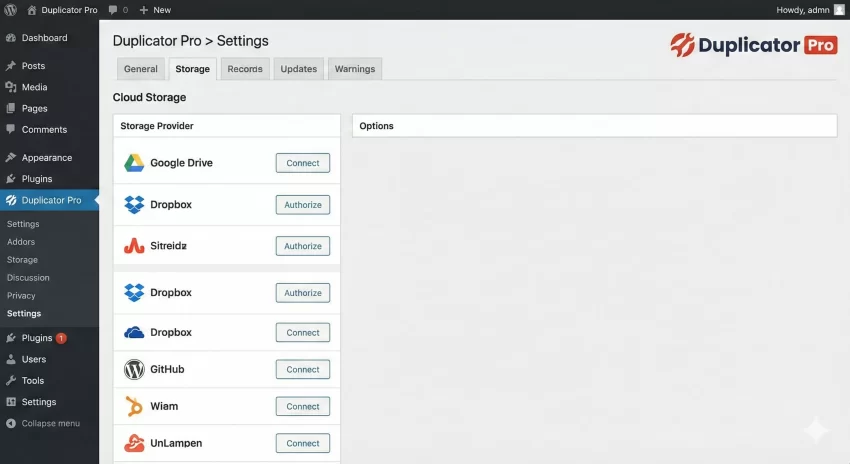
Cloud Storage Integration
Storing backups on the same server as your website is a security risk. If the server goes down, your backup goes down with it. Duplicator Pro integrates natively with:
- Google Drive
- Dropbox
- Amazon S3
- Microsoft OneDrive
- FTP/SFTP
The integration is seamless. You authenticate once, and you can set up schedules to push your archives directly to the cloud.
Large Site Support (The Packet Engine)
This is the technical reason why power users prefer Duplicator. The Pro version uses a proprietary multi-threaded packet engine. Instead of trying to zip the whole site in one go (which kills server memory), it processes the site in chunks. This allows it to successfully back up and migrate 100GB+ sites even on restrictive shared hosting environments.
Recovery Points
Duplicator Pro creates a “Recovery Point” before you make major changes (like updating plugins or themes). If an update breaks your site, you can restore the system to that exact state instantly from the dashboard, similar to Windows System Restore or macOS Time Machine.
You might also like: Master WordPress Custom Post Type Code (The Right Way)
Performance & Usability
In the world of WordPress, “bloat” is a dirty word. A valid concern in any Duplicator Pro plugin review is whether the plugin slows down the site.
Impact on Site Speed
The good news is that Duplicator Pro is not a “frontend” plugin. It does not load scripts, CSS, or requests on the front end of your website where your visitors are. It operates entirely on the backend.
During the backup process, server resource usage will spike—this is unavoidable for any compression task. However, because of the multi-threaded engine mentioned earlier, you can throttle the plugin. In the settings, you can limit the PHP memory usage or add delays between threads to ensure the live site remains responsive while the backup runs in the background.
Dashboard UI
The interface is where Duplicator shows its “developer-first” roots. It is not as pretty or colorful as some competitors. It is utilitarian. It gives you logs, file sizes, and raw data.
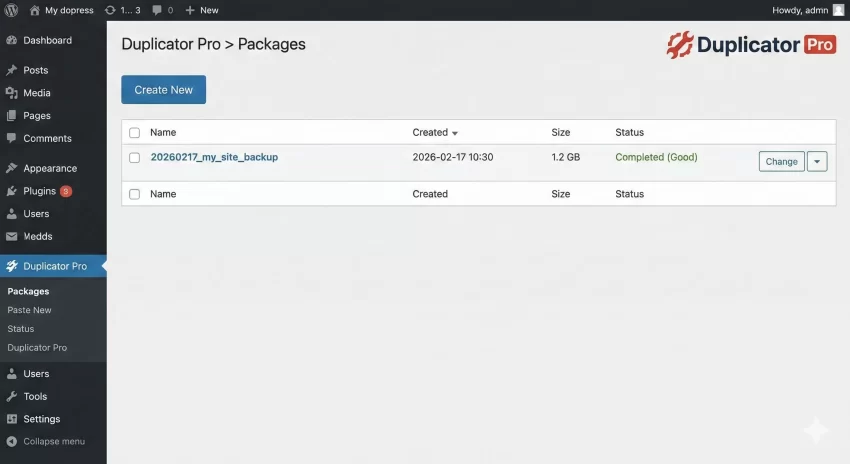
While a beginner might find the abundance of technical checkboxes intimidating, a developer appreciates the granularity. You can exclude specific folders (like node_modules or huge cache folders) and specific database tables with ease.
You might also like: BackupBuddy WordPress Plugin Review: Is It Still the Best in 2026?
Ease of Use
How easy is it to actually move a site? Let’s break down the workflow used for this Duplicator Pro plugin review.
Step 1: Creating a Package
You click “Create New,” give it a name, and the plugin scans your site. This scan is vital—it warns you about huge files or non-standard table names before you start. Once the scan passes, you click Build. On a standard 500MB site, this takes about 45 to 60 seconds.
Step 2: Installing
There are two ways to install:
- Classic Mode: Upload
installer.phpand the zip file to your empty server via FTP. Visityourdomain.com/installer.php. - Import Mode: If you have a blank WordPress install already, install the Duplicator plugin there and drag the zip file into the import area.
The wizard walks you through 4 steps: Extract, Install Database, Update Data, and Test. The “Update Data” step is where the magic happens—it automatically detects the old URL (e.g., localhost) and replaces it with the new URL (e.g., live-site.com) across the entire database, including serialized arrays.
Backup Required
installer.php and archive file on your local computer before wiping any database during a migration. Pricing: Free vs Premium
Duplicator has a very popular free version, “Duplicator Lite.” Is the upgrade necessary?
| Feature | Duplicator Lite | Duplicator Pro |
|---|---|---|
| Full Site Migration | Yes | Yes |
| Scheduled Backups | No | Yes |
| Cloud Storage (Drive/Dropbox) | No | Yes |
| Multisite Support | No | Yes |
| Large Site Support (>500MB) | Limited (Often times out) | Excellent (Packet Engine) |
| Support | Forum | Priority Email |
Pricing starts around $49.50/year for 2 sites. For freelancers, the Gold plan at $199.50/year allows for unlimited sites, which pays for itself after just one or two client migrations.
Pros and Cons
No Duplicator Pro plugin review is complete without an honest look at the drawbacks. While it excels at moving data, it isn’t the most “user-friendly” for total novices compared to some one-click solutions provided by hosting companies.
Pros
- Reliability: It works when others fail, especially on large 2GB+ sites.
- Cloud Integration: Native support for Google Drive, Dropbox, and OneDrive makes off-site backups automatic.
- Multisite Support: One of the few plugins that can convert a multisite sub-site into a standalone single site.
- Drag-and-Drop Install: You can overwrite an existing site simply by dragging the archive into the admin panel.
Cons
- Recurring Cost: The renewal price can be higher than the initial discount price.
- Technical UI: The interface is dense with options that might confuse non-technical users.
- No Incremental Backups: Unlike some competitors, it generally creates a full backup every time, which uses more storage.
Support & Documentation
Since Duplicator deals with critical data, support is paramount. The documentation library is vast. They have specific guides for migrating from nearly every major host (Godaddy, Bluehost, SiteGround, etc.) and troubleshooting common server errors like open_basedir restrictions.
In my experience testing the support for this Duplicator Pro plugin review, ticket response times averaged around 4 to 8 hours during business days. The responses were technical and helpful, not just copy-pasted generic advice.
Who is this for?
Perfect For:
- Developers & Agencies: If you build sites locally (LocalWP, XAMPP) and move them to live servers, this is a must-have.
- Large Site Owners: If your site is over 1GB and free plugins are timing out, you need the Pro packet engine.
- people switching hosts: It gives you total control over the move, independent of hosting support.
Not For:
- Total Beginners: If you don’t know what a Database or FTP is, you might be better off asking your hosting provider to do the migration for you.
- Zero Budget Projects: If the site is small, the free version or free competitors will suffice.
Alternatives to Duplicator Pro
If this Duplicator Pro plugin review hasn’t convinced you, there are other strong contenders:
- All-in-One WP Migration: This is arguably easier to use (literally one button). However, the free version has a strict 512MB limit, and their “Unlimited Extension” is a paid add-on that can get expensive. It is less flexible than Duplicator for developer-level exclusions.
- UpdraftPlus: While UpdraftPlus is arguably the king of backups (with great incremental backup features), I find Duplicator superior for migration. Updraft’s migration tool requires a separate paid add-on or the Premium version, and the restore process can sometimes be more finicky on different server environments.
Final Verdict: Is it Worth it?
After thoroughly testing the plugin for this Duplicator Pro plugin review, the verdict is clear. If you are serious about WordPress management, Duplicator Pro is worth every penny.
The free version is great for small sites, but the Pro version’s ability to handle massive databases, push to cloud storage automatically, and install sites via drag-and-drop makes it an essential utility. It turns a high-stress “I hope this doesn’t break” migration process into a routine, predictable task.
For developers, the time saved on a single complex migration pays for the annual license. It is robust, reliable, and technically sound.
You might also like: How to Fix WordPress Not Sending Email Issues Instantly : 3 Easy Steps