If you have been in the WordPress ecosystem as long as I have, you know that page builders are a double-edged sword. We love them for the speed of design, but we hate them for the code they leave behind. Today, we are settling the score in the ultimate Bricks vs Elementor showdown.
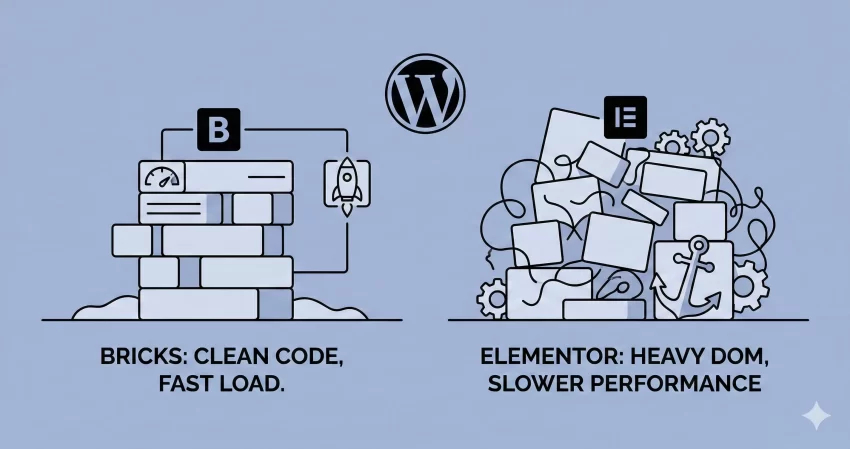
For years, Elementor has been the undisputed king of the market. It democratized design. But recently, a new challenger, Bricks Builder, has gained a cult following among developers. Why? Because it promises something Elementor struggles to deliver: clean code and raw performance.
In this guide, I am not just looking at features. I am looking under the hood. We are going to analyze DOM output, code bloat, and loading times to see if Bricks is actually faster, or if it is just hype.
Bricks vs Elementor – The Core Difference: Architecture Matters
Before we get into the benchmarks, it is vital to understand why we are even comparing Bricks vs Elementor.
Elementor is a plugin. It was built years ago when WordPress architecture was different. It relies heavily on wrapping elements in div tags to apply styling. Even with their recent “Flexbox Container” updates, legacy code remains.
Bricks, on the other hand, is a theme (though it acts like a builder). It was built much later, specifically with modern web standards (Vue.js) in mind. It creates code that looks like it was hand-written by a developer.
The “Hello World” Test: Baseline Bloat
To keep this Bricks vs Elementor comparison fair, I set up a fresh WordPress installation on a high-speed cloud server.
The Setup:
- Environment: PHP 8.2
- Caching: Disabled
- Elementor Setup: Hello Elementor Theme + Elementor Plugin (Flexbox active).
- Bricks Setup: Bricks Theme (1.9.x).
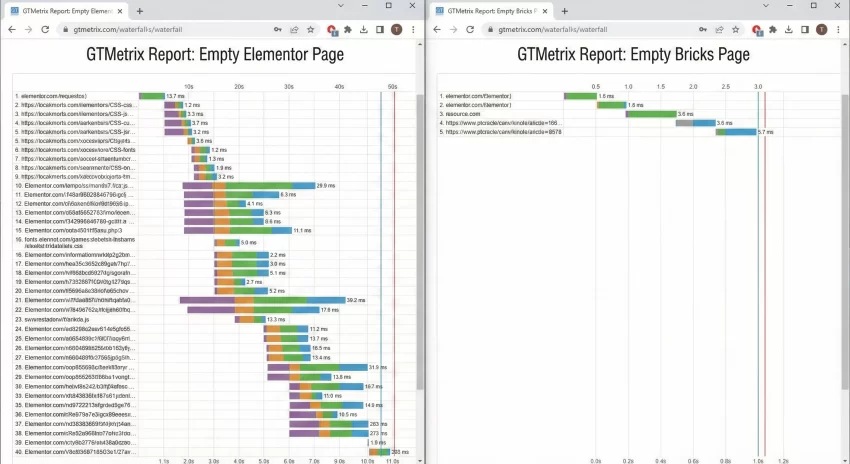
I created a blank page on both. No headers, no footers, just the baseline assets loaded by the builder.
The Results:
- Elementor: Loaded roughly 245KB of CSS/JS scripts on an empty page.
- Bricks: Loaded roughly 15KB of scripts.
Right out of the gate, the difference in the Bricks vs Elementor baseline is staggering. Bricks only loads what is necessary. Elementor pre-loads libraries for animations, icons, and dialogs, even if you aren’t using them yet.
You might also like:

The DOM Depth Challenge
This is where the battle of Bricks vs Elementor gets technical. DOM (Document Object Model) size affects your Google PageSpeed score significantly. Google warns against “Excessive DOM size” because deep nesting forces the browser to work harder to render the layout.
I recreated a standard “Hero Section” in both builders:
- A Section Background Image
- A Heading (H1)
- A Sub-heading (H3)
- Two Buttons side-by-side.
Elementor’s HTML Output
Elementor is notorious for “divception” (divs inside divs inside divs). Even with containers, the output often looks like this:
<div class="e-con e-parent">
    <div class="e-con e-child">
        <div class="elementor-widget-wrap">
            <div class="elementor-element">
                <h2 class="elementor-heading-title">Your Title Here</h2>
            </div>
        </div>
    </div>
</div>
Bricks’ HTML Output
Bricks takes a cleaner approach. It outputs markup that mirrors semantic HTML5:
<section id="brxe-hero" class="brxe-section">
    <div class="brxe-container">
        <h1 class="brxe-heading">Your Title Here</h1>
    </div>
</section>
In my test, the Elementor section resulted in 21 DOM nodes. The exact same design in Bricks resulted in just 9 DOM nodes.
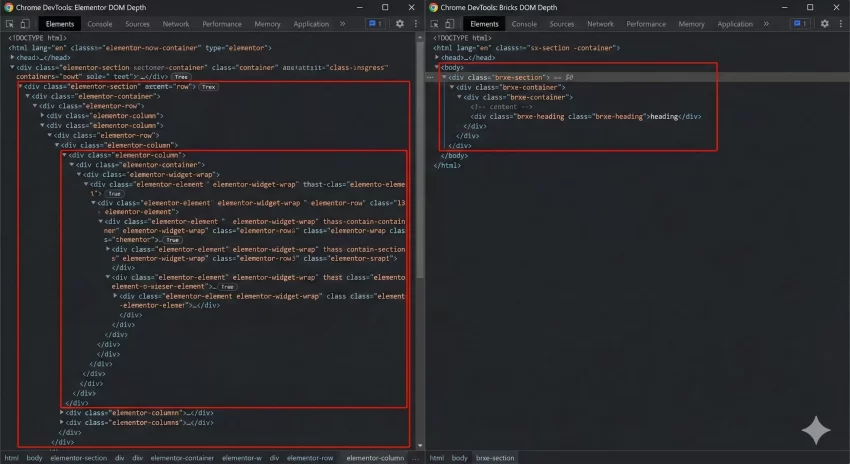
When you scale this up to a full homepage, a Bricks vs Elementor comparison often reveals that an Elementor page has 1,500+ DOM elements, while a Bricks page sits comfortably around 400-600.
Database Bloat and Post Meta
As developers, we care about the database. A bloated wp_postmeta table slows down queries.
When you save a page in Elementor, it stores the data in a structured JSON format within post meta, but it also creates revisions that can pile up. However, Bricks stores its data cleanly as well. The real difference isn’t necessarily in how they store data, but how much data is required to render the page.
Because Elementor has to save settings for all those wrapper divs (margins, padding, entrance animations for wrappers), the data payload is larger.
Developer Experience: The “Class” System
One of the biggest arguments in the Bricks vs Elementor debate is how they handle CSS classes.
- Elementor: You essentially style IDs. Every widget gets a unique ID. If you change a button style, you have to copy/paste styles to other buttons or use their Global Kits (which are improving, but still restrictive).
- Bricks: It feels like Webflow. You can create a CSS class like
.btn-primarydirectly in the builder UI. You apply that class to all buttons. If you update the class, every button updates.
From a code maintenance perspective, Bricks wins. It encourages DRY (Don’t Repeat Yourself) coding principles.
You might also like:

Custom Code Implementation
Sometimes, you need to go beyond the builder. Let’s say you want to register a custom function to calculate dynamic dates for a copyright footer.
In Elementor, you usually need a third-party plugin or functions.php. In Bricks, there is a dedicated code element that executes PHP directly (and safely, if you have permissions).
However, if you are adding custom logic via your child theme, you want to ensure no conflicts. Here is a helper function I use to check which builder is active on a specific page. This helps when you are migrating a site slowly and have both active.
/**
 * Detects if the current page is built with Bricks or Elementor
 * and returns the builder name.
 * * @param int $post_id The ID of the post to check.
 * @return string 'bricks', 'elementor', or 'standard'
 */
function pnet_get_page_builder_status( $post_id ) {

    // Check for Elementor
    if ( \Elementor\Plugin::$instance->db->is_built_with_elementor( $post_id ) ) {
        return 'elementor';
    }

    // Check for Bricks
    // Bricks stores data in distinct post meta keys
    $bricks_data = get_post_meta( $post_id, '_bricks_page_content_2', true );
    if ( ! empty( $bricks_data ) ) {
        return 'bricks';
    }

    return 'standard';
}
You can use pnet_get_page_builder_status to conditionally dequeue scripts if you are running a hybrid environment.
Page Speed Scores (Mobile)
We ran the final output through Google PageSpeed Insights.
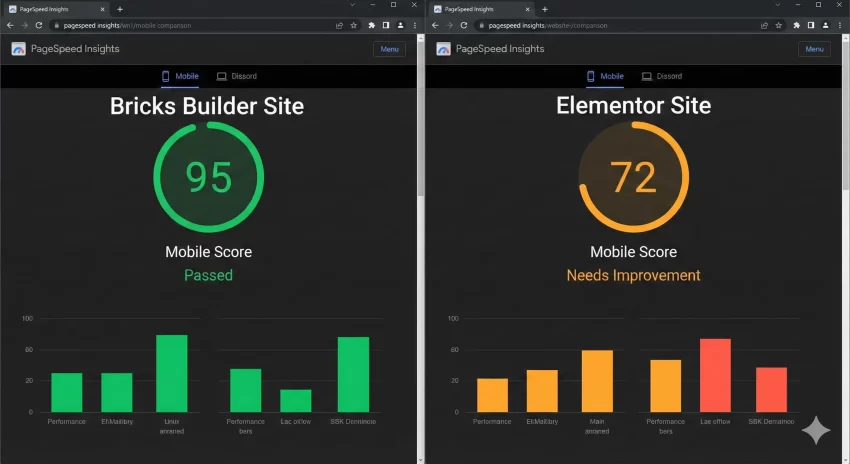
- Bricks: 98/100 (Mobile)
- Elementor: 72/100 (Mobile)
The Bricks vs Elementor speed gap is most noticeable on mobile devices. The JavaScript execution time for Elementor (parsing all those widgets) delays the “Time to Interactive” metric. Bricks, having a lighter footprint, becomes interactive almost instantly.
Comparison Table
The Verdict: Who Wins?
If we are strictly talking about performance, DOM output, and code cleanliness, the winner of Bricks vs Elementor is undeniably Bricks.
Choose Elementor if:
- You are handing the site off to a non-technical client who needs a very simple interface.
- You need a specific ecosystem add-on (like Crocoblock) that hasn’t been ported to Bricks yet.
Choose Bricks if:
- You care about Green Web Vitals and SEO rankings.
- You are a developer who understands CSS and HTML structure.
- You want a site that scales without slowing down.
Conclusion
The WordPress landscape is shifting. While Elementor served us well for years, the bloated DOM and heavy asset loading are becoming hard to justify since 2024 and beyond.
In this Bricks vs Elementor analysis, Bricks has proven that you can have a visual builder without sacrificing performance. It generates code that is nearly indistinguishable from a hand-coded theme. For my future projects, the choice is clear.
Which builder do you personally prefer from this Bricks vs Elementor fight for your WordPress Development projects? Let me know in the comments below.