If you ask five WordPress experts to pick a winner in the Divi vs Elementor battle, you will likely get five different answers—and a lot of heated debate. For beginners, it is often a matter of interface preference. But for freelancers, agencies, and developers, the choice impacts your profit margins, your site performance, and your sanity.
In 2026, the landscape has shifted. With the highly anticipated release of Divi 5.0 (public beta) moving away from shortcodes and Elementor Pro continuing to dominate the market share, the decision isn’t as simple as it was two years ago. In this guide, we are cutting through the marketing fluff to give you a technical, code-focused comparison of these two giants.
If you want to read our individual review, they are here. Divi Review vs Elementor Pro review.
The Interface: Fixed Sidebar vs. Floating Modals
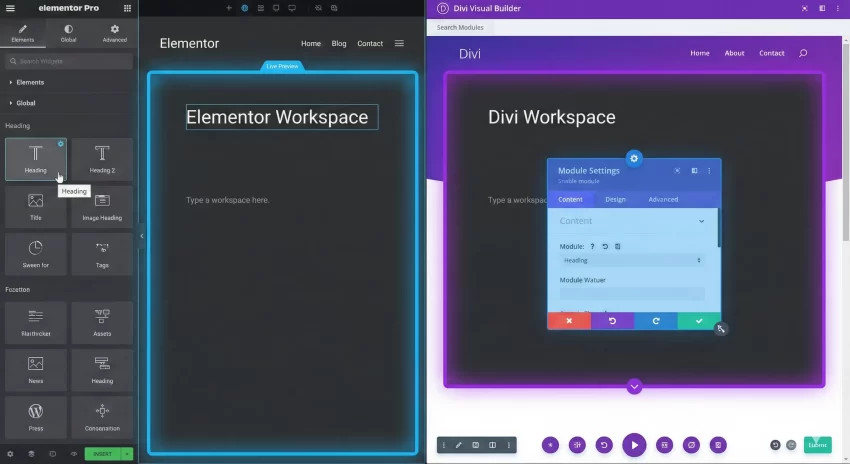
The most immediate difference lies in the User Experience (UX). Elementor utilizes a fixed sidebar on the left. For many developers, this feels more like a traditional IDE or design tool (like Figma). You drag elements from the left, drop them on the canvas, and edit them in the sidebar.
Divi, conversely, has historically used floating modals. You click an element, and a popup appears right next to it. While some designers love the “true frontend” feel, developers often found the floating windows cluttered. However, with the new Divi 5.0 interface updates, the experience has become much snappier and can be docked to mimic a sidebar workflow if preferred.
Divi vs Elementor Performance and Code Bloat
For us developers, this is the critical section. Historically, Divi was notorious for “shortcode lock-in.” If you disabled the plugin, your content was left wrapped in messy [[et_pb_section]] tags. Elementor leaves behind cleaner HTML (mostly div soup), but it still leaves a mess.
The Divi 5.0 Game Changer: Elegant Themes has rebuilt Divi from the ground up. Divi 5 moves away from shortcodes to a JSON-based storage format, similar to Gutenberg. This results in significantly faster rendering and a cleaner backend.
However, both builders can suffer from “DOM excessive size” warnings if not managed correctly. As a developer, you often need to conditionally check if a page builder is active to dequeue unnecessary assets on non-builder pages.
You might also like:

Developer’s Snippet: Check for Builder Activity
If you are building a custom theme wrapper or a utility plugin, you often need to know if the current post is built with Divi or Elementor. Here is a standardized helper function to check this universally.
/**
 * Check if the current post is built with Divi or Elementor.
 * Useful for conditionally deregistering scripts.
 *
 * @param int|null $post_id Optional. Post ID to check. Defaults to current global post.
 * @return string|false Returns 'divi', 'elementor', or false if neither.
 */
function pnet_is_page_builder_used( $post_id = null ) {
    if ( ! $post_id ) {
        $post_id = get_the_ID();
    }

    // Check for Elementor
    if ( did_action( 'elementor/loaded' ) && \Elementor\Plugin::$instance->db->is_built_with_elementor( $post_id ) ) {
        return 'elementor';
    }

    // Check for Divi (Standard & Divi 5.0 Compat)
    if ( function_exists( 'et_pb_is_pagebuilder_used' ) && et_pb_is_pagebuilder_used( $post_id ) ) {
        return 'divi';
    }

    return false;
}

// Example Usage: Dequeue a script if a builder is active
function pnet_dequeue_conflicting_scripts() {
    if ( pnet_is_page_builder_used() ) {
        wp_dequeue_script( 'some-conflicting-script' );
    }
}
add_action( 'wp_enqueue_scripts', 'pnet_dequeue_conflicting_scripts', 100 );
Divi vs Elementor Pricing: The Agency Dilemma
When comparing Divi vs Elementor for an agency, the math is undeniable.
- Elementor Pro: Uses a subscription model based on the number of sites. For an agency managing 100+ client sites, this can cost upwards of $399/year recurring.
- Divi: Offers a Lifetime Access deal (approx $249 one-time) for unlimited websites.
If you are a freelancer building brochure websites, Divi’s lifetime license acts as an incredible asset, essentially infinite ROI after your third client. Elementor requires you to factor the recurring license cost into your monthly maintenance retainers.
You might also like:

Theme Building and Dynamic Content
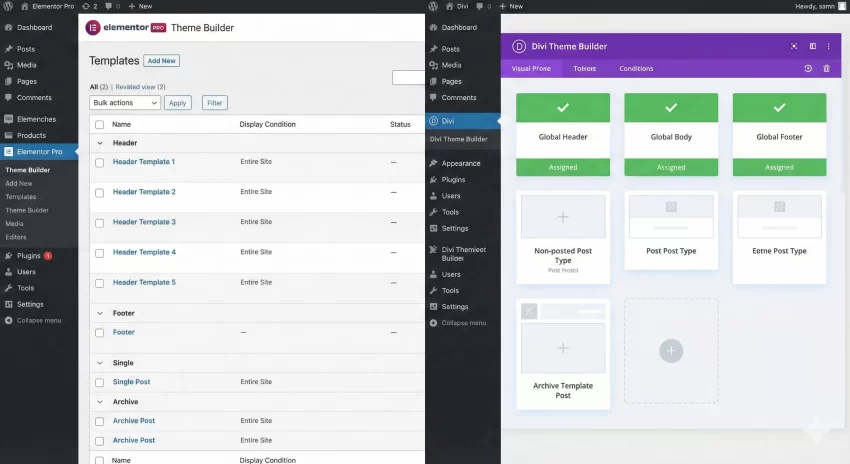
Both plugins now offer robust Theme Builders, allowing you to design Headers, Footers, 404 pages, and Archive templates visually. Elementor Pro’s “Loop Grid” is slightly ahead in terms of flexibility for custom post types without needing extra addons.
However, Divi is catching up fast. For a deeper dive into how WordPress handles these hooks natively, you can check the wp_head action reference in the WordPress Codex to understand where these builders inject their styles.
Divi vs Elementor : Quick Compare
Verdict: Which One Should You Choose?
The battle of Divi vs Elementor ultimately comes down to your business model and workflow preference.
- Choose Elementor if: You prefer a fixed sidebar interface, require advanced popup capabilities out of the box, and don’t mind the recurring annual fees for the sake of a massive third-party addon ecosystem.
- Choose Divi if: You are an agency maximizing profit margins (Lifetime deal), you are excited about the performance promises of Divi 5.0, or you want full control over the CSS of every module element without writing custom classes.
As a developer, I keep both in my toolkit. I use Divi for budget-conscious client builds where no recurring fee is preferred, and Elementor for complex, dynamic sites requiring intricate custom post type layouts.
That should give you enough insights for the Divi vs Elementor battle. Which one do you find will suite your need? Do let me know in the comment below.