
If there is one nightmare that keeps WordPress developers up at night, it is the thought of a hacked website. We have all heard the horror stories: a simple contact form becomes a gateway for SQL injection, or a comment section turns into a breeding ground for Cross-Site Scripting (XSS) attacks. The root cause? Often, it is a lack of proper WordPress Data Sanitization.
As developers, we love building features. We love creating custom settings pages, dynamic forms, and interactive user profiles. However, blindly trusting user input is the cardinal sin of web development. Whether you are building a custom plugin or tweaking a child theme, understanding how to handle incoming data is not just “nice to have”—it is mandatory.
In this guide, we are going to move beyond the basics. We will dive deep into the mechanics of WordPress Data Sanitization and validation. We will look at the difference between the two, explore the native tools WordPress gives us, and build a secure data processing function from scratch. By the end of this post, you will be writing code that is not just functional, but bulletproof.
The Vital Difference: Sanitization vs. Validation
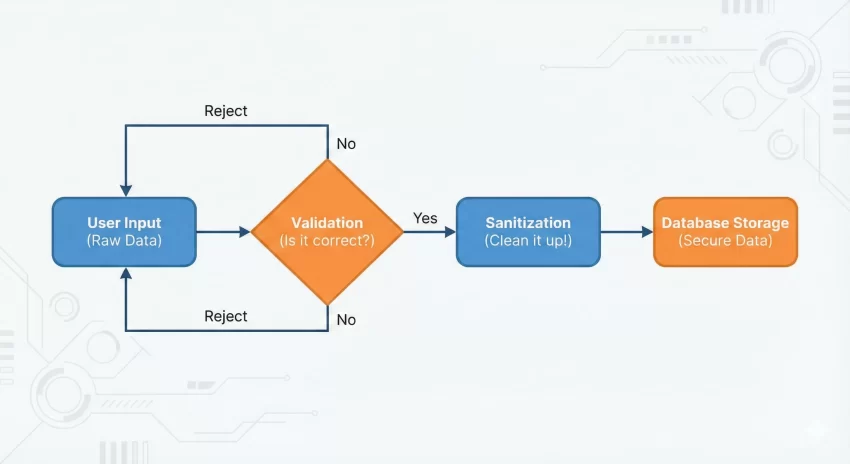
Before we start writing code, we need to clear up a common confusion. Many developers use the terms “sanitization” and “validation” interchangeably, but they perform two very different roles in the security lifecycle. If you want to master WordPress Data Sanitization, you must understand where it fits in the workflow.
1. Validation: Asking “Is this data correct?”
Validation is the gatekeeper. It checks the data against a specific set of rules before you do anything with it. It does not change the data; it simply accepts or rejects it. For example, if a user enters “Banana” into a field meant for an email address, validation is the process that says, “Stop, this is not a valid email.”
2. Sanitization: Asking “Is this data safe?”
Sanitization is the cleaning crew. It takes the input and strips out anything that shouldn’t be there before saving it to the database or displaying it. If a user tries to sneak a <script> tag into your text field, WordPress Data Sanitization strips those tags out, ensuring the data is harmless.
Why WordPress Data Sanitization is Non-Negotiable
You might be thinking, “My site is small, who would hack me?” The answer is: bots. Automated scripts crawl the web 24/7 looking for known vulnerabilities. If you ignore WordPress Data Sanitization, you open yourself up to two massive risks:
- SQL Injection: Without sanitization, a malicious user could input SQL commands into a form field, potentially deleting your database or stealing admin passwords.
- XSS (Cross-Site Scripting): Hackers can inject JavaScript into your pages. When other users view that page, the script runs in their browser, potentially hijacking their session cookies.
The philosophy of WordPress security is summarized in one phrase: “Trust no one.” Treat all data—even data from logged-in administrators—as potential threats until proven otherwise.
You might also like:

Validating User Input: The First Line of Defense
Let’s start with validation. WordPress provides several helper functions to check data types. While our main goal is WordPress Data Sanitization, you cannot sanitize what you haven’t validated.
Here is a custom function example to demonstrate how to validate a custom form submission.
function pnet_validate_user_submission() {
    // Check if the nonce is valid (Security Check)
    if ( ! isset( $_POST['pnet_nonce_field'] ) || ! wp_verify_nonce( $_POST['pnet_nonce_field'], 'pnet_submit_action' ) ) {
        return false;
    }

    // 1. Validate an Email
    if ( isset( $_POST['user_email'] ) && ! is_email( $_POST['user_email'] ) ) {
        // Handle error: Invalid Email
        return new WP_Error( 'invalid_email', 'Please provide a valid email address.' );
    }

    // 2. Validate a Number (e.g., Age)
    if ( isset( $_POST['user_age'] ) && ! is_numeric( $_POST['user_age'] ) ) {
         // Handle error: Not a number
         return new WP_Error( 'invalid_number', 'Age must be a number.' );
    }

    return true;
}
In the code above, we aren’t cleaning the data yet; we are just checking if it looks right. If is_email() returns false, we reject the process immediately. This saves processing power and improves security.
Mastering WordPress Data Sanitization Functions
Once data passes validation, it must be sanitized. This is where WordPress Data Sanitization shines. WordPress offers a suite of specific functions for different data types. Using the generic PHP functions is okay, but using the WordPress-specific wrappers is much safer because they handle edge cases relevant to the CMS.
Sanitizing Text Fields
The most common function you will use is sanitize_text_field(). It does the heavy lifting for standard inputs like names, titles, or short descriptions.
- Checks for invalid UTF-8.
- Converts single
<characters to entities. - Strips all tags.
- Removes line breaks, tabs, and extra whitespace.
$clean_name = sanitize_text_field( $_POST['first_name'] );
Sanitizing Email Addresses
Even if you validated the email, you should sanitize it to remove illegal characters before storage.
$clean_email = sanitize_email( $_POST['user_email'] );
Sanitizing File Names
If you allow file uploads, never trust the filename provided by the user. WordPress Data Sanitization includes a function specifically for this.
$clean_filename = sanitize_file_name( $_FILES['upload']['name'] );
Sanitizing HTML Content
Sometimes you want users to submit HTML (like in a bio box or a post editor). Using sanitize_text_field would strip everything. Instead, use wp_kses_post(). This allows only the HTML tags that are allowed in standard WordPress posts.
$clean_bio = wp_kses_post( $_POST['user_bio'] );
This is a powerful feature of WordPress Data Sanitization because it allows rich text while stripping out dangerous scripts or iframes.
Tip: Effortlessly Add Custom Admin Columns WordPress: The Ultimate Guide
A Complete Example
Let’s put it all together. Imagine we are building a custom settings page for a plugin. We need to save a text field (API Key) and a textarea (Custom Message). We will implement robust WordPress Data Sanitization to ensure the database stays clean.
Here is how we would structure the code using our preferred pnet_ prefix.
/**
 * Saves custom plugin settings with security measures.
 */
function pnet_save_custom_options() {

    // 1. Check user capabilities
    if ( ! current_user_can( 'manage_options' ) ) {
        return;
    }

    // 2. Verify Nonce
    if ( ! isset( $_POST['pnet_settings_nonce'] ) || ! wp_verify_nonce( $_POST['pnet_settings_nonce'], 'pnet_save_action' ) ) {
        return;
    }

    // 3. Initialize an array for clean data
    $pnet_clean_data = array();

    // 4. Sanitize API Key (Single line text)
    if ( isset( $_POST['pnet_api_key'] ) ) {
        // Strong sanitization for keys
        $pnet_clean_data['api_key'] = sanitize_text_field( $_POST['pnet_api_key'] );
    }

    // 5. Sanitize Welcome Message (HTML allowed)
    if ( isset( $_POST['pnet_welcome_msg'] ) ) {
        // Allow safe HTML tags
        $pnet_clean_data['welcome_msg'] = wp_kses_post( $_POST['pnet_welcome_msg'] );
    }

    // 6. Sanitize a URL field
    if ( isset( $_POST['pnet_website_url'] ) ) {
        $pnet_clean_data['website_url'] = esc_url_raw( $_POST['pnet_website_url'] );
    }

    // Save to database
    update_option( 'pnet_plugin_options', $pnet_clean_data );
}
In this example, notice how we handle the URL. We use esc_url_raw(). This is a specific nuance of WordPress Data Sanitization. When saving a URL to the database, you want the “raw” version (not encoded for display), but you still want to ensure it doesn’t contain malicious protocols like javascript:alert(1).
You might also like:

Sanitization vs. Escaping: The Output
We have talked a lot about input, but what about output? WordPress Data Sanitization cleans data on the way in. Escaping cleans data on the way out.
Even if you sanitized data perfectly when saving it, you should still escape it when displaying it. This is known as “Defense in Depth.” If a hacker somehow compromised your database directly, escaping ensures that the bad data is rendered harmlessly as text rather than executed code.
Common escaping functions include:
esc_html(): For escaping HTML inside HTML tags.esc_url(): For escaping URLs inside href attributes.esc_attr(): For escaping data inside HTML attributes (like alt text or classes).
Advanced Tips for Secure Inputs
1. Use Nonces Everywhere
You may have noticed the wp_verify_nonce in our code examples. While not strictly part of WordPress Data Sanitization, nonces are critical. They prevent Cross-Site Request Forgery (CSRF), ensuring that the person submitting the form is the one who intended to do it.
2. Strict Typing
If you expect an integer, cast it as an integer. Using absint() is a great way to force a number to be a non-negative integer. This is the ultimate form of sanitization because it transforms the data type entirely.
$clean_id = absint( $_POST['post_id'] );
3. Map Array Function
If you are dealing with an array of text fields, you don’t need to loop through them manually. You can use PHP’s array_map combined with WordPress functions.
$clean_tags = array_map( 'sanitize_text_field', $_POST['tags'] );
Conclusion
Security is not a feature you add at the end of a project; it is a mindset you apply to every line of code. Implementing proper WordPress Data Sanitization is the hallmark of a professional developer. It protects your clients, preserves your reputation, and keeps the web a safer place.
Remember the golden rule: Validate early, sanitize on input, and escape on output. By using the native functions provided by WordPress and following the patterns we discussed, you ensure that your plugins and themes are robust against attacks.
For a comprehensive list of all available sanitization functions, I highly recommend you bookmark the official WordPress Developer Handbook on Data Sanitization. It is an invaluable resource that stays up to date with the latest security standards.
Start auditing your code today. Look for any $_POST or $_GET variable that is being used without a wrapper. If you find one, wrap it in a sanitization function immediately. Your future self will thank you.