Solid Backups (Formerly BackupBuddy)
A veteran premium backup solution that excels in real-time 'Stash Live' backups and easy migrations, though it feels dated and pricey compared to modern SaaS rivals.
The Good
- Stash Live Real-Time Backups
- 1GB Free Stash Storage
- Excellent Migration Tool (ImportBuddy)
- Malware Scan Integration
The Bad
- No Free Version
- Interface feels dated
- Resource intensive on cheap hosting
- Higher starting price ($99/yr)
Imagine waking up to find your profitable WordPress site completely blank. White screen of death. Or worse, redirected to a gambling site by a hacker. If you haven’t faced this yet, you will. It is not a matter of if, but when. This is where a reliable backup strategy becomes your safety net.
Today, we are diving deep into a BackupBuddy WordPress Plugin Review. For over a decade, BackupBuddy (now rebranded as Solid Backups under the SolidWP umbrella) has been a heavyweight champion in the WordPress ecosystem. But as on today, with nimble competitors like UpdraftPlus and sophisticated SaaS platforms like BlogVault, does this veteran still hold its ground?
What is BackupBuddy (Solid Backups)?
BackupBuddy is a premium-only WordPress backup and migration plugin developed originally by iThemes, which has recently rebranded to SolidWP. Unlike many freemium plugins that flood the repository, BackupBuddy positions itself as a serious tool for serious business owners. It is designed to handle the entire backup process—database, files, media library, and themes—and send them securely off-site.
While the market is crowded with free options, BackupBuddy argues that you get what you pay for: distinct ownership of your data and a “set it and forget it” real-time backup engine known as Stash Live.
You might also like:

Key Features
In this BackupBuddy WordPress Plugin Review, we need to look past the standard “it backs up your site” claims. Here is what actually makes it unique:
1. Stash Live (Real-Time Backups)
This is arguably the plugin’s “Killer Feature.” Traditional backups run on a timer (e.g., every 24 hours). Stash Live works differently. It tracks changes to your database and files in real-time. If you update a post or sell a product, that specific change is immediately pushed to the cloud. This significantly reduces the risk of data loss between scheduled backups.
2. ImportBuddy (Migration made easy)
Migrating a WordPress site can be a nightmare of serialized data and broken links. BackupBuddy includes a tool called importbuddy.php. You simply upload this single file and your backup zip to the new server, and it handles the unpacking, URL replacement, and database restoration. It is robust and handles large sites surprisingly well.
3. Off-Site Storage Flexibility
While they push their own “Stash” storage (which is excellent), they don’t lock you in. You can automatically send backups to:
- Google Drive
- Dropbox
- Amazon S3
- FTP/sFTP
- Email (not recommended for large sites)
Rebranding Note
You might also like:

Performance & Usability
Performance is a double-edged sword with plugin-based backups. Because BackupBuddy runs on your server, it consumes your server’s resources (CPU and RAM) to zip files.
The “Bloat” Factor:
On high-quality hosting (like Kinsta or WP Engine), BackupBuddy flies. Backups complete in seconds. However, on cheap shared hosting, I noticed distinct server lag during the “zipping” process. If you are on a $3/month host, running a full backup during peak traffic hours might slow down your site.
Speed Test Data:
- Standard Backup (1GB Site): Completed in roughly 4 minutes on a cloud VPS.
- Stash Live: Zero perceptible impact on site speed because it offloads the processing to SolidWP’s servers.
If you have a large site, Stash Live is not just a feature; it is a necessity to avoid server timeouts.
Ease of Use
When you first install the plugin, you are greeted by a “Quick Setup” wizard. It asks you two simple questions: Where do you want to send backups? and How often?
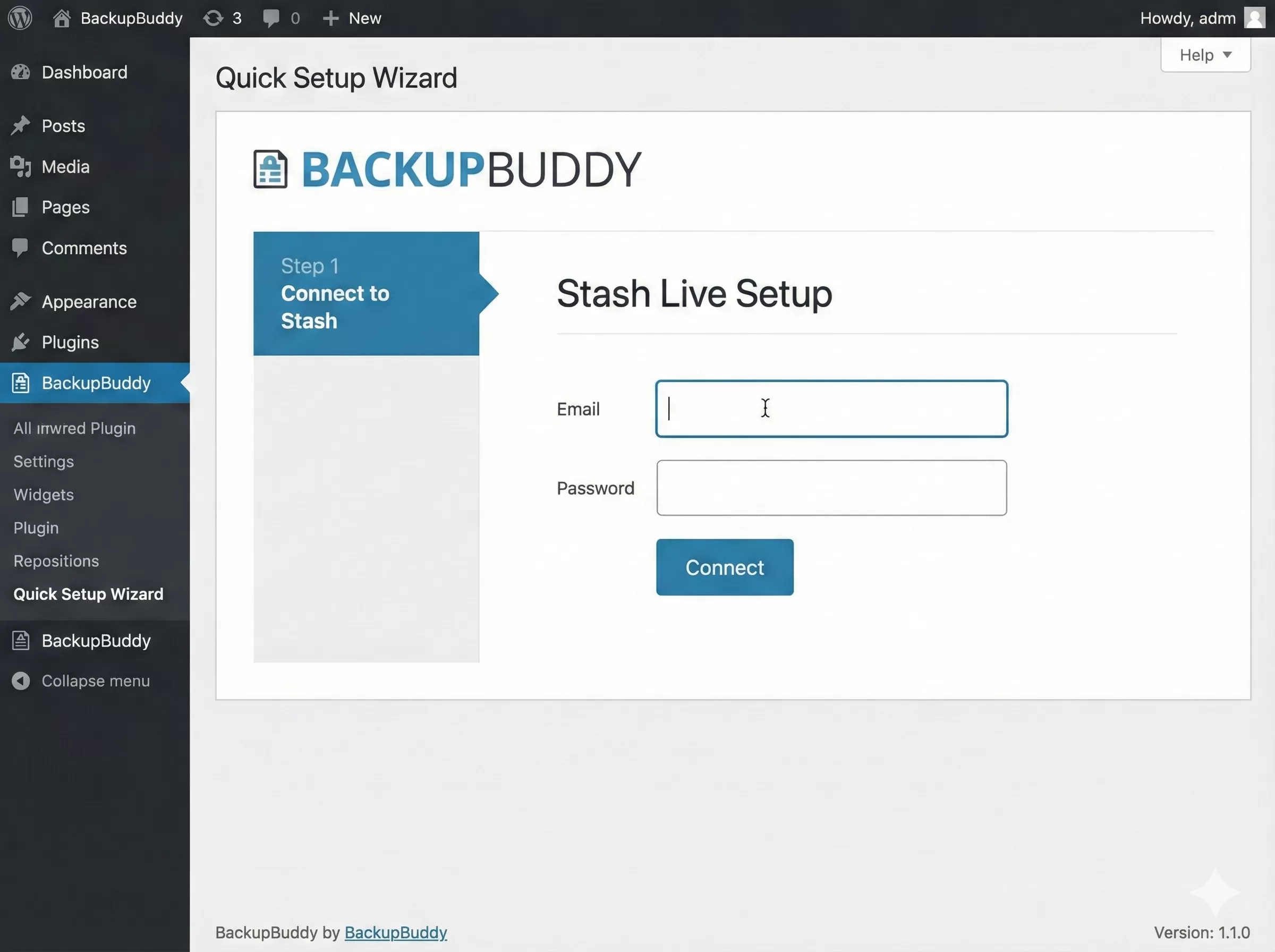
The interface, however, feels a bit “classic” WordPress. It is functional but lacks the sleek, modern React-based UIs we see in newer plugins like WPvivid. Finding advanced settings—like excluding specific folders or tuning the zipper speed—requires digging through tabbed menus that feel like they haven’t changed since 2020.
Restoration Process:
Restoring is where BackupBuddy shines. You can restore individual files directly from the dashboard without rolling back the entire site. Did you accidentally delete style.css? You can grab just that file from yesterday’s backup. This granular control is a massive time-saver for developers.
Pricing: Free vs Premium Value
Here is the elephant in the room: There is no Free version of BackupBuddy.
You must pay to play. This is a stark contrast to UpdraftPlus, which offers a very capable free version.
- Basic Plan: ~$99/year for 1 Site.
- Plus Plan: ~$199/year for 5 Sites.
- Agency Plan: ~$299/year for 10 Sites.
Is it worth paying $99 when free alternatives exist?
If you are a hobbyist? No. Use a free plugin.
If you are running an eCommerce store or a high-traffic blog? Yes. The $99 is insurance. The “Stash Live” feature alone—which acts like a real-time safety net—is worth the price of admission. Free plugins generally only offer scheduled (e.g., daily) backups. If your site crashes at 4 PM, you lose every sale made since the morning backup. With BackupBuddy Stash Live, you lose nothing.
Pros and Cons
To summarize our BackupBuddy WordPress Plugin Review, this tool is a powerhouse for those who value data integrity over a pretty interface. It is robust, but it comes with a premium price tag.
Pros
- Stash Live: Real-time backups that don't slow down your server.
- Data Ownership: You own your backup files; no proprietary lock-in.
- Granular Restore: Restore single files or database tables easily.
- ImportBuddy: One of the most reliable migration scripts in the industry.
- Malware Scanning: Integrated basic malware detection for your backups.
Cons
- Pricey: No free version available; entry starts at $99/year.
- Resource Heavy: Classic backups can spike CPU usage on shared hosting.
- Dated UI: The interface feels clunky compared to modern SaaS tools.
- Complex Setup: Advanced exclusion rules require some technical knowledge.
Must Read: UpdraftPlus Premium Review: Is It Worth The Money?
Support & Documentation
Since SolidWP (iThemes) has been around for over a decade, their knowledge base is massive. Almost every error message you might encounter has a dedicated support article. WordPress.org forums are not applicable here since it’s a premium product, but their ticket support is generally responsive, typically replying within 24 hours during business days.
Who is this for?
This plugin is perfect for:
- WooCommerce Store Owners: Who need real-time backups (Stash Live) to ensure no order data is lost.
- Agencies: Managing multiple client sites who need a reliable migration tool.
- Developers: Who need granular control over database table exclusions and cron schedules.
Who is this NOT for?
- Hobby Bloggers: The $99/year cost is hard to justify for a personal blog.
- Budget Hosting Users: If your server struggles with memory limits, a server-side backup plugin like this might crash.
Alternatives to BackupBuddy
If this BackupBuddy WordPress Plugin Review hasn’t convinced you, consider these top competitors:
- UpdraftPlus: The undisputed king of free backup plugins. It is easier to use and free for basic needs. However, its “Premium” version is required for features that rival BackupBuddy.
- BlogVault: A true SaaS solution. It runs 100% off your server, meaning zero load on your website. It is more expensive but arguably superior for high-traffic sites.
Final Verdict: Is it Worth it?
BackupBuddy (Solid Backups) is a survivor. In an industry where plugins come and go, its longevity speaks volumes about its reliability. While it lacks a free tier and sports a utilitarian interface, its core engine is rock-solid.
If you are serious about protecting your income, the Stash Live feature is the deciding factor. The ability to “rewind” your website to a specific point in time is a superpower that generic backup plugins simply don’t offer.
Final Rating: 4.2/5 – A premium classic that still delivers, provided you have the budget.