Technical tutorials can end up with incomplete, duplicated, or mismatched structured data when schema is added before checking what Rank Math already outputs. This guide shows you how to inspect the existing JSON-LD graph, configure the post schema, and add only the extra markup the tutorial genuinely needs, using Rank Math Schema as the starting point rather than layering on a competing source.
Structured data should describe information readers can see on the page: a tutorial with clear, ordered actions may warrant a HowTo entity, while an explanatory article may need only its article markup. You will review the page content and Rank Math settings before extending the graph, then validate the rendered output. Correct JSON-LD can help search engines and other tools interpret a page, but it does not guarantee a search enhancement or ranking change. Before you begin, make sure you have:
- A WordPress site running a current version of Rank Math SEO
- A published or draft technical tutorial with a clear title, author, featured image, and accurate publication details
- Administrator access to edit the post and its schema settings
- A full site backup or staging environment before adding PHP code
- A code editor or trusted snippet manager for deploying a PHP filter
Audit the Existing Schema Output
Before changing settings or adding custom JSON-LD, inspect the exact tutorial URL as it currently renders. Open the page source in your browser and search for application/ld+json. Review each matching script and follow the data graph: Rank Math may place several entities inside an @graph, or output them across multiple scripts. Look for types such as Article, Person, Organization, WebPage, and BreadcrumbList, then note their @id values and how those identifiers connect the page, author, publisher, and article.
Do not assume that missing markup means nothing is being generated: inspect the rendered page source, not just the editor preview. If you find repeated entities, check whether the theme, another SEO plugin, a schema plugin, or custom code is also adding structured data. Record what each source emits before making changes. A repeated type is not automatically an error, but competing versions of the same article or HowTo can create conflicting details, so establish which output should remain authoritative.
Save this baseline for comparison after configuration:
- The tutorial URL and its canonical URL.
- Every current schema type and its source, if identifiable.
- The Article entity ID and its connection to the page entity.
- The author name and any Person or Organization references.
- The image URL, plus any publication or modification details shown.
Keep these notes beside the draft. They make it easier to spot whether later edits add a genuinely useful entity or simply duplicate information already present.
Prepare the Tutorial Content and Step Sequence
Structured data must represent information readers can actually find on the page. Do not use it to add hidden claims, promotional copy, or steps that the tutorial does not explain. Before configuring a HowTo entity, confirm the article describes a real procedure: readers should be able to follow a meaningful sequence of actions, with each action clearly distinguished and enough detail to complete it.
Draft the sequence from the visible tutorial sections rather than inventing schema-only instructions. A useful step tells the reader what to do and, where needed, what result to expect. If the post mainly explains a concept, compares approaches, or shares general advice without an ordered procedure, keep it as an article and do not add HowTo data. This content decision prevents the markup from promising instructions the page does not provide.
Before editing schema settings, verify the page details that the structured data should reflect:
- Title and description: Use a clear title and concise summary that match the visible tutorial.
- Step sequence: Record the final order and wording of each distinct action.
- Image: Confirm the featured image URL points to the image used for this post.
- Author: Check the displayed author name and its WordPress profile details.
- Canonical URL: Confirm the preferred URL for the page, including its intended permalink.
- Dates: Verify publication and modification dates against the post record.
Keep these details consistent across the article, WordPress post settings, and eventual JSON-LD. If any value changes during editing, update the relevant source rather than leaving the page and its structured data out of sync.
Configure Rank Math Schema for the Tutorial
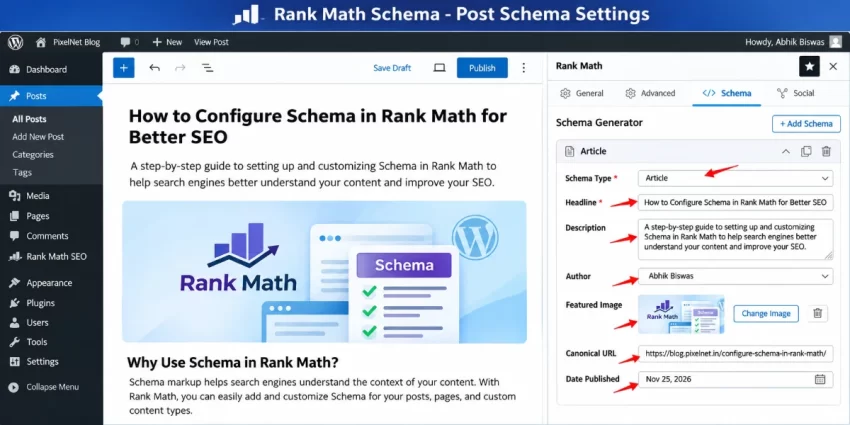
Open the tutorial in the WordPress editor and locate Rank Math’s Schema controls. Depending on the plugin version and editor, these may appear in the Rank Math sidebar, a post settings panel, or a Schema Generator interface. Choose the most accurate Article subtype available. A standard Article or BlogPosting-style entity is generally appropriate for a technical tutorial; use the option that best describes the post rather than selecting a type to chase a search display.
Keep the Article entity Rank Math creates. If the page also contains a genuine, visible sequence of instructions, a separate HowTo entity can describe that procedural aspect. It should supplement—not replace—the article metadata, since the two entities describe different facets of the same page. Avoid adding another schema plugin simply to create a second Article entity.
- Check the article details. Review the generated title and description against the visible heading and introduction. Confirm the author, featured image, canonical page URL, and publication or modification dates are accurate. Correct these values at their source in the post or site settings when possible, rather than adding conflicting overrides.
- Save and compare the output. Update the post, then inspect its rendered JSON-LD and compare it with the baseline from the previous audit. Interface labels can change between Rank Math versions; the goal is to configure the post’s existing schema and verify its fields, not to create competing markup.
Search Appearance Note
Add a Scoped HowTo Node with a Rank Math Filter
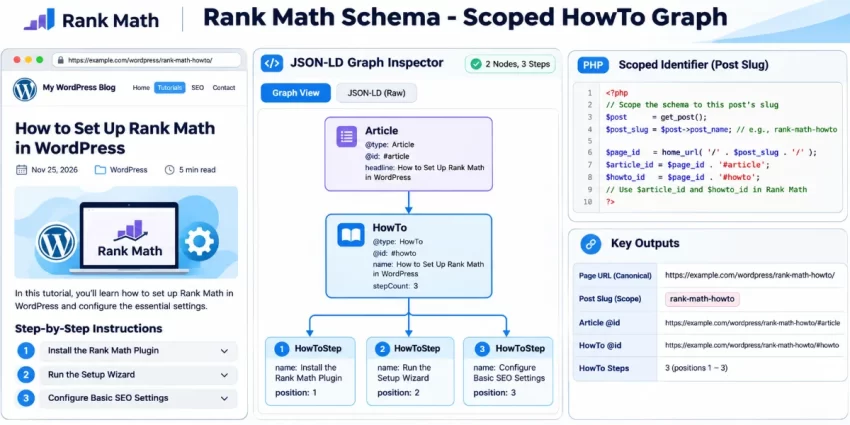
Keep Rank Math’s native Article entity intact; add a separate HowTo node only when the page contains a visible, ordered procedure. This filter targets one post by slug, uses WordPress to retrieve its title, permalink, and excerpt, and adds steps that should match the tutorial sections readers can follow. Replace the example slug and step text with the exact values for your post.
Put the snippet in a small site-specific plugin, a child theme, or a trusted snippet manager. Test it on staging first, then inspect the generated graph to ensure no other source already emits a HowTo entity.
<?php
add_filter('rank_math/json_ld', 'pnet_add_tutorial_howto_schema', 99, 2);
function pnet_add_tutorial_howto_schema($data, $jsonld) {
if (!is_singular('post')) {
return $data;
}
$post_id = get_queried_object_id();
if (!$post_id || get_post_field('post_name', $post_id) !== 'rank-math-json-ld-schema-setup') {
return $data;
}
foreach ($data as $entity) {
if (is_array($entity) && isset($entity['@type']) && in_array('HowTo', (array) $entity['@type'], true)) {
return $data;
}
}
$title = get_the_title($post_id);
$url = get_permalink($post_id);
$description = wp_strip_all_tags(get_the_excerpt($post_id));
if ($description === '') {
$description = 'Step-by-step instructions for ' . $title . '.';
}
$data['pnet_tutorial_howto'] = array(
'@type' => 'HowTo',
'@id' => $url . '#howto',
'url' => $url,
'name' => $title,
'description' => $description,
'step' => array(
array('@type' => 'HowToStep', 'name' => 'Audit existing schema', 'text' => 'Inspect the page source and record the JSON-LD entities already present.'),
array('@type' => 'HowToStep', 'name' => 'Configure the Article schema', 'text' => 'Set the appropriate post schema and verify its visible page details.'),
array('@type' => 'HowToStep', 'name' => 'Add and validate HowTo data', 'text' => 'Add this scoped node for the ordered procedure, then validate the rendered output.'),
),
);
return $data;
}
Backup Required
Did you know: You can use Rank Math Custom Variables to add custom variables to Yoast and Rank Math meta titles, making search snippets more relevant and easier to manage across your WordPress site—without editing every page manually.
Keep the Article and HowTo Entities Consistent
The Article entity and a HowTo entity can describe different aspects of the same tutorial: one identifies the published article, while the other describes its procedure. Keep their names, descriptions, and page URLs aligned with the visible content and canonical URL. If the canonical URL differs from the permalink, use the canonical URL as the basis for the HowTo identifier, such as the canonical page URL followed by #howto. Keep Rank Math’s existing graph context; do not add a competing @context or create another HowTo node through a theme, plugin, or separate snippet.
Before publishing, compare the custom node against the article and the rendered page. Each step should correspond to a visible heading or action, appear in the same order, and explain a useful task rather than a vague topic. Remove any step that readers cannot find or follow on the page.
- Names: Use a tutorial title and procedure name that describe the same subject.
- Descriptions: Keep both summaries accurate and consistent with the visible introduction.
- URLs and IDs: Point to the canonical page and use a stable, page-based identifier for the HowTo node.
- Steps: Match every step to a real, ordered section or action in the tutorial.
Omit the custom node for a conceptual article, a short list of tips, or instructions that are not visible to readers. In those cases, the article markup alone is the more accurate description. The goal is a coherent graph, not the largest number of schema types.
Validate the JSON-LD and Search Eligibility
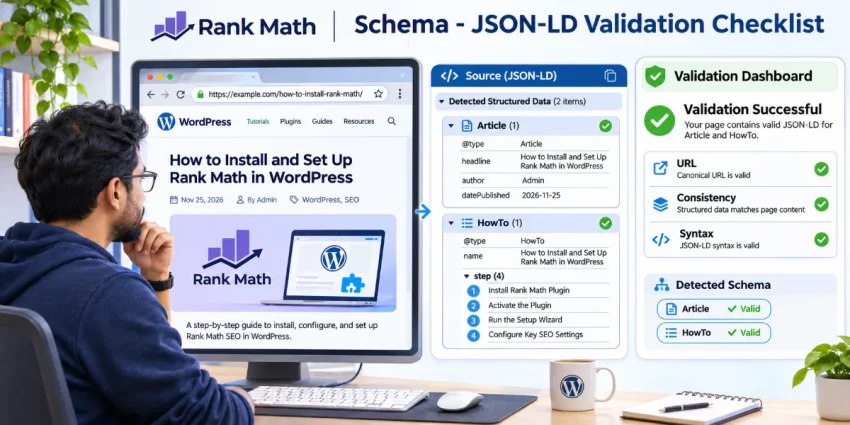
After deployment, clear the page cache and inspect the tutorial at its canonical URL. View the rendered page source and search for application/ld+json. Confirm that Rank Math’s Article entity appears once and that a HowTo entity appears once only if you added one. Check that the JSON is syntactically valid, identifiers refer to the correct page, and the author, title, image, and dates agree with the visible content. This final check confirms that Rank Math Schema describes the published page rather than an earlier draft.
Run the URL through the Schema.org Validator to review vocabulary and structure. You can also check the official Schema.org HowTo type and Google Search Central structured data guidance. Use Google’s Rich Results Test to assess only features Google currently supports; Google no longer displays HowTo rich results in Search. Passing a validator means the markup can be parsed, not that Google will show a rich result or improve rankings.
Confirm that the canonical page is crawlable and that the test tools report no syntax or relevant structured-data errors. Use this visual checklist before publishing:
- The tested URL is the intended canonical page.
- There is one intended HowTo node, if the page warrants one.
- Steps are accurate, visible, and in the correct order.
- Article details match the page and Rank Math output.
- No duplicate entities or test errors remain.
Common Errors and Troubleshooting
Duplicate Article or HowTo entities
Symptom: The page source or validator shows competing Article or HowTo entries with different titles, URLs, or descriptions. Fix: Compare the output from Rank Math, your theme, other schema plugins, and custom snippets. Disable the duplicate source, or adjust its scope, so one accurate entity represents each intended type. Recheck the rendered page after clearing caches.
Missing or invalid fields
Symptom: A validator flags a missing value, malformed step, or invalid JSON. Fix: Compare the reported property with the visible page and correct the source data. Check arrays, brackets, commas, and field names in custom output. Do not invent an author, image, date, or instruction just to silence a warning; omit unsupported data instead.
Schema does not appear
Symptom: The expected custom node is absent from the page source. Fix: Confirm the snippet is active, Rank Math is enabled, and the filter runs on the intended singular post. Verify the post ID or slug condition, then clear page, object, and CDN caches before checking the canonical URL again.
Unexpected rich-result test results
Symptom: A test does not report a HowTo enhancement even though the JSON-LD parses. Fix: Treat validation and search display as separate checks. Google no longer shows HowTo rich results in Search, so valid HowTo vocabulary is not a promise of a result. Use a validator to assess markup structure, and use Google tools only for features it currently supports.
PHP fatal error after adding a snippet
Symptom: The site or editor reports a PHP error after deployment. Fix: Disable the snippet through its manager or the host recovery method; restore the backup if needed. Check the error log, correct the code, and retest on staging before re-enabling it on the live site.
Conclusion
Technical tutorial schema is most reliable when it follows an inspect, configure, extend, and validate workflow. First, review the JSON-LD Rank Math already generates and identify any overlapping output. Next, configure the post’s native Article details so the title, author, image, dates, and canonical URL reflect the published page. Add a separate, narrowly scoped HowTo node only when readers can follow a genuine, visible sequence of actions, then validate the rendered graph at the canonical URL.
Keep the markup aligned with the content throughout editing: every entity and step should describe information readers can see, and duplicate or unsupported data should be removed rather than patched with invented values. Valid JSON-LD helps machines interpret a page, but it does not guarantee a Google search enhancement or ranking change. In particular, Google no longer displays HowTo rich results in Search, so treat the markup as a structured description—not a promise of a special result.
For a practical next step, test one suitable tutorial on staging. Compare its output before and after the change, confirm the custom node appears only on the intended post, and check that all steps match the published instructions. Reuse the pattern only after that test confirms its scope and accuracy. With that careful approach, Rank Math Schema can support a clear, maintainable description of your tutorial.