If you have been working in the WordPress ecosystem for any length of time, you have likely heard the debates surrounding page builders. Some swear by them for speed; others hate them for code bloat. Welcome to my detailed Elementor Pro review, where I aim to settle the score. As someone who builds client sites daily, I have used just about every tool on the market, from Gutenberg to Bricks.
In this post, I am going to dissect Elementor Pro not just from a “drag-and-drop” beginner’s perspective, but also through the lens of a developer who cares about clean code and extensibility. By the end of this Elementor Pro review, you will know exactly if this plugin is the right investment for your next project.
Elementor Pro Review: What is it and Why Do You Need It?
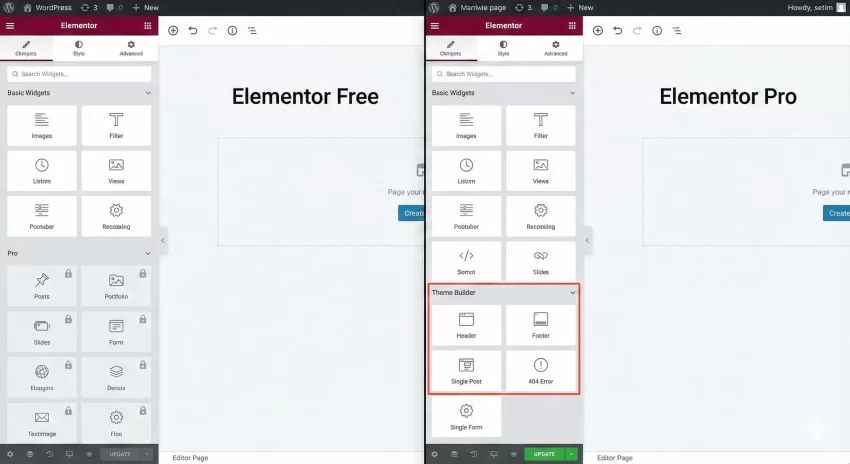
Elementor started as a simple page builder but has evolved into a comprehensive website creation platform. While the free version gives you basic widgets, the Pro version unlocks the true power of the “Theme Builder.”
Theme Builder allows you to design your entire site—headers, footers, single post templates, and 404 pages—visually. You are no longer restricted by your theme’s limitations. For many agencies, this feature alone justifies the price tag because it drastically speeds up the turnaround time for client builds.
The Beginner’s Experience: Usability and Design
For non-coders, Elementor Pro is arguably the most intuitive tool available. The learning curve is surprisingly gentle.
The Drag-and-Drop Interface
The core experience revolves around the visual editor. You drag a widget from the left sidebar and drop it onto your canvas. What you see is literally what you get. Unlike some other builders that require you to save and refresh to see animations, Elementor renders them in real-time.
Global Settings and Site Kits
One of the biggest pitfalls for beginners is inconsistent design (different fonts on every page). Elementor Pro’s “Global Design System” allows you to set site-wide fonts and colors. If you decide to change your brand color from blue to green, you change it in one global setting, and it updates across the entire site instantly.
You might also like:

The Developer’s Perspective: Is It Extensible?
This is where this Elementor Pro review shifts gears. A pretty interface is nice, but as developers, we need control. Can we hook into it? Can we optimize it?
Custom CSS and Dynamic Data
Elementor Pro allows you to add custom CSS directly to any widget, column, or section. You can even use the selector keyword to target the current wrapper without worrying about generating unique IDs manually.
Furthermore, the Dynamic Tags feature is a game-changer. You can pull data from Custom Fields (ACF, Pods, Metabox) directly into the visual editor. This bridges the gap between complex backend data and frontend visual design.
Extending Elementor with Custom Code
If the built-in widgets aren’t enough, Elementor possesses a robust API. You can create your own custom widgets to keep the UI easy for your clients while running complex PHP logic in the background.
Here is an example of how we might structure a simple custom widget registration in a plugin or theme functions.php file. Note the use of our custom prefix pnet_ to ensure no conflicts.
/**
 * Register a custom Elementor Widget.
 *
 * @param \Elementor\Widgets_Manager $widgets_manager Elementor widgets manager.
 * @return void
 */
function pnet_register_custom_widgets( $widgets_manager ) {

    // Ensure the class exists before registering
    require_once( __DIR__ . '/widgets/pnet-hero-widget.php' );

    $widgets_manager->register( new \Pnet_Hero_Widget() );

}
add_action( 'elementor/widgets/register', 'pnet_register_custom_widgets' );
This level of extensibility means you aren’t locked into Elementor’s logic. You can build a bespoke experience for your clients while giving them the ease of editing the content later.
You might also like:
Performance: The Elephant in the Room
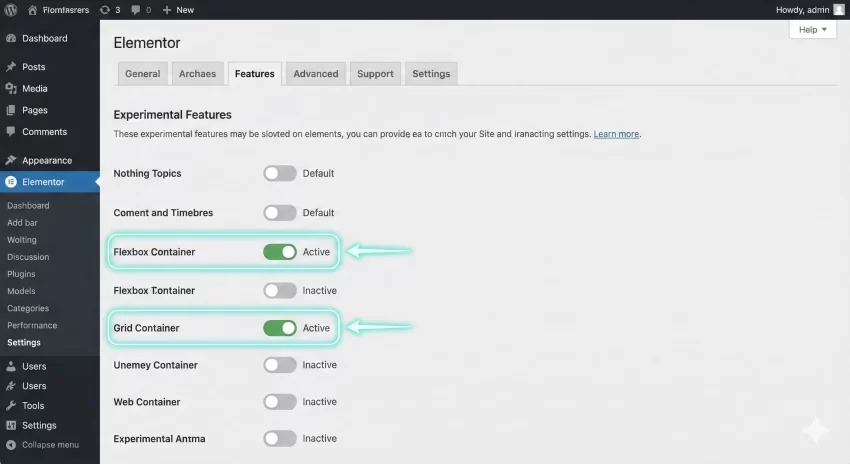
No honest Elementor Pro review can ignore performance. Historically, Elementor was criticized for “DOM excessive depth” (too many div tags nested inside each other). However, recent updates have introduced “Flexbox Containers” and “Grid Containers.”
Why Containers Matter:
- Reduced DOM Size: Containers reduce the code markup significantly compared to the old Section/Column approach.
- Faster Rendering: Less code means the browser renders the page faster.
- Mobile Responsiveness: Flexbox gives you granular control over widget order and alignment on mobile devices without duplicating content.
If you are using Elementor Pro in 2026, ensure you have Containers activated in the experiments tab.
Elementor Pro Pricing
Elementor Pro moved to a subscription-based model that scales with the number of sites you manage. While there is no lifetime deal (which frustrates some), the annual cost is generally covered by the profit of a single client project.
- Essential Plan: For 1 site. Great for solopreneurs.
- Expert Plan: For 25 sites. The sweet spot for freelancers.
- Agency Plan: For 1000 sites. Ideal for larger development shops.
Pros and Cons
To summarize this Elementor Pro review, let’s look at the highs and lows.
Pros
- Theme Builder: Complete control over Header, Footer, and Archive pages.
- Popup Builder: Saves you from installing a separate, expensive popup plugin.
- Ecosystem: Being the most popular builder means endless third-party addons exist.
- WooCommerce Builder: Customize your single product and checkout pages visually.
Cons
- Bloat (If unchecked): You must be disciplined. dragging in too many animations can slow down the site.
- Subscription Fatigue: It is a recurring yearly cost.
Final Verdict: Is Elementor Pro Worth It?
After years of testing, my conclusion for this Elementor Pro review is a resounding yes, but with a caveat. It is the ultimate tool for those who want to balance design speed with client editability.
If you are a WordPress developer, the ability to create custom skins and widgets makes it a powerful framework. If you are a beginner, the Theme Builder empowers you to create professional sites without writing a single line of CSS.
For high-performance requirements, simply ensure you are using a good hosting provider and utilize the new Container layout system. Elementor Pro remains the king of the hill for a reason—it just works.
Next Step: If you are ready to take your WordPress development to the next level, I highly recommend giving the Pro version a test drive on a staging site. The difference in workflow efficiency is night and day.