
For high-volume B2B wholesalers, the standard “Add to Cart” flow is often insufficient. Negotiation is the lifeblood of business-to-business transactions, and displaying a fixed price can deter bulk buyers who expect tiered pricing or custom agreements. The problem is that default WooCommerce installations assume a B2C model. To bridge this gap, you need to implement a robust WooCommerce request a quote system. This guide provides a comprehensive, technical solution to replace the checkout process with a custom inquiry engine, allowing you to capture leads effectively in 2026.
In this technical walkthrough, we will bypass bloated plugins and build a lightweight, high-performance solution. By the end of this tutorial, you will have a fully functional WooCommerce request a quote feature integrated directly into your theme, complete with AJAX submission and email notifications.
Prerequisites for Custom Development
Before diving into the code to build your WooCommerce request a quote functionality, ensure your development environment meets the following strict standards to prevent conflicts and ensure security.
- PHP Environment: PHP 8.1 or higher is recommended for optimal performance and security compliance in 2026.
- WordPress Version: WordPress 6.7+ (ensure you are on the latest stable release).
- WooCommerce Version: WooCommerce 9.0+.
- Access: SFTP or SSH access to your server for file modifications.
- Child Theme: A configured child theme to ensure your WooCommerce request a quote code isn’t wiped during updates.
- Backup: A full database and file backup before editing
functions.php.
Step 1: Assessing the WooCommerce Hooks Architecture
To successfully inject a WooCommerce request a quote button, we must first understand the visual hierarchy of the Single Product Page. WooCommerce uses a system of hooks—specifically actions and filters—to render content. The standard “Add to Cart” button is rendered via the woocommerce_single_product_summary hook.
For a clean implementation of the WooCommerce request a quote feature, we simply cannot hide the old button with CSS (display: none). That is a bad practice known as “cloaking” in SEO terms and leaves the functionality exposed to bots or savvy users inspecting the DOM. Instead, we must programmatically unhook the default buttons and hook in our new function. This ensures that the WooCommerce request a quote logic is handled on the server side, maintaining the integrity of your B2B store.
Identifying the Target Hooks
The specific hooks we need to target depend on product types. Simple products use woocommerce_simple_add_to_cart, while variable products use woocommerce_variable_add_to_cart. A complete WooCommerce request a quote solution must address both.
You might also like:

Step 2: Removing the Standard Add to Cart Button
The first step in transforming your store is to remove the ability to purchase directly. We will create a function that conditionally checks if a product requires a quote. For this guide, we will apply the WooCommerce request a quote logic to all products, but you can easily modify the condition (e.g., check for a specific category or tag).
Open your child theme’s functions.php file. We will use the wp_head hook to remove actions, ensuring they trigger before the page renders. This is crucial for a glitch-free WooCommerce request a quote user experience.
/**
 * Remove standard Add to Cart buttons to prepare for
 * WooCommerce request a quote functionality.
 */
function pnet_remove_add_to_cart_buttons() {
    // Check if we are on a product page
    if ( is_product() ) {
        // Remove button for Simple Products
        remove_action( 'woocommerce_single_product_summary', 'woocommerce_template_single_add_to_cart', 30 );

        // Remove button for Variable Products
        remove_action( 'woocommerce_single_product_summary', 'woocommerce_template_variable_add_to_cart', 30 );
    }
}
add_action( 'wp', 'pnet_remove_add_to_cart_buttons' );
By executing this code, the default purchasing buttons disappear. This clears the visual real estate needed for our custom WooCommerce request a quote button. It is vital to test this immediately. If the buttons remain, your theme might be overriding default hooks, a common issue when implementing a WooCommerce request a quote system in premium themes.
Must Read: Boost Profits: How to Set a WooCommerce Minimum Order Amount Easily
Step 3: Injecting the “Request a Quote” Button
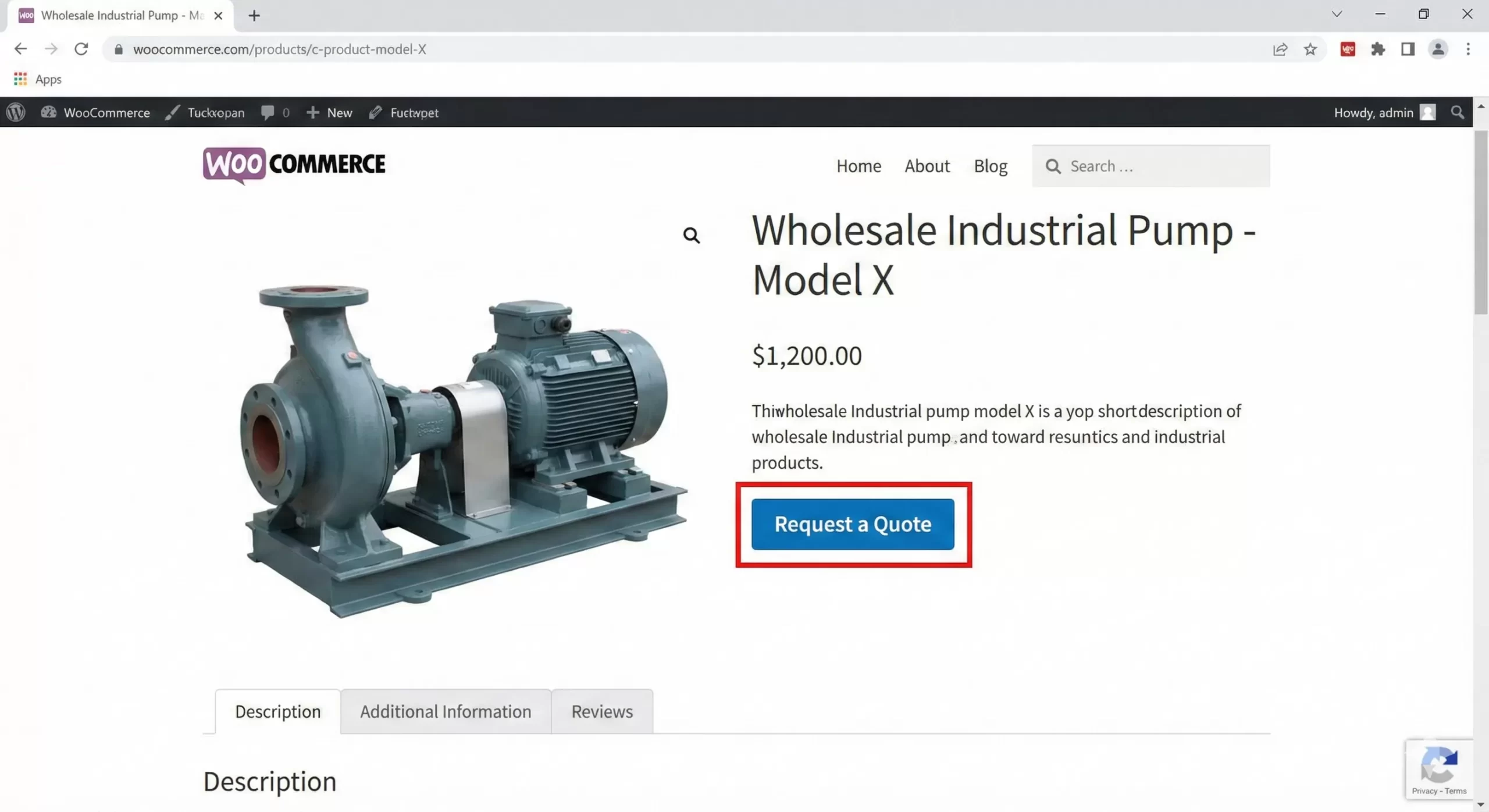
Now that the canvas is clean, we will insert the new call-to-action. The goal is to place the WooCommerce request a quote button exactly where the “Add to Cart” button used to be. To do this, we use the same woocommerce_single_product_summary hook but with a priority that sits comfortably among the price and meta data.
Building the Button Markup
We will create a function pnet_add_quote_button that outputs the HTML. We will also include a hidden modal or a scroll-to-anchor interaction. For this example, the button will toggle a hidden inquiry form, a UX pattern that reduces friction for the WooCommerce request a quote process.
/**
 * Render the custom WooCommerce request a quote button.
 */
function pnet_add_quote_button() {
    global $product;
    $product_id = $product->get_id();

    // Output the button HTML
    echo '<div class="pnet-quote-wrapper" style="margin-top: 20px; margin-bottom: 20px;">';
    echo '<button id="pnet-trigger-quote" class="button alt pnet-quote-btn" data-product-id="' . esc_attr($product_id) . '">';
    echo 'Request a Quote';
    echo '</button>';
    echo '</div>';
}
add_action( 'woocommerce_single_product_summary', 'pnet_add_quote_button', 30 );
This snippet successfully renders the trigger for the WooCommerce request a quote interaction. We use esc_attr() for security, ensuring the Product ID is sanitized. This is a best practice referenced in the WordPress Security Handbook. Without this button, users have no entry point to the WooCommerce request a quote funnel.
Step 4: Rendering the Inquiry Form
A button is useless without a mechanism to collect data. The core of the WooCommerce request a quote system is the form itself. To keep the user experience seamless, we will render a hidden HTML form on the product page that appears when the user clicks the button. This prevents page reloads, which is critical for maintaining user attention during the WooCommerce request a quote process.
We will append this form to the footer or directly below the button. Here, we add it to the woocommerce_after_single_product hook to ensure it’s loaded in the DOM but can be hidden via CSS until toggled. This approach makes the WooCommerce request a quote feature snappy and responsive.
/**
 * Output the hidden form for WooCommerce request a quote functionality.
 */
function pnet_render_quote_form() {
    // Only render on product pages
    if ( ! is_product() ) return;

    global $product;
    ?>
    <div id="pnet-quote-modal" style="display:none; background:#f9f9f9; padding:20px; border:1px solid #ddd; margin-top:20px;">
        <h3>Get a Custom Price</h3>
        <form id="pnet-quote-form">
            <input type="hidden" name="action" value="pnet_submit_quote">
            <input type="hidden" name="product_id" value="<?php echo esc_attr($product->get_id()); ?>">
            <?php wp_nonce_field( 'pnet_quote_nonce', 'security' ); ?>

            <p>
                <label for="pnet-name">Name <span class="required">*</span></label>
                <input type="text" name="customer_name" id="pnet-name" required class="input-text">
            </p>
            <p>
                <label for="pnet-email">Email <span class="required">*</span></label>
                <input type="email" name="customer_email" id="pnet-email" required class="input-text">
            </p>
            <p>
                <label for="pnet-qty">Estimated Quantity</label>
                <input type="number" name="expected_qty" id="pnet-qty" min="1" class="input-text">
            </p>
            <p>
                <label for="pnet-notes">Notes</label>
                <textarea name="customer_notes" id="pnet-notes" class="input-text" rows="4"></textarea>
            </p>
            <p>
                <button type="submit" class="button primary">Send Request</button>
            </p>
            <div id="pnet-response-message"></div>
        </form>
    </div>
    <script>
    jQuery(document).ready(function($) {
        $('#pnet-trigger-quote').on('click', function(e) {
            e.preventDefault();
            $('#pnet-quote-modal').slideToggle();
        });
    });
    </script>
    <?php
}
add_action( 'woocommerce_after_single_product', 'pnet_render_quote_form' );
This code block handles the visual presentation of the WooCommerce request a quote interface. Note the inclusion of wp_nonce_field. Nonces are essential for preventing Cross-Site Request Forgery (CSRF) attacks. If you omit this, your WooCommerce request a quote form becomes a security vulnerability.
You might also like:

Step 5: Handling AJAX Submission
A modern WooCommerce request a quote system should not require a page refresh. To achieve this, we use AJAX. The JavaScript snippet included above handles the UI toggle, but now we need a dedicated script to serialize the form data and send it to the WordPress backend.
We need to queue a JavaScript file or add inline script (for simplicity in this guide, we continue with inline logic, though separate files are preferred for larger projects). The script will intercept the form submission, prevent the default behavior, and post the data to admin-ajax.php. This creates a smooth “app-like” feel for your WooCommerce request a quote tool.
/**
 * Enqueue scripts for WooCommerce request a quote AJAX handling.
 */
function pnet_enqueue_quote_scripts() {
    if ( is_product() ) {
        ?>
        <script type="text/javascript">
        jQuery(document).ready(function($) {
            $('#pnet-quote-form').on('submit', function(e) {
                e.preventDefault();
                var $form = $(this);
                var $message = $('#pnet-response-message');
                var $btn = $form.find('button[type="submit"]');

                $btn.text('Sending...').prop('disabled', true);

                $.post('<?php echo admin_url('admin-ajax.php'); ?>', $form.serialize(), function(response) {
                    if(response.success) {
                        $message.html('<p style="color:green;">' + response.data + '</p>');
                        $form[0].reset();
                    } else {
                        $message.html('<p style="color:red;">' + response.data + '</p>');
                    }
                    $btn.text('Send Request').prop('disabled', false);
                });
            });
        });
        </script>
        <?php
    }
}
add_action( 'wp_footer', 'pnet_enqueue_quote_scripts' );
This script connects the frontend form to the backend processor. The user sees immediate feedback (“Sending…”), which improves the perceived performance of the WooCommerce request a quote interaction.
Step 6: Processing the Quote on the Server
The final piece of the puzzle is the PHP handler that receives the data, sanitizes it, and sends the email. This is the engine of your WooCommerce request a quote functionality. We must hook into wp_ajax_nopriv_pnet_submit_quote (for guests) and wp_ajax_pnet_submit_quote (for logged-in users).
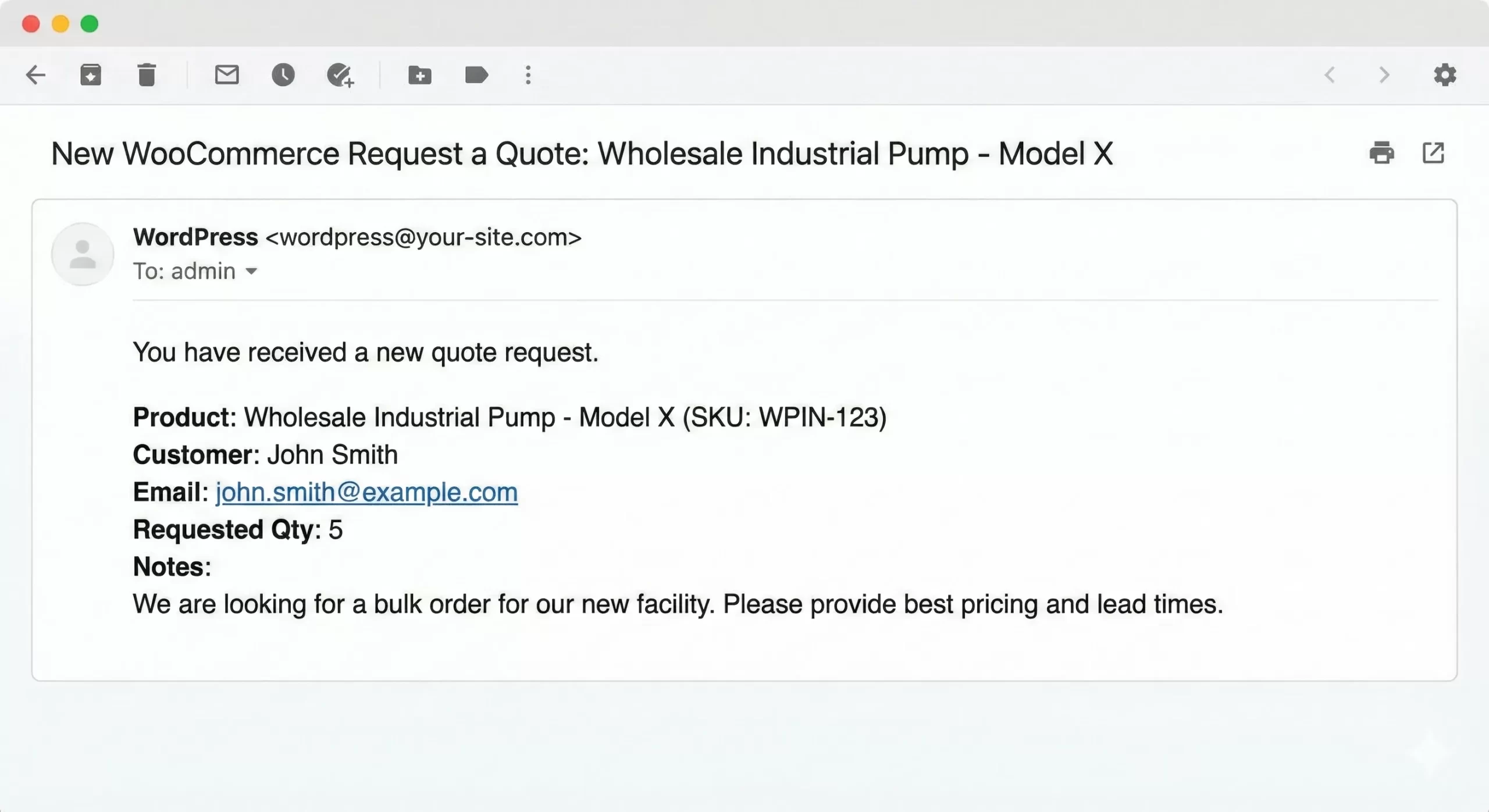
In this function, we validate the nonce, sanitize every input field using PHP sanitization filters, and utilize wp_mail() to deliver the lead. This ensures your WooCommerce request a quote system produces clean, safe data.
/**
 * Handle the AJAX submission for WooCommerce request a quote.
 */
function pnet_process_quote_submission() {
    // 1. Check Nonce
    check_ajax_referer( 'pnet_quote_nonce', 'security' );

    // 2. Sanitize Data
    $name = sanitize_text_field( $_POST['customer_name'] );
    $email = sanitize_email( $_POST['customer_email'] );
    $qty = intval( $_POST['expected_qty'] );
    $notes = sanitize_textarea_field( $_POST['customer_notes'] );
    $product_id = intval( $_POST['product_id'] );

    // 3. Validation
    if ( ! is_email( $email ) || empty( $name ) ) {
        wp_send_json_error( 'Please provide a valid name and email.' );
    }

    // 4. Get Product Details
    $product = wc_get_product( $product_id );
    $product_name = $product ? $product->get_name() : 'Unknown Product';
    $sku = $product ? $product->get_sku() : 'N/A';

    // 5. Prepare Email
    $to = get_option( 'admin_email' ); // Send to site admin
    $subject = 'New WooCommerce Request a Quote: ' . $product_name;
    $message = "You have received a new quote request.\n\n";
    $message .= "Product: " . $product_name . " (SKU: $sku)\n";
    $message .= "Customer: " . $name . "\n";
    $message .= "Email: " . $email . "\n";
    $message .= "Requested Qty: " . $qty . "\n";
    $message .= "Notes:\n" . $notes . "\n";

    $headers = array('Content-Type: text/plain; charset=UTF-8');

    // 6. Send Email
    $sent = wp_mail( $to, $subject, $message, $headers );

    if ( $sent ) {
        wp_send_json_success( 'Thank you! Your WooCommerce request a quote has been sent successfully.' );
    } else {
        wp_send_json_error( 'Server error: Could not send email.' );
    }
}
add_action( 'wp_ajax_pnet_submit_quote', 'pnet_process_quote_submission' );
add_action( 'wp_ajax_nopriv_pnet_submit_quote', 'pnet_process_quote_submission' );
This handler completes the loop. When a user submits the form, this function executes. It is critical to test this thoroughly. If the wp_mail function fails, your WooCommerce request a quote system fails.
Advanced Customization: Handling Variable Products
The code above works perfectly for Simple Products. However, Variable Products pose a unique challenge for any WooCommerce request a quote implementation. Variable products require the user to select attributes (like Size or Color) *before* the request is valid.
In a standard “Add to Cart” flow, WooCommerce uses JavaScript to pass the `variation_id`. To upgrade our WooCommerce request a quote script for variables, you would need to listen for the jQuery event found_variation. When this event triggers, you capture the variation ID and inject it into a hidden field in your quote form. Without this step, your WooCommerce request a quote email will only show the parent product, leaving you guessing which specific variant the customer wants.
Refining the User Experience
To make your WooCommerce request a quote feature truly professional, consider adding conditional logic. For example, you might want to show the price *and* the quote button, or perhaps hide the price only for guest users while showing it to logged-in wholesalers. You can achieve this by wrapping the remove_action calls in Step 2 with if ( ! is_user_logged_in() ). This flexibility is why custom coding your WooCommerce request a quote solution is often superior to rigid plugins.
Troubleshooting Common Errors
Even with clean code, issues can arise. Here are the most common problems developers face when deploying a WooCommerce request a quote system.
1. Email Delivery Failures
If the AJAX response says “Success” but you never receive the email, the issue is likely not with the WooCommerce request a quote code, but with your server’s PHP mail() function. WordPress defaults to PHP mail, which is often blocked by spam filters. To fix this, install an SMTP plugin to route your WooCommerce request a quote emails through a reliable provider like SendGrid or Google Workspace.
2. 400 Bad Request on Submission
If you see a generic “0” or “400 Bad Request” error in your browser console when submitting the form, it usually means the AJAX action hook is not firing or the nonce verification failed. Double-check that wp_ajax_pnet_submit_quote matches the action value in your JavaScript. This is the most common syntax error in WooCommerce request a quote development.
3. Cache Conflicts
Aggressive caching (like Varnish or WP Rocket) can sometimes cache the Nonce, causing it to expire. If users report that the WooCommerce request a quote form works once but fails an hour later, exclude your product pages from caching or use “ESI” (Edge Side Includes) if your host supports it. Alternatively, load the Nonce via AJAX dynamically to ensure the WooCommerce request a quote form is always valid.
4. jQuery Is Not Defined
If your console reports that $ or jQuery is undefined, your theme might be loading scripts in the footer without proper dependencies. Ensure your script is wrapped in jQuery(document).ready(function($) { ... }) to ensure the library is loaded before your WooCommerce request a quote script executes.
Conclusion
Implementing a custom WooCommerce request a quote functionality allows you to tailor the B2B experience precisely to your business needs. By removing the default cart flow and replacing it with a direct inquiry line, you remove barriers for bulk buyers and open the door to negotiation.
This guide covered the removal of default hooks, the injection of a custom modal, AJAX handling, and secure server-side processing. While plugins exist, this lightweight, code-first approach ensures your site remains fast and your code base remains clean. By mastering these hooks, you not only solve the WooCommerce request a quote requirement but also gain a deeper control over the entire WooCommerce product lifecycle.