
The standard Query Loop can display posts in flexible layouts, but it does not automatically provide every project-specific filter a site needs. In this guide, you will extend the Gutenberg Query Loop with a small site-specific plugin: it will read a validated URL parameter and add a taxonomy filter to eligible loops using WordPress hooks, without changing core files.
The example filters standard posts by a term in an existing public taxonomy, such as resource_topic. Missing or invalid values will leave the loop unchanged, and the same pattern can be adapted to other carefully validated query arguments. This adds front-end filtering behavior only; it does not create a filter form or a custom control in the editor sidebar. You will need the following before you begin:
- PHP 8.0 or newer and a current WordPress installation with the block editor.
- A development or staging site, plus a recent database and file backup before testing.
- A child theme or, preferably, access to create and activate a small site-specific plugin.
- A public taxonomy registered for standard posts, such as
resource_topic, with at least two terms and posts assigned to them. - Basic familiarity with PHP, the WordPress plugin folder, and editing a Query Loop block.
Step 1: Define the filter behavior and prepare a small plugin
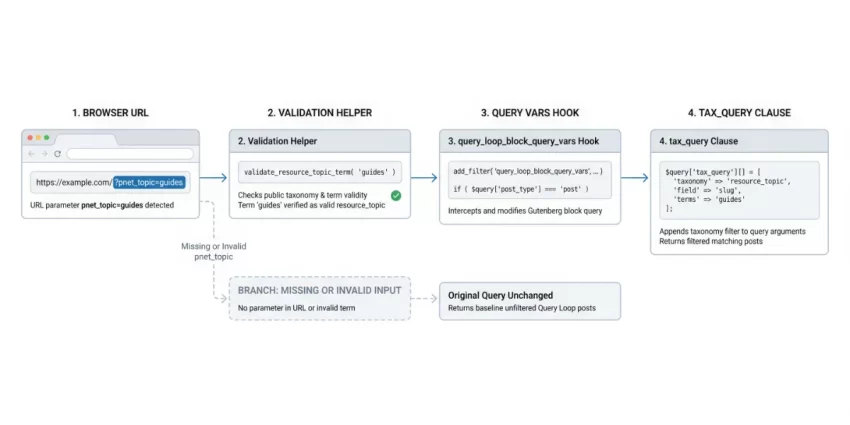
Set the filter contract before adding a hook. A request such as ?pnet_topic=guides will use guides as a term slug in the existing resource_topic taxonomy. It is not a general-purpose query argument: visitors cannot use it to choose arbitrary query properties. When the parameter is missing, empty, or does not identify a valid term, the eligible Query Loop should keep its normal results. A valid term should narrow eligible standard-post loops to posts assigned to that term.
Put this behavior in a small site-specific plugin rather than editing WordPress core or a parent theme. Theme updates can overwrite theme-file changes, and core edits are not a maintainable extension point. Create the directory wp-content/plugins/pnet-query-loop-filter/ and the file pnet-query-loop-filter.php inside it. The next steps will add the plugin header and hook callbacks there. Keep the plugin focused on the filter; do not register a new taxonomy as part of this example.
The example assumes resource_topic is already registered as a public taxonomy for the standard post type, with terms and assigned posts available for testing. If your site uses a different taxonomy, confirm its actual identifier and post-type association before adapting the implementation. This preparation also keeps the later checks meaningful: sanitizing a slug is not the same as confirming that a matching term exists.
Pro Tip
Step 2: Register and validate the custom URL query variable
WordPress only makes public query variables available through its normal request handling when they are registered. Add the following code to pnet-query-loop-filter.php, beneath the plugin header. It registers pnet_topic, then provides a helper that returns a canonical term slug only when the taxonomy is public, attached to standard posts, and contains a matching term.
public || ! is_object_in_taxonomy( 'post', 'resource_topic' ) ) {
        return false;
    }

    $term = get_term_by( 'slug', $slug, 'resource_topic' );
    if ( ! $term || is_wp_error( $term ) ) {
        return false;
    }

    return $term->slug;
}
The helper deliberately rejects arrays, empty values, and values that change during slug sanitization; the URL should contain a canonical slug such as guides. Sanitization alone cannot establish that a term exists or belongs to the intended taxonomy. The taxonomy and term checks prevent an arbitrary or stale value from reaching the query-building code. The query_vars filter is documented in the official WordPress developer reference.
The next step can call pnet_get_topic_filter_slug() and leave the original query arguments untouched whenever it returns false. That fallback is intentional: an absent or invalid filter should not break the page or produce an unintended taxonomy query.
Step 3: Add the custom taxonomy argument to eligible Query Loop queries
Use the query_loop_block_query_vars filter to modify server-side query arguments for the block. This callback only targets a Query Loop whose post type is exactly post; other post types and loops with no valid pnet_topic value pass through unchanged. It also preserves existing taxonomy conditions by nesting them with the new clause under an AND relation.
/**
 * Add the validated topic condition to standard-post Query Loop blocks.
 *
 * @param array    $query Query arguments prepared for the block.
 * @param WP_Block $block The rendered block instance.
 * @return array
 */
function pnet_filter_query_loop_by_topic( $query, $block ) {
    if ( ! isset( $query['post_type'] ) || 'post' !== $query['post_type'] ) {
        return $query;
    }

    $topic_slug = pnet_get_topic_filter_slug();
    if ( false === $topic_slug ) {
        return $query;
    }

    if ( isset( $query['tax_query'] ) && ! is_array( $query['tax_query'] ) ) {
        return $query;
    }

    $topic_clause = array(
        'taxonomy' => 'resource_topic',
        'field'    => 'slug',
        'terms'    => $topic_slug,
    );

    if ( ! empty( $query['tax_query'] ) ) {
        $query['tax_query'] = array(
            'relation' => 'AND',
            $query['tax_query'],
            $topic_clause,
        );
    } else {
        $query['tax_query'] = array( $topic_clause );
    }

    return $query;
}
add_filter( 'query_loop_block_query_vars', 'pnet_filter_query_loop_by_topic', 10, 2 );
The callback keeps the incoming arguments and adds a fixed taxonomy, field, and validated slug rather than copying request data into a query. Because this hook affects front-end query behavior only, it does not add a selector or other filter control to the editor sidebar. A visible form or per-block editor option requires a separate interface implementation.
Scope Check
Step 4: Install the plugin and configure the Query Loop block
Save the complete plugin file in wp-content/plugins/pnet-query-loop-filter/pnet-query-loop-filter.php, including the plugin header and the functions from the earlier steps. In the WordPress dashboard, open Plugins, activate the site-specific plugin, and check the page and server logs for PHP errors before building the test. If activation fails, deactivate it or correct the reported syntax issue before continuing; do not display debugging errors to visitors on a live site.
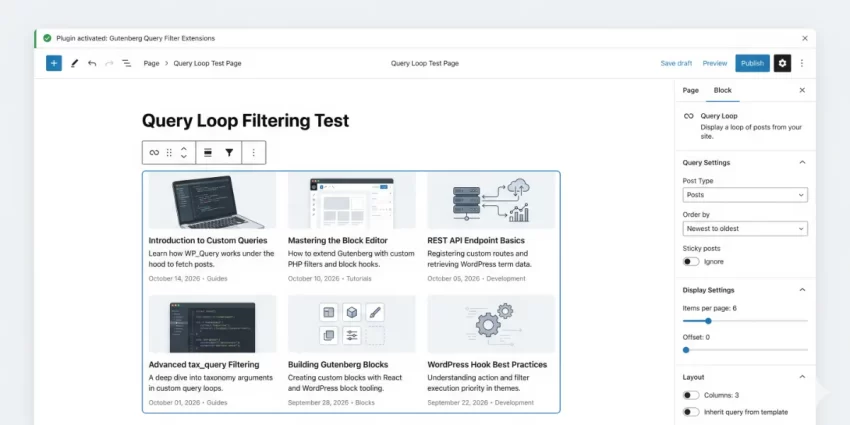
Create a test page, or edit a staging page, and insert a Query Loop block. In the block settings, select the standard Posts post type, which matches the callback eligibility check. Choose any layout that makes individual results easy to recognize, such as a list or grid, and display post titles plus an excerpt or featured image. These presentation settings control how results appear; they do not add or replace the PHP taxonomy filtering logic.
Publish or preview the page and first load it without a pnet_topic parameter. Record which posts appear, including their order and visible titles. This is the baseline: with no filter value, the block should retain its normal results. Keep the test page and its URL handy for the valid, missing, and invalid parameter checks in the next step.
Did you know: You can use WordPress Custom Block Styles to create reusable Gutenberg designs and unique button shapes without building custom blocks? Explore this practical guide to get started with WordPress Custom Block Styles.
Step 5: Test valid, missing, and invalid filter values
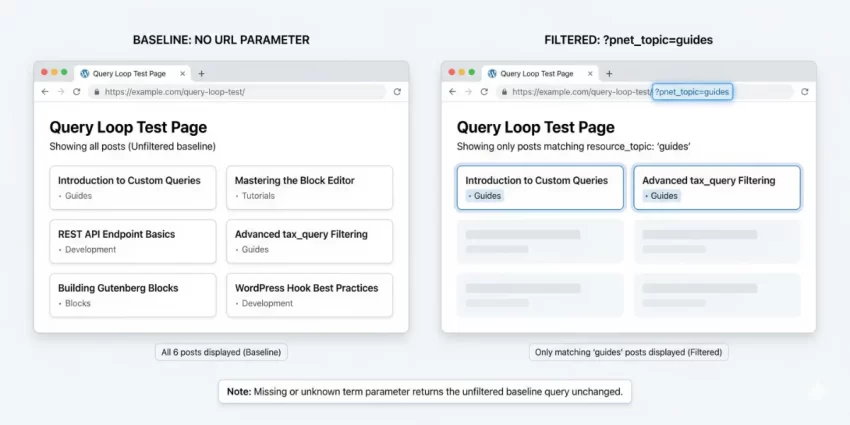
Test the page in a browser while signed in or out, using the same published test-page URL from the previous step. First open the page with no query parameter. The Query Loop should show its baseline results, confirming that an absent filter does not alter the block query. Note the visible post titles so you can compare each request consistently.
Next, append ?pnet_topic=guides to the page URL. The results should now contain only standard posts assigned to the guides term in resource_topic. If your test term has another slug, use that exact slug instead. URL parameters must be encoded when they contain reserved characters; for example, a space is normally represented as %20. Term slugs usually avoid this issue because they use hyphens.
Finally, test an unknown value such as ?pnet_topic=not-a-real-term, an empty value such as ?pnet_topic=, and malformed input such as an encoded array value. Each should fall back to the unfiltered loop without a PHP warning or malformed query. If a valid slug also shows the baseline results, check that the term exists, has posts assigned, and that the request reaches the page with the exact parameter name.
Entering these URLs manually verifies the server-side behavior; it does not create a visible filter form, selector, or navigation control. A front-end control can be added separately and should submit the same validated parameter.
You might also like:

Step 6: Account for pagination, multiple loops, and existing query arguments
Filtering the first page is only part of the job. If a visitor selects ?pnet_topic=guides, the pagination links must carry that parameter forward; otherwise, the next page request will use the unfiltered query. Test the actual next and previous links in the browser and inspect their URLs. If the parameter disappears, update the pagination implementation to include pnet_topic in its generated links, or use a filter interface that consistently submits the selected value. Verify more than one page of matching posts, since a single-page test cannot reveal this problem.
The callback from Step 3 applies to every Query Loop on the request whose query uses the standard post post type. That is suitable when all standard-post loops on the page should respond to the same filter. If one loop should remain unchanged, or different loops need separate filters, narrow the behavior with an explicit block-level marker or a custom block variation. The PHP URL filter alone does not identify which visual block a visitor intended to control.
Existing taxonomy conditions are combined with the new clause using an AND relation, so all conditions must match. This preserves the original query structure, but a clause already restricting resource_topic to another term can produce no results when combined with the selected term. Check the block settings and any other query filters before treating that outcome as a code failure.
Finally, confirm that page caching varies by the pnet_topic query parameter. A cache that ignores query strings may serve the unfiltered page—or another term selection—to every visitor. Purge page and object caches during testing, then configure the cache to distinguish requests by this parameter where necessary.
You might also like:

Step 7: Troubleshoot common errors
Check the request, taxonomy data, and query scope before changing the callback. Most failures come from a mismatched parameter or term, an unexpected block query, or infrastructure that serves a stale page.
The parameter is ignored
Confirm the plugin is active, the query_vars filter registers the exact name pnet_topic, and the URL uses that spelling. Test the published page URL directly with ?pnet_topic=guides. If the request is rewritten or redirected, inspect the final URL and verify that WordPress receives the query parameter.
The loop returns no posts
Verify that resource_topic is the registered taxonomy identifier, guides is an existing term slug, and the term has published posts assigned to it. Check the Query Loop block query uses the expected post post type. Do not loosen the query until those values match the site data.
Every loop is filtered unexpectedly
The sample intentionally affects all eligible standard-post Query Loop blocks on the request. If that scope is too broad, add an explicit block-level marker and check it in the callback before adding the taxonomy clause. A PHP URL filter does not automatically identify one particular visual block.
A PHP warning or fatal error appears
Check syntax, function-name collisions, and whether the taxonomy is registered before the callback validates it. Review the server or WordPress error log on a staging site, and keep debugging output disabled on public pages. Disable the plugin if it prevents normal site operation, then correct the issue before reactivating it.
Pagination or caching drops the filter
Inspect the next-page URL: it must retain pnet_topic, or later pages will show unfiltered results. Also clear page and object caches while testing, then configure page caching to vary by this query parameter. Otherwise, visitors may receive a cached response that does not match their selected term.
Step 8: Extend the pattern safely
To filter a different taxonomy, replace the fixed resource_topic identifier in the validation helper and query clause. Keep the checks explicit: confirm the taxonomy exists, is public, and is associated with the intended post type, then verify that the requested term belongs to it. Keep the expected post type check in the Query Loop callback so a change does not affect unrelated loops.
For a metadata filter or another query argument, define a fixed allowlist of accepted keys and validate each value according to its expected type. For example, accept only known status values or convert a numeric identifier to an integer before using it. Never copy arbitrary request data into WP_Query arguments. Untrusted orderby or meta_key values can cause unintended query behavior, and accepting a visitor-supplied nested query structure can bypass the careful scope and validation built into this example.
This PHP implementation changes front-end query behavior; it does not add an editor-side selector or per-block setting. A visual control requires a separate JavaScript enhancement, such as extending block registration and adding an editor control, plus a deliberate way to pass and validate that setting on the server. If the filter should target only one block, use an explicit block-level marker rather than relying on a URL parameter alone.
For hook arguments and current usage details, see the official WordPress reference for query_loop_block_query_vars. Treat the taxonomy, post type, and accepted request values as fixed application rules; extend them deliberately instead of turning the callback into a general-purpose query builder.
Conclusion: Keep Query Loop filtering explicit and testable
A project-specific filter should not require editing core files or trusting arbitrary URL data. Register a dedicated query variable, validate that it identifies a real term in the expected public taxonomy, and add the taxonomy condition through the Query Loop hook only when the block uses the intended post type. When the parameter is absent or invalid, preserve the original query so the loop continues to work normally.
Keep existing query arguments intact, combine taxonomy clauses deliberately, and test valid, missing, and unknown values against real posts. Check pagination URLs and make sure page caches distinguish requests by the filter parameter. These checks help ensure the Gutenberg Query Loop remains predictable as the site grows. A visible filter form or per-block editor control is a separate layer that can build on this validated server-side foundation.