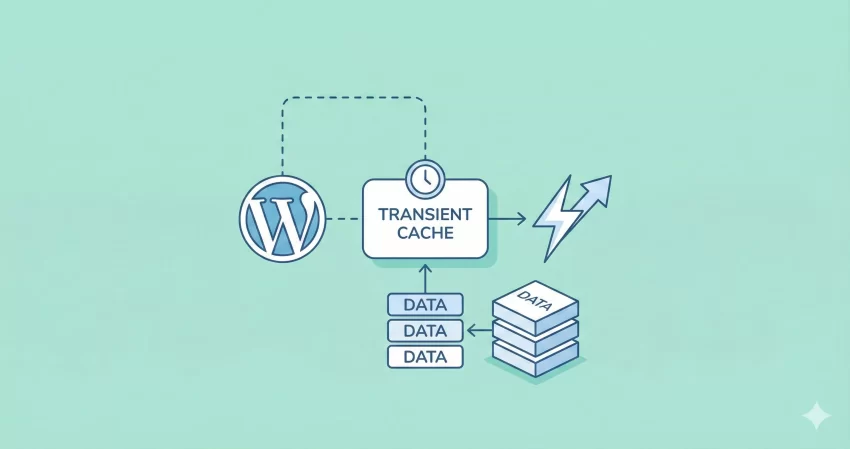
Is your website sluggish? Are complex database queries dragging down your load times? If you are a developer looking to optimize a high-traffic site, you cannot ignore the power of WordPress Transients. Caching is the secret weapon of high-performance websites, and the Transients API is one of the easiest, most effective ways to implement it natively in WordPress.
In this guide, we will move beyond the basics. We will explore how to safely use WordPress Transients to cache expensive data, reduce server load, and deliver a lightning-fast experience for your visitors.
What Are WordPress Transients?
Think of WordPress Transients as a temporary storage locker for your website’s data. Unlike standard database options, which stay forever until you delete them, transients are designed to expire. They allow you to store cached data—like the results of a complex query or a response from a remote API—for a specific period.
When you use WordPress Transients correctly, your site doesn’t have to regenerate heavy data every single time a user visits a page. Instead, it serves the pre-generated data from the cache, which is significantly faster.
The 3 Core Functions You Need
To master WordPress Transients, you only need to get comfortable with three specific functions. Let’s break them down.
1. Saving Data: set_transient()
This function saves your data. You give it a name (key), the data you want to save, and an expiration time in seconds.
// Syntax: set_transient( $transient, $value, $expiration );

// Example: Saving a custom welcome message for 1 hour (3600 seconds)
$message = "Welcome to our high-performance site!";
set_transient( 'pnet_welcome_msg', $message, 3600 );
2. Retrieving Data: get_transient()
This function tries to fetch the cached data. If the transient has expired or doesn’t exist, it returns false. This “false” return is crucial for using WordPress Transients safely.
$cached_message = get_transient( 'pnet_welcome_msg' );

if ( false === $cached_message ) {
    // The transient does not exist or has expired.
    // You should regenerate the data here.
}
3. Deleting Data: delete_transient()
Sometimes you need to clear the cache before it expires naturally—for example, when you update a post and need the front-end list to update immediately.
delete_transient( 'pnet_welcome_msg' );
You might also like:

Real-World Example: Caching a Heavy WP_Query
Let’s look at a practical scenario. Imagine you have a widget that displays the “Top 5 Most Commented Posts” from the last year. Running this query on every page load is expensive because WordPress has to sort through thousands of posts and calculate comment counts every time.
Here is how we optimize this using WordPress Transients.
The “Unsafe” Way (Without Caching)
Normally, you might write a function like this. It hits the database every single time the page loads:
function pnet_get_top_posts_unsafe() {
    $args = array(
        'posts_per_page' => 5,
        'orderby'        => 'comment_count',
        'date_query'     => array(
            array( 'after' => '1 year ago' ),
        ),
    );

    // This runs a heavy DB query every time!
    return new WP_Query( $args );
}
The “Safe” Way (With Transients)
Now, let’s wrap this in our transient logic. We will check if the data exists first. If it does, we serve it. If not, we run the query and save it.
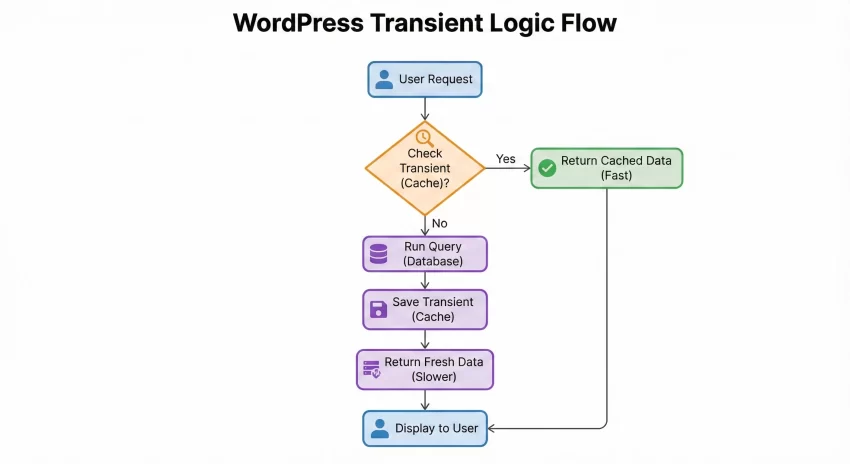
function pnet_get_top_posts_safe() {
    // 1. Check if the transient already exists
    $top_posts = get_transient( 'pnet_top_commented_posts' );

    // 2. If it returns false, the cache is empty or expired
    if ( false === $top_posts ) {

        $args = array(
            'posts_per_page' => 5,
            'orderby'        => 'comment_count',
            'date_query'     => array(
                array( 'after' => '1 year ago' ),
            ),
        );

        // Run the heavy query
        $top_posts = new WP_Query( $args );

        // 3. Save the result in a transient for 12 hours (43200 seconds)
        set_transient( 'pnet_top_commented_posts', $top_posts, 12 * HOUR_IN_SECONDS );
    }

    // 4. Return the cached or newly generated data
    return $top_posts;
}
By implementing this simple check, you have reduced the database load for this specific feature by nearly 99% (assuming you get hits more often than once every 12 hours). This is the power of WordPress Transients.
You might also like:

Best Practices for Safety and Performance
While WordPress Transients are powerful, using them incorrectly can lead to bugs. Here is how to keep your code safe.
1. Always Check for False
Never assume your transient exists. Even if you set it to expire in a year, a server restart or an object cache flush could wipe it out. Always write your code to handle the false return value gracefully by regenerating the data.
2. Use Unique Keys
Transient names should be unique to avoid conflicts with plugins or themes. Using a prefix like pnet_ (as shown in our examples) ensures your transients don’t accidentally overwrite someone else’s data.
3. Don’t Store Too Much Data
WordPress Transients are stored in your database (specifically the wp_options table) unless you are using an external object cache like Redis or Memcached. Storing massive arrays or huge chunks of HTML can bloat your database options table. Keep it lean.
Conclusion
Optimizing your site doesn’t always require complex server upgrades. often, it just requires smarter coding. By integrating WordPress Transients into your development workflow, you can drastically reduce database queries and improve your Time to First Byte (TTFB).
Start small: identify the heaviest query on your homepage and wrap it in a transient today. Your server (and your visitors) will thank you.
How did you find this WordPress Transients tutorial? A friend’s suggestion? Web search? Or, just stumbled upon it? Do let me know in the comments below.