
Every millisecond counts when it comes to website performance. If you have been looking for a way to optimize your heavy themes or complex plugins, you have likely heard that database queries are often the primary bottleneck. This is where the WordPress Transients API becomes your secret weapon.
Whether you are building a custom plugin or optimizing a high-traffic client site, learning how to effectively cache data can transform a sluggish website into a lightning-fast experience. In this comprehensive guide, we will dive deep into the WordPress Transients API, exploring how it works, why it is superior to standard options for temporary data, and how you can implement it today to cache resource-intensive database queries.
What is the WordPress Transients API?
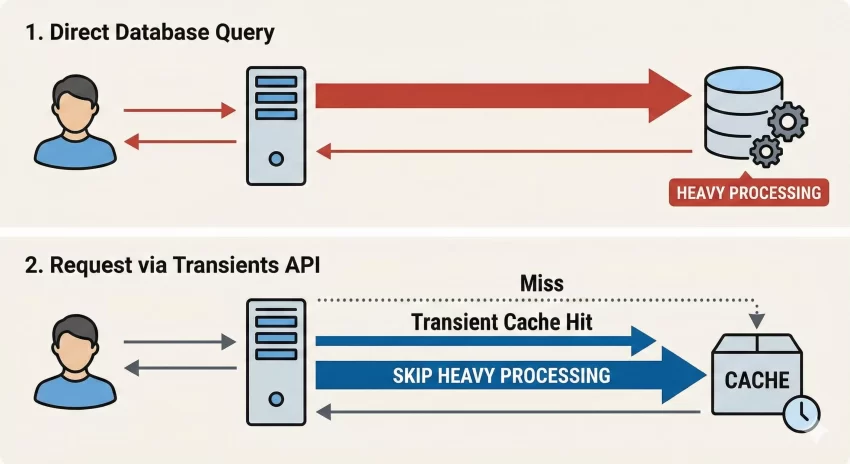
The WordPress Transients API is a powerful system built into WordPress that allows developers to store cached data in the database temporarily. It is very similar to the Options API, but with one critical difference: expiration times.
When you save data using the Options API, it stays there forever until you manually delete it. However, when you use the WordPress Transients API, you set an expiration time. Once that time passes, the data is deleted or regenerated. This makes it perfect for storing the results of complex database queries, remote API calls (like fetching your latest Tweets or Instagram posts), or any data that is computationally expensive to generate but does not need to be real-time.
Transients vs. Object Caching
It is important to distinguish between the WordPress Transients API and persistent object caching. Object caching usually relies on server-level memory (like Redis or Memcached) to store data. While object caching is incredibly fast, not all hosting environments support it.
Transients, on the other hand, are stored in the WordPress database (specifically the wp_options table) by default. This means the WordPress Transients API works on every WordPress site, regardless of the hosting environment. If a persistent object cache is present, the Transients API will automatically adapt and use that memory cache instead of the database, giving you the best of both worlds without changing a single line of code.
You might also like:
Why You Should Use Transients for Database Queries
Imagine you have a custom sidebar widget that displays the “Top 5 Most Commented Posts from the Last Month.” To generate this list, WordPress has to:
- Query the posts table.
- Filter by date.
- Join with the comments table to count comments.
- Sort the results by the highest count.
On a high-traffic site, running this complex SQL query for every single visitor can crash your server. By using the WordPress Transients API, you perform this query once, save the result for an hour (or a day), and serve that saved result to the next 10,000 visitors. The difference in server load is astronomical.
Core Functions of the WordPress Transients API
To master the WordPress Transients API, you only need to learn three primary functions. Let’s look at them in detail.
1. Saving Data: set_transient()
This function saves your data to the database with an expiration timer. It accepts three arguments:
- Key: A unique name for your transient (maximum 172 characters).
- Value: The data you want to save (variable, array, or object).
- Expiration: Time in seconds until the data expires.
Here is a basic syntax example:
// Save a simple string for 1 hour
set_transient( 'pnet_special_message', 'Hello World', 3600 );
2. Retrieving Data: get_transient()
This function attempts to fetch the cached data. If the data has expired or does not exist, it returns false. This boolean return is crucial because it allows us to build logic that checks if the cache exists before deciding whether to run the heavy query.
$message = get_transient( 'pnet_special_message' );

if ( false === $message ) {
    // Transient expired, generate data again
}
3. Deleting Data: delete_transient()
Sometimes you need to clear the cache before it expires naturally—for example, when you publish a new post and need your “Recent Posts” list to update immediately. This function manually removes the transient.
delete_transient( 'pnet_special_message' );
Practical Tutorial: Caching a Custom WP_Query
Let’s move from theory to a real-world scenario. We are going to create a function that fetches the 5 latest posts from a specific category. Without the WordPress Transients API, this standard query runs on every page load.
Step 1: The Unoptimized Query
Normally, your code might look like this:
function pnet_get_latest_news() {
    $args = array(
        'category_name' => 'news',
        'posts_per_page' => 5,
        'post_status'   => 'publish',
    );

    $query = new WP_Query( $args );

    if ( $query->have_posts() ) {
        echo '<ul>';
        while ( $query->have_posts() ) {
            $query->the_post();
            echo '<li><a href="' . get_permalink() . '">' . get_the_title() . '</a></li>';
        }
        echo '</ul>';
        wp_reset_postdata();
    }
}
This works, but it is not efficient for high-scale sites.
Tip: Don’t Panic: How to Safely Rollback WordPress Plugin Versions Instantly
Step 2: Implementing the WordPress Transients API
Now, let’s wrap this logic in a transient check. We will set the cache to last for 12 hours. We will use WordPress time constants (like HOUR_IN_SECONDS) to make the math easier and the code more readable.
function pnet_get_latest_news_optimized() {

    // 1. Check if the transient already exists
    $cached_query = get_transient( 'pnet_news_query_cache' );

    // 2. If no cache exists (false), run the heavy query
    if ( false === $cached_query ) {

        $args = array(
            'category_name' => 'news',
            'posts_per_page' => 5,
            'post_status'   => 'publish',
        );

        $query = new WP_Query( $args );

        // 3. Set the transient
        // We are storing the entire $query object here
        // Expiration: 12 Hours
        set_transient( 'pnet_news_query_cache', $query, 12 * HOUR_IN_SECONDS );

        $cached_query = $query;
    }

    // 4. Output the data (from cache or fresh query)
    if ( $cached_query->have_posts() ) {
        echo '<ul>';
        while ( $cached_query->have_posts() ) {
            $cached_query->the_post();
            echo '<li><a href="' . get_permalink() . '">' . get_the_title() . '</a></li>';
        }
        echo '</ul>';
        wp_reset_postdata();
    }
}
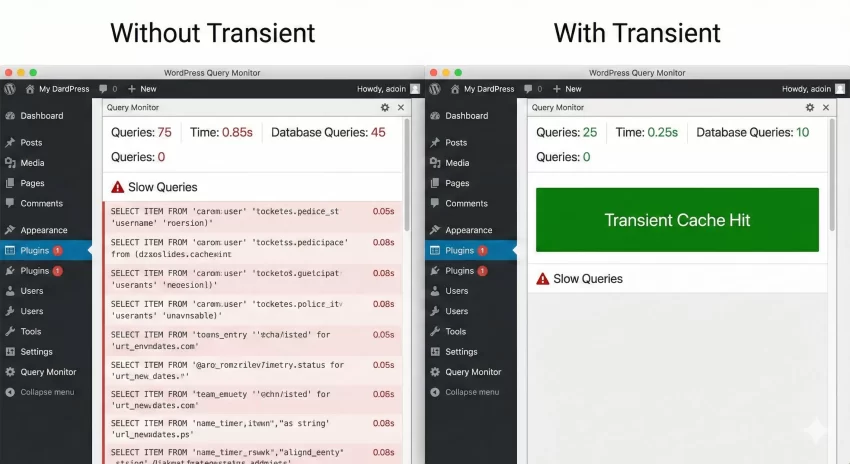
In the code above, the expensive WP_Query only runs twice a day. The rest of the time, WordPress fetches the prepared object directly from the options table, which is significantly faster.
You might also like:
Handling Cache Invalidation
One common pitfall when using the WordPress Transients API is serving stale content. If you set your news query to expire in 12 hours, but you publish a breaking news story 10 minutes later, your sidebar won’t show it for another 11 hours and 50 minutes.
To fix this, we need to delete the transient whenever a new post is saved. We can do this by hooking into the save_post action.
function pnet_flush_news_transient( $post_id ) {
    // Optional: Check if the saved post is in the 'news' category
    // If not, we don't need to clear the cache.
    if ( has_category( 'news', $post_id ) ) {
        delete_transient( 'pnet_news_query_cache' );
    }
}
add_action( 'save_post', 'pnet_flush_news_transient' );
This is the “pro” way to handle caching. You get the performance benefits of a long expiration time, but the flexibility of instant updates when content changes.
Common Mistakes to Avoid
As you start integrating the WordPress Transients API into your projects, keep these common errors in mind:
1. Storing Too Much Data
Transients are stored in your database (usually). Do not try to store massive chunks of HTML or huge datasets that could bloat your wp_options table. If you find yourself needing to cache megabytes of data, you should be looking at external file caching or specialized solutions, not the database.
2. Relying on Transients for Critical Data
Transients are by definition temporary. Your code must always have a fallback method to generate the data if the transient is missing. Never assume the data will be there just because you set it. External object caches like Memcached can evict keys early to free up memory, so your code must be robust enough to handle a false return at any time.
3. Ignoring Autoloading
By default, WordPress might autoload your transients on every page load. If you have hundreds of unused transients, this can actually slow down your site. While the Transients API handles much of this, being mindful of your transient names and cleaning up after your plugin is uninstalled is good practice.
Advanced: Garbage Collection
You might wonder: “What happens to the data after it expires?”
In a standard WordPress setup (without external object caching), the expired records remain in your database until someone tries to access them. When get_transient() is called on an expired item, WordPress notices the expiration date has passed and deletes it then. This is a form of “lazy” garbage collection.
However, if you create thousands of transients with random names that are never accessed again, they can pile up. There are excellent tools available to help manage this, such as the delete_expired_transients() function introduced in later versions of WordPress, or various database optimization plugins.
Conclusion
The WordPress Transients API is an essential tool for any developer looking to scale their applications. It offers a standardized, reliable way to cache expensive queries and complex calculations, reducing the load on your database server and speeding up page load times for your visitors.
By mastering set_transient, get_transient, and delete_transient, you ensure your WordPress sites are not just functional, but performant. Remember to always pair your caching strategy with an invalidation strategy (like the save_post hook we discussed) to keep your content fresh.
Start small: identify the one query on your homepage that takes the longest to run, wrap it in a transient, and watch your Time to First Byte (TTFB) drop!