Are you tired of users bouncing from your blog because they have to click through clunky pagination links? Traditional pagination interrupts the reading experience and forces unnecessary page reloads, significantly degrading your site’s User Experience (UX). The modern solution is to implement a WordPress ajax load more feature. By fetching and appending new posts dynamically, you keep visitors engaged on a single, continuous page. In this comprehensive technical guide, we will build a robust, secure, and performant load more button using modern Vanilla JavaScript (Fetch API) and native WordPress AJAX handlers, bypassing the heavy jQuery dependency entirely.
Before diving into the code for our WordPress ajax load more implementation, let’s ensure your environment is prepped and ready for custom development.
Prerequisites
- PHP 8.0 or higher recommended for optimal performance.
- WordPress 6.0+ installed and running.
- Active Child Theme (do not edit parent theme files directly to prevent update overwrites).
- Basic understanding of the WordPress WP_Query class.
- A complete backup of your website files and database.
Backup Required
Implementing a WordPress ajax load more button involves three distinct layers: the frontend HTML/JS, the bridge that connects JS to PHP, and the backend PHP processor. Let’s break this down into manageable, foolproof steps.
Step 1: Enqueueing Scripts and Localizing AJAX Data
Learn how to properly register and enqueue your JavaScript file while securely passing localized PHP variables using the WordPress localized script function.
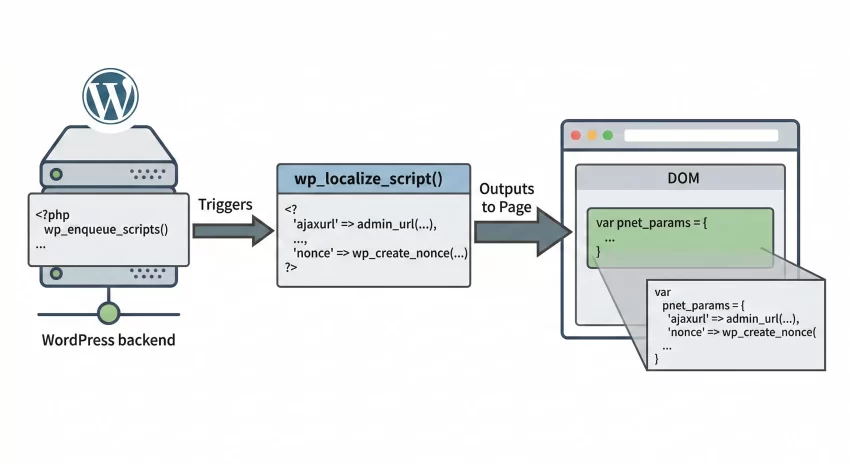
The first crucial step in building a WordPress ajax load more system is loading our JavaScript file and handing it the necessary backend data. JavaScript inherently doesn’t know where the WordPress AJAX processing file (admin-ajax.php) lives. We must use wp_localize_script() to create a global JavaScript object containing our AJAX URL, a security nonce, and the initial query parameters.
Creating the JavaScript File
First, create a new file in your child theme’s directory. A good standard practice is to place this inside an assets/js/ folder. Create the file and name it pnet-loadmore.js. Leave it blank for now; we will write the logic in Step 4. This file will handle the asynchronous requests for our WordPress ajax load more functionality.
Registering in functions.php
Open your child theme’s functions.php file. We will write a function hooked to wp_enqueue_scripts. This script not only enqueues our newly created JS file but also serializes backend data into a frontend variable.
function pnet_enqueue_load_more_scripts() {
    // Only load on the blog/archive pages to save resources
    if ( ! is_home() && ! is_archive() ) {
        return;
    }

    // Register and enqueue the script
    wp_register_script(
        'pnet-ajax-load-more',
        get_stylesheet_directory_uri() . '/assets/js/pnet-loadmore.js',
        array(), // No dependencies, we are using Vanilla JS!
        '1.0.0',
        true // Load in footer
    );

    wp_enqueue_script( 'pnet-ajax-load-more' );

    // Define the global WP_Query to access current page details
    global $wp_query;

    // Localize the script with new data
    wp_localize_script(
        'pnet-ajax-load-more',
        'pnet_loadmore_params',
        array(
            'ajaxurl'      => admin_url( 'admin-ajax.php' ), // The WP AJAX endpoint
            'posts'        => json_encode( $wp_query->query_vars ), // Current query arguments
            'current_page' => get_query_var( 'paged' ) ? get_query_var('paged') : 1, // Current page number
            'max_page'     => $wp_query->max_num_pages, // Total number of pages
            'nonce'        => wp_create_nonce( 'pnet_loadmore_nonce' ) // Security token
        )
    );
}
add_action( 'wp_enqueue_scripts', 'pnet_enqueue_load_more_scripts' );
Security First
wp_create_nonce(). This generates a cryptographic token that our backend will verify before processing the WordPress ajax load more request, protecting your server from unauthorized malicious requests. You might also like: Better WordPress Cron Job for Superior Site Performance
Step 2: Building the HTML Structure and Loop
Create the foundation by writing a custom WordPress WP_Query loop and adding the structural HTML required for the load more button.
For your WordPress ajax load more button to function, your frontend HTML must be structured to wrap the posts in a container. This container acts as the target where our JavaScript will inject the newly fetched HTML payloads.
Setting up the initial query
Navigate to your theme’s index.php, home.php, or custom archive template. You need to wrap your standard WordPress loop inside a specific div. Let’s look at how a standard loop should be structured for compatibility.
<div class="pnet-post-wrapper" id="pnet-post-container">
    <?php if ( have_posts() ) : ?>
        <?php while ( have_posts() ) : the_post(); ?>

            <article id="post-<?php the_ID(); ?>" <?php post_class( 'pnet-article-card' ); ?>>
                <h2 class="entry-title"><a href="<?php the_permalink(); ?>"><?php the_title(); ?></a></h2>
                <div class="entry-excerpt">
                    <?php the_excerpt(); ?>
                </div>
            </article>

        <?php endwhile; ?>
    <?php else : ?>
        <p><?php esc_html_e( 'No posts found.', 'textdomain' ); ?></p>
    <?php endif; ?>
</div>
Adding the Load More Button
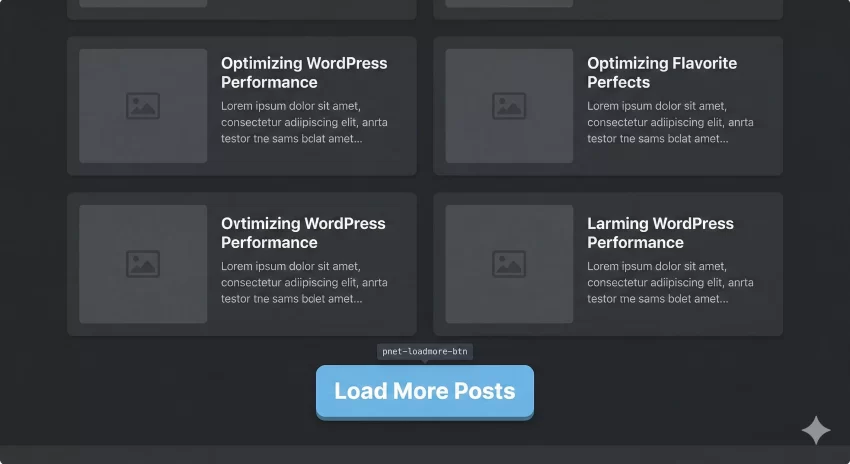
Immediately after the closing </div> of your #pnet-post-container, we need to output the physical button. However, we should only display this button if there is more than one page of content available. This keeps the UI clean when your WordPress ajax load more feature isn’t needed.
<?php
global $wp_query; // Ensure we have access to the main query object
if (  $wp_query->max_num_pages > 1 ) :
?>
    <div class="pnet-loadmore-wrapper" style="text-align: center; margin-top: 2rem;">
        <button id="pnet-loadmore-btn" class="button pnet-btn-primary">
            <?php esc_html_e( 'Load More Posts', 'textdomain' ); ?>
        </button>
    </div>
<?php endif; ?>
Step 3: Developing the AJAX PHP Handler
Write the backend PHP logic hooked to admin-ajax to securely process the incoming request and return the rendered post HTML.
When the user clicks the button, a request is sent to admin-ajax.php. WordPress looks for an action hook matching the request to process it. This is the heart of the WordPress ajax load more system.
Creating the wp_ajax_ actions
In WordPress, AJAX handlers require two hooks: wp_ajax_{action} for logged-in users, and wp_ajax_nopriv_{action} for logged-out visitors. Let’s add this processor to your functions.php.
function pnet_ajax_load_more_handler() {
    // 1. Verify the security nonce immediately
    if ( ! isset( $_POST['nonce'] ) || ! wp_verify_nonce( sanitize_text_field( $_POST['nonce'] ), 'pnet_loadmore_nonce' ) ) {
        wp_send_json_error( 'Invalid security token.', 403 );
        wp_die();
    }

    // 2. Decode the query arguments passed from JS
    $args = isset( $_POST['query'] ) ? json_decode( stripslashes( $_POST['query'] ), true ) : array();

    // 3. Increment the page number for the new query
    $args['paged'] = isset( $_POST['page'] ) ? absint( $_POST['page'] ) + 1 : 2;
    $args['post_status'] = 'publish'; // Ensure only published posts are fetched

    // 4. Run the WP_Query
    $query = new WP_Query( $args );

    // 5. Output the results
    if ( $query->have_posts() ) {
        ob_start(); // Start output buffering

        while ( $query->have_posts() ) : $query->the_post();
            // It is best practice to use get_template_part here if you have a separate file
            // For this example, we output the markup directly
            ?>
            <article id="post-<?php the_ID(); ?>" <?php post_class( 'pnet-article-card' ); ?>>
                <h2 class="entry-title"><a href="<?php the_permalink(); ?>"><?php the_title(); ?></a></h2>
                <div class="entry-excerpt">
                    <?php the_excerpt(); ?>
                </div>
            </article>
            <?php
        endwhile;

        $html = ob_get_clean(); // Capture the buffer
        wp_send_json_success( $html ); // Send valid JSON success response with HTML
    } else {
        wp_send_json_error( 'No more posts.' ); // Send JSON error if no posts
    }

    wp_die(); // Always kill the process at the end of an AJAX handler
}

// Hook for logged-in users
add_action( 'wp_ajax_pnet_loadmore', 'pnet_ajax_load_more_handler' );
// Hook for logged-out/guest users
add_action( 'wp_ajax_nopriv_pnet_loadmore', 'pnet_ajax_load_more_handler' );
Developer Tip
ob_start() and ob_get_clean() (Output Buffering) is the cleanest way to render complex HTML blocks in PHP and pass them back flawlessly via a JSON response for your WordPress ajax load more handler. Step 4: Writing the Vanilla JavaScript Fetch Logic
Implement modern, dependency-free vanilla JavaScript to listen for the button click, send the Fetch request, and seamlessly append the new posts.
Historically, WordPress ajax load more tutorials relied heavily on jQuery. In modern web development, vanilla JavaScript’s Fetch API is much faster, lighter, and completely eliminates the need for external libraries. Let’s write the client-side logic in the pnet-loadmore.js file we created in Step 1.
Catching the button click
We need to grab the DOM elements and add an event listener. We also need to manage state variables so we know which page we are currently on.
document.addEventListener('DOMContentLoaded', function() {
    const button = document.getElementById('pnet-loadmore-btn');
    const container = document.getElementById('pnet-post-container');

    if ( ! button || ! container ) return; // Exit if elements don't exist

    // Extract variables from the localized object
    let currentPage = parseInt( pnet_loadmore_params.current_page );
    const maxPages = parseInt( pnet_loadmore_params.max_page );

    button.addEventListener('click', function(e) {
        e.preventDefault();

        // Update button UI state
        const originalText = button.textContent;
        button.textContent = 'Loading...';
        button.disabled = true;

        // Prepare the POST data using URLSearchParams
        const params = new URLSearchParams();
        params.append('action', 'pnet_loadmore'); // Matches our wp_ajax_ hook
        params.append('query', pnet_loadmore_params.posts);
        params.append('page', currentPage);
        params.append('nonce', pnet_loadmore_params.nonce);

        // Execute the Fetch request
        fetch( pnet_loadmore_params.ajaxurl, {
            method: 'POST',
            body: params,
            headers: {
                // Required by WP to process standard form data correctly
                'Content-Type': 'application/x-www-form-urlencoded; charset=UTF-8'
            }
        })
        .then( response => response.json() )
        .then( data => {
            if ( data.success ) {
                // Append the raw HTML to our container
                container.insertAdjacentHTML('beforeend', data.data);

                currentPage++; // Increment the page counter

                // Hide button if we reached the end
                if ( currentPage >= maxPages ) {
                    button.style.display = 'none';
                } else {
                    // Reset UI
                    button.textContent = originalText;
                    button.disabled = false;
                }
            } else {
                console.error('WordPress ajax load more error:', data);
                button.textContent = 'End of content';
            }
        })
        .catch( error => {
            console.error('Fetch error:', error);
            button.textContent = 'Error loading posts';
            button.disabled = false;
        });
    });
});
Common Errors & Troubleshooting
Even with copy-pasting, environmental configurations can cause hiccups. Here are the most frequent issues developers face when implementing a WordPress ajax load more system.
Why is my WordPress ajax load more returning a 400 Bad Request?
This usually happens when the action parameter in your JavaScript does not match the wp_ajax_ hook in your PHP file. Double-check that params.append('action', 'pnet_loadmore'); exactly matches add_action( 'wp_ajax_pnet_loadmore', ... ).
Why does the button load the same posts repeatedly?
This occurs if your JavaScript does not correctly increment the current page variable, or if your PHP handler is ignoring the $args['paged'] parameter. Ensure currentPage++ is executing successfully inside the .then() block of your fetch request.
Why is admin-ajax.php returning a 0 instead of my HTML?
If WordPress returns a 0, it means the AJAX request reached admin-ajax.php, but WordPress couldn’t find a matching action hook to process it. This is often caused by typos in the action name or failing to include both wp_ajax_ and wp_ajax_nopriv_ hooks. Also, ensure you have wp_die() at the very end of your PHP handler function.
You might also like: Frustrated by File Limits? How to Increase WordPress Maximum Upload Size Easily
Conclusion
Upgrading your site from traditional pagination to a smooth, asynchronous fetching architecture provides a massive boost to user engagement. By following this guide, you have successfully implemented a highly optimized WordPress ajax load more feature using native PHP processors and modern JavaScript. You have eliminated the need for heavy jQuery dependencies, utilized secure nonces for backend protection, and created a scalable architecture that can be adapted for custom post types, WooCommerce products, or portfolio items.
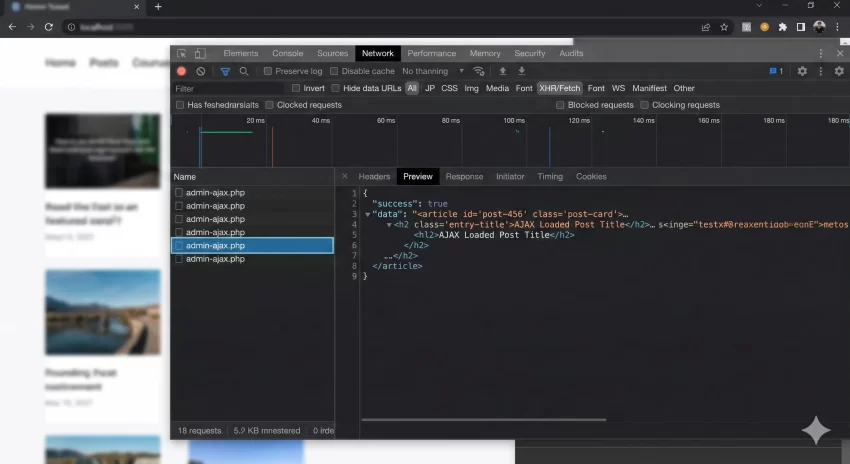
Remember that while AJAX creates a seamless experience, you should always ensure your site remains accessible and functional. Test your implementation across different devices and monitor your network tab to ensure performance remains blazing fast.