
Default SEO title variables cannot express every business-specific detail, and manually editing titles one post at a time quickly becomes difficult to maintain. You can solve this by registering a custom PHP variable with the active SEO plugin, adding its token to a title template, and checking the rendered result; this guide shows how to implement Rank Math Custom Variables safely, along with the equivalent approach for Yoast SEO.
These plugins use different hooks, registration APIs, and token formats, so choose the implementation for the plugin installed on your site rather than enabling both indiscriminately. We will use a post-aware editorial-region value as a practical example, explain how to return a useful fallback when that value is missing, and cover how to apply and test the token. The same pattern can be adapted to other post metadata or a global site value. Before editing, identify the source and metadata key for your value, decide what should appear when it is empty, and note the SEO plugin version in use.
- PHP 8.0 or newer: Use a supported PHP version and code compatible with your site’s WordPress version.
- An active SEO plugin: Install and activate Yoast SEO or Rank Math, and record its version before implementation.
- A safe test environment: Have a staging site or local development environment available to test the change before deploying it.
- A current backup and suitable code location: Back up the database and files, then use a site-specific plugin or child theme rather than editing a parent theme or SEO plugin files.
- A defined value and fallback: Know whether the value comes from post metadata or a global setting, confirm its actual key, and choose concise text to display when it is unavailable.
Choose the variable and prepare a safe implementation
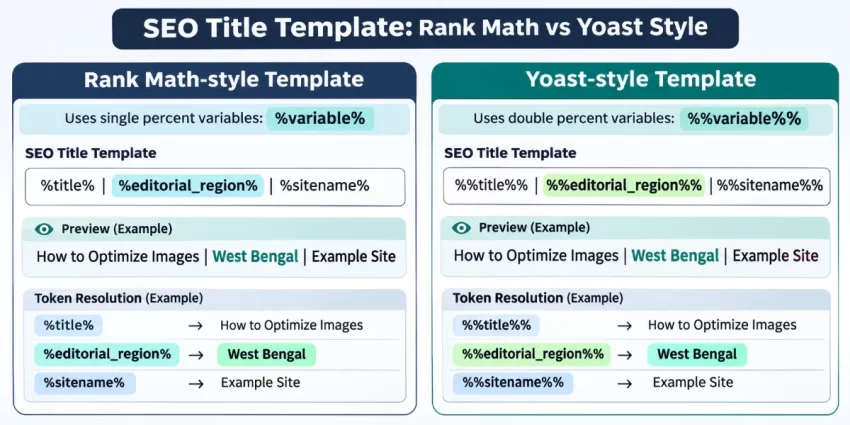
Start by deciding exactly what the variable should return and where that value is stored. This guide uses each post’s editorial region, saved in post metadata, as the example. Once registered, the same value can be referenced as %%editorial_region%% in Yoast SEO or %editorial_region% in Rank Math. These tokens are not interchangeable: the active plugin determines both the registration method and the syntax you will add to its title template.
Find the actual metadata key used by your site before implementing the callback; a field named “Editorial Region” in the editing screen does not necessarily use a key with that wording. Replace the example key in the later implementation with the key your site stores. If the value should be the same across every page, consider a site-wide setting instead; if it varies by content, post metadata is appropriate. Also choose a short fallback, such as “Global,” for posts where the field is empty.
Store the integration in a site-specific plugin when possible, so it remains active if the site’s theme changes. A child theme’s functions.php is another suitable location when the behavior is intentionally tied to that theme. Do not add the code to a parent theme or edit Yoast SEO or Rank Math plugin files: updates can overwrite those changes. Keep each plugin’s registration conditional on the corresponding SEO plugin being active, particularly on a site that may switch plugins, and test one implementation at a time.
Backup Required
Add a custom variable to Rank Math
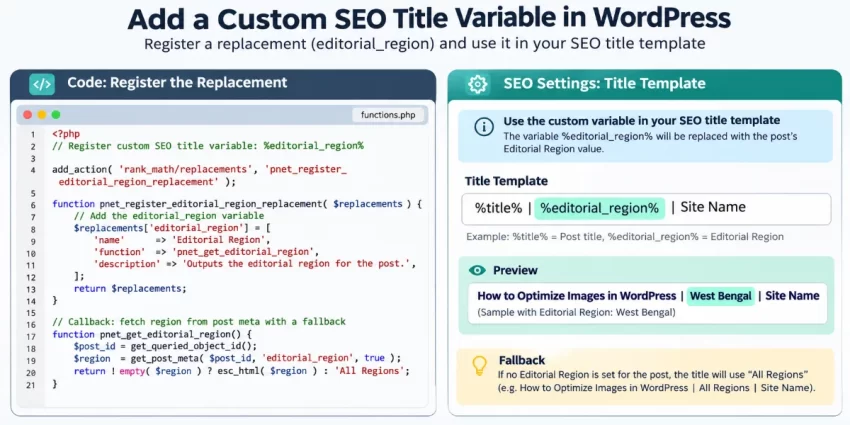
Rank Math registers extra replacements through the rank_math/vars/register_extra_replacements action. The registration function supplies the variable’s name, description, example value, and token name; its callback returns the value to use for the current post. Register the token as lowercase editorial_region without percent signs—the title template uses the percent-delimited form %editorial_region%.
Add this code to your site-specific plugin or child theme. It checks for a usable post before reading metadata, then returns a concise fallback if the post or field is unavailable. The example reads the editorial_region metadata key; change that key and the fallback text to match your site. The WordPress developer reference for get_post_meta() explains how the metadata lookup works.
add_action( 'rank_math/vars/register_extra_replacements', 'pnet_register_editorial_region' );

function pnet_register_editorial_region() {
    rank_math_register_var_replacement(
        'editorial_region',
        array(
            'name'        => 'Editorial Region',
            'description' => 'The editorial region assigned to the current post.',
            'variable'    => 'editorial_region',
            'example'     => 'North America',
        ),
        'pnet_get_editorial_region'
    );
}

function pnet_get_editorial_region() {
    global $post;

    $post_id = 0;
    if ( $post instanceof WP_Post ) {
        $post_id = (int) $post->ID;
    } else {
        $post_id = (int) get_queried_object_id();
    }

    $fallback = 'Global';
    if ( $post_id < 1 || ! get_post( $post_id ) ) {
        return $fallback;
    }

    $value = get_post_meta( $post_id, 'editorial_region', true );
    if ( ! is_scalar( $value ) ) {
        return $fallback;
    }

    $value = trim( sanitize_text_field( (string) $value ) );
    return '' !== $value ? $value : $fallback;
}
After the code loads, Rank Math can resolve the token when generating a title. Registration does not automatically change existing titles: add %editorial_region% to the appropriate Rank Math title template or individual SEO title field. The callback deliberately returns plain text, not HTML, and handles previews or other contexts where a post may not be available.
Add a custom variable to Yoast SEO
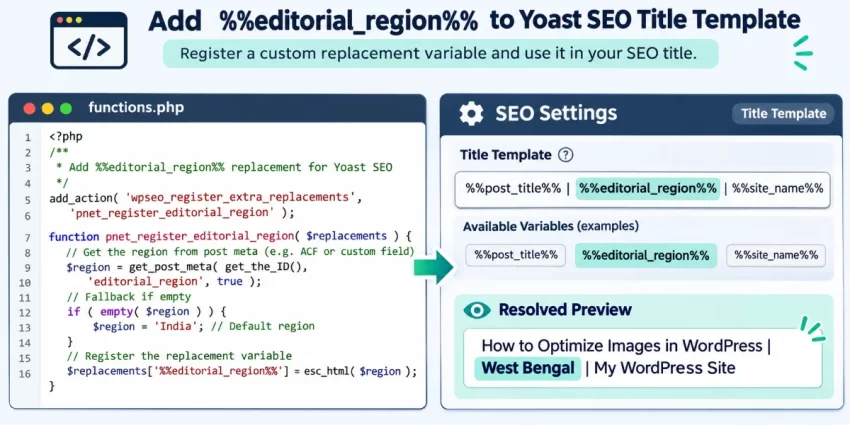
Yoast SEO uses its own replacement API: register a token with the wpseo_register_extra_replacements action and wpseo_register_var_replacement() function. For the editorial-region example, the token is %%editorial_region%%. This differs from Rank Math’s syntax, so use this code only when Yoast SEO is the active plugin.
Add the code to your site-specific plugin or child theme. It checks for a valid post before reading the editorial_region metadata key, returns a plain-text value, and uses “Global” when the post or field is unavailable. Replace the metadata key and fallback with values appropriate for your site. See the official Yoast developer guide to custom variables for details about the registration API.
add_action( 'wpseo_register_extra_replacements', 'pnet_register_yoast_editorial_region' );

function pnet_register_yoast_editorial_region() {
    if ( ! function_exists( 'wpseo_register_var_replacement' ) ) {
        return;
    }

    wpseo_register_var_replacement(
        '%%editorial_region%%',
        'pnet_get_yoast_editorial_region',
        'advanced',
        'The editorial region assigned to the current post.'
    );
}

function pnet_get_yoast_editorial_region() {
    global $post;

    $post_id = 0;
    if ( $post instanceof WP_Post ) {
        $post_id = (int) $post->ID;
    } else {
        $post_id = (int) get_queried_object_id();
    }

    $fallback = 'Global';
    if ( $post_id < 1 || ! get_post( $post_id ) ) {
        return $fallback;
    }

    $value = get_post_meta( $post_id, 'editorial_region', true );
    if ( ! is_scalar( $value ) ) {
        return $fallback;
    }

    $value = trim( sanitize_text_field( (string) $value ) );
    return '' !== $value ? $value : $fallback;
}
Once the code is loaded, add %%editorial_region%% to the relevant Yoast title template or an individual post’s SEO title field. Registration makes the token available; it does not automatically alter existing titles. Do not copy this registration call into Rank Math: that plugin uses a different hook, API, and token format.
Use the variable in a meta title template
Registering a callback makes its token available to the SEO plugin, but it does not automatically change existing page titles. Add the correct token to a global title template or to an individual post’s SEO title field. The available built-in title and site-name variables differ between plugins, so use the tokens shown in the active plugin’s editor rather than assuming they are interchangeable.
Rank Math: add the percent-delimited token
In Rank Math, open the relevant Titles & Meta settings for the content type, or edit an individual post and locate its SEO title field. Insert %editorial_region% where the region should appear. For example, a template could combine the post title, a separator, the custom region token, and the site name. Use Rank Math’s own variable picker for the exact built-in tokens available on your site, then save the settings.
Yoast SEO: add the double-percent token
In Yoast SEO, edit the appropriate search appearance title template or open an individual post’s SEO title field. Insert %%editorial_region%% in the desired position; a title might place it after the post title and separator, then finish with the site name. Select built-in variables from Yoast’s variable picker because their syntax can differ from Rank Math’s. Save your changes and check the post-level SEO title field: a custom title entered there may take precedence over the global template.
These settings control where and how the registered value is used; the PHP callback supplies the value itself. Verify the resolved title in the plugin’s preview after saving, especially when testing a post with its own SEO title override.
You might also like:

Verify rendered titles and improve the callback
Test the variable with a controlled post before relying on it across your site. Create or select a staging post, enter a known value in the editorial_region custom field, save the post, and inspect the SEO plugin’s title preview. Confirm that the token resolves to the expected value and that the title’s wording and separators read naturally. Repeat the test with the field empty to confirm that the fallback appears instead of a blank space or unresolved token.
Check the preview and front-end output
After saving, view the post on the front end and inspect its HTML source for the generated title element. The plugin preview, front-end source, and a search result are not guaranteed to match: search engines may choose a different title or rewrite a snippet. Use the preview and rendered source to diagnose your site’s output, but treat the final search result as a decision made by the crawler. For WordPress metadata behavior, see the official get_post_meta() reference.
Keep the callback predictable
The callback should read metadata using the correct key and a valid current post ID; do not assume the global $post object exists in every preview, archive, or administrative context. get_post_meta() returns the stored value, so check its type, convert an accepted scalar to a string, trim whitespace, and return a concise fallback when the value is empty. Return plain text rather than HTML, and sanitize or otherwise validate values according to their source and intended use. Keep title-length decisions and separator placement in the template or editorial guidance, rather than truncating the value inside the variable callback.
Pro Tip
Did you know: You can Auto Login After Registration in WordPress to eliminate unnecessary login steps and create a smoother registration experience? This simple PHP technique helps new members access their accounts immediately after signing up.
Common Errors
When a custom variable does not behave as expected, first determine whether the issue occurs during registration, value lookup, or title rendering. Test the Rank Math and Yoast implementations separately, using only the code and token format for the active plugin. This makes it easier to isolate the cause and avoids duplicate callbacks or confusing results.
Token appears literally in the title
Check the token’s spelling and delimiters: Rank Math uses %editorial_region%, while Yoast uses %%editorial_region%%. Confirm that the matching plugin is active and that your registration code runs after WordPress loads the relevant plugin API. Review PHP logs for syntax errors or other failures that could prevent the registration function from running.
Variable is missing from the picker
Verify that you used the correct plugin-specific action and registration function, and that the replacement includes the metadata required by the installed plugin version. Reload the editor after saving the code. If the picker still appears stale, clear relevant object or administrative caches and try again.
Value is blank or unexpected
Check that the test post has been saved, that the callback receives the intended post ID, and that the metadata key exactly matches the key used by the custom field. Confirm that the field contains a scalar value and that the fallback branch returns the expected text when the field is empty. A label shown in the editor is not necessarily the stored metadata key.
A fatal error or white screen occurs
Inspect the PHP error log and check for a misspelled function, a missing plugin API function, or a helper function that has already been declared elsewhere. If the site becomes inaccessible, use staging or your hosting recovery access to disable the snippet safely. Avoid making further changes on production until the corrected code has been tested.
Editor preview and front-end title differ
Inspect the rendered HTML source, check for an individual post’s SEO title override, and look for other title filters that may modify the output. Clear page and CDN caches before retesting. If the site output is correct but a search result differs, remember that search engines can choose another title or rewrite their displayed snippets.
If changes do not appear publicly, verify that the correct template was saved and that caches have been cleared. Keep the plugin-specific implementations separate, use one at a time, and test both a post with metadata and one that relies on the fallback.
Conclusion: maintain a reliable custom title variable
Custom SEO title variables solve a practical problem: a title template can include useful business-specific information without requiring someone to edit every title manually. The implementation has three parts: register a callback through the active SEO plugin’s API, add the matching token to a title template, and verify the resolved title using a post with known metadata. Registration alone does not change titles, and a post-level SEO title can take precedence over a global template.
Keep the plugin distinction clear. Rank Math and Yoast SEO use different registration hooks and token formats, so implement only the version that matches the active plugin: Rank Math uses %editorial_region%, while Yoast uses %%editorial_region%%. Each callback should use the correct metadata key, handle contexts without a valid post, return plain text, and provide a concise fallback when the field is empty.
Before deploying or maintaining the integration, use this checklist:
- Document the metadata key, its source, and the intended fallback value.
- Keep the code in a site-specific plugin or child theme, and retain it in version control.
- Test on staging with both populated and empty metadata, then inspect the plugin preview and rendered front-end title.
- Retest after SEO plugin, theme, or related custom-field changes, and clear relevant caches when checking updates.
A safe, documented callback makes dynamic titles easier to manage while reducing the risk of blank values or unresolved tokens. Follow these checks whenever maintaining Rank Math Custom Variables on a WordPress site.