
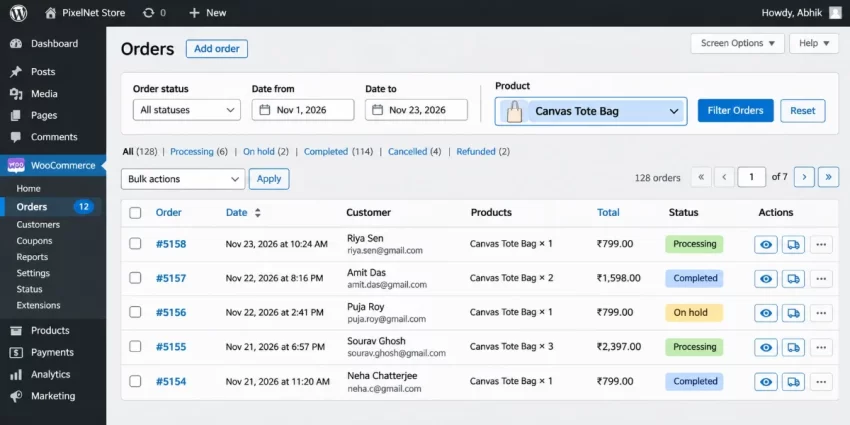
The WooCommerce Orders screen can make it difficult to find every order containing a particular product, leaving staff to search through order details manually. You can Filter WooCommerce Orders by adding a product selector to the admin order list and connecting it to the query used by your store. This guide uses a small site-specific plugin, keeps existing status and date filters in place, and distinguishes High-Performance Order Storage (HPOS) from the legacy posts-based order screen.
The implementation is designed to be read-only: it narrows the order list without changing orders or customer data. You will also learn how to test simple products, variable products, and individual variations, combine the product selection with other order filters, and check that clearing the selection restores the normal list. Test the changes on staging before deploying them to a live store.
- A WordPress site with WooCommerce installed and an administrator account.
- PHP 8.0 or newer, in line with your site requirements.
- A staging site or a recent, verified backup before changing PHP code.
- Access to install or edit a small site-specific plugin.
- Knowledge of whether the store uses HPOS, or access to check the WooCommerce order-storage settings.
Confirm the Orders Screen and Storage Mode
Before adding a filter, identify which WooCommerce Orders screen your store uses. Stores using High-Performance Order Storage (HPOS) display orders through WooCommerce’s dedicated order list table. Stores using legacy storage display orders through the WordPress posts-based list. Check WooCommerce’s order-storage settings and note the active mode; the screen and query hooks differ, so code written for one mode may appear to run without filtering the other.
HPOS stores order data in dedicated WooCommerce tables, so its integration should use WooCommerce order-query mechanisms rather than assume orders are WordPress posts. The official HPOS guide explains the storage options and compatibility considerations. For the HPOS list, the order table exposes hooks such as woocommerce_order_list_table_restrict_manage_orders for filter controls and woocommerce_order_list_table_prepare_items_query_args for query arguments. Availability can depend on the WooCommerce version.
The legacy list can use the WordPress restrict_manage_posts action to render a control and a narrowly scoped query hook, such as pre_get_posts, to apply it only to the shop order admin screen. Keep that adapter separate from HPOS handling. In either mode, extend existing query arguments rather than replacing them, so order status, date range, customer search, sorting, and pagination continue to work.
Define product matching consistently: choosing a parent product should include orders containing that product or any of its variations. Choosing a specific variation should match orders containing that variation, not every variation under its parent. This distinction matters because order line items can store the parent product ID and variation ID separately.
Staging Check
Add a Product Selector to the Orders Screen
Put this code in a small site-specific plugin, not a parent theme, so a theme update cannot remove the filter. The callbacks below add the control to the HPOS order list and provide a fallback for the legacy shop_order screen. They render it only above the list, alongside WooCommerce’s existing filters.
Create a PHP file in a folder such as wp-content/plugins/pnet-order-product-filter/, paste in the code, and activate the plugin. This bounded list includes published and private products and variations; variation options are labeled separately so staff can distinguish them.
<?php
/**
* Plugin Name: PixelNet Order Product Filter
* Description: Adds a product selector to WooCommerce order lists.
* Version: 1.0.0
*/
defined('ABSPATH') || exit;
add_action('woocommerce_order_list_table_restrict_manage_orders', 'pnet_render_hpos_product_filter', 20, 2);
add_action('restrict_manage_posts', 'pnet_render_legacy_product_filter', 20, 2);
function pnet_render_hpos_product_filter($order_type, $which) {
if ('shop_order' !== $order_type || 'top' !== $which) {
return;
}
pnet_output_product_filter();
}
function pnet_render_legacy_product_filter($post_type, $which) {
if ('shop_order' !== $post_type || 'top' !== $which) {
return;
}
pnet_output_product_filter();
}
function pnet_output_product_filter() {
if (!function_exists('wc_get_product') || !current_user_can('edit_shop_orders')) {
return;
}
$raw_product_id = isset($_GET['pnet_product_id']) ? wp_unslash($_GET['pnet_product_id']) : '';
$selected_product_id = is_scalar($raw_product_id) ? absint($raw_product_id) : 0;
$product_ids = get_posts(array(
'post_type' => array('product', 'product_variation'),
'post_status' => array('publish', 'private'),
'posts_per_page' => 200,
'orderby' => 'title',
'order' => 'ASC',
'fields' => 'ids',
'no_found_rows' => true,
));
$product_ids = array_map('absint', $product_ids);
$selected_product = $selected_product_id ? wc_get_product($selected_product_id) : false;
if (!$selected_product) {
$selected_product_id = 0;
} elseif (!in_array($selected_product_id, $product_ids, true)) {
$product_ids[] = $selected_product_id;
}
echo '<label class="screen-reader-text" for="pnet-product-filter">' . esc_html__('Filter by product', 'pnet') . '</label>';
echo '<select id="pnet-product-filter" name="pnet_product_id">';
echo '<option value="0">' . esc_html__('All products', 'pnet') . '</option>';
foreach ($product_ids as $product_id) {
$product = wc_get_product($product_id);
if (!$product) {
continue;
}
$label = $product->is_type('variation') ? 'Variation: ' . $product->get_name() : $product->get_name();
echo '<option value="' . esc_attr($product_id) . '"' . selected($selected_product_id, $product_id, false) . '>' . esc_html($label) . '</option>';
}
echo '</select>';
}
The control uses the request parameter pnet_product_id and restores a valid selection after the list refreshes. It does not change order data. The 200-item cap keeps the basic dropdown from loading an unbounded catalog; the selected product is added back to the options when it falls outside that initial list.
Large Catalogs
Render and Preserve the Filter Value
Keep the selector tied to the stable request parameter pnet_product_id. Read it as a scalar, unslash it, and pass it through absint(); then confirm WooCommerce can load that product before treating it as selected. The renderer below can replace the inline selector output in the callback from the previous step. Pass it the bounded product ID list already prepared there.
<?php
function pnet_get_selected_product_id() {
if (!isset($_GET['pnet_product_id'])) {
return 0;
}
$raw_product_id = wp_unslash($_GET['pnet_product_id']);
if (!is_scalar($raw_product_id)) {
return 0;
}
$product_id = absint($raw_product_id);
return $product_id && function_exists('wc_get_product') && wc_get_product($product_id) ? $product_id : 0;
}
function pnet_render_product_filter_select($product_ids) {
$selected_product_id = pnet_get_selected_product_id();
$product_ids = array_values(array_unique(array_filter(array_map('absint', (array) $product_ids))));
if ($selected_product_id && !in_array($selected_product_id, $product_ids, true)) {
$product_ids[] = $selected_product_id;
}
echo '<label class="screen-reader-text" for="pnet-product-filter">' . esc_html__('Filter by product', 'pnet') . '</label>';
echo '<select id="pnet-product-filter" name="pnet_product_id">';
echo '<option value="0">' . esc_html__('All products', 'pnet') . '</option>';
foreach ($product_ids as $product_id) {
$product = wc_get_product($product_id);
if (!$product) {
continue;
}
$label = $product->is_type('variation') ? 'Variation: ' . $product->get_name() : $product->get_name();
echo '<option value="' . esc_attr($product_id) . '"' . selected($selected_product_id, $product_id, false) . '>' . esc_html($label) . '</option>';
}
echo '</select>';
}
This read-only GET control does not need a nonce because it performs no state-changing action. Validation is still essential: it rejects array-shaped input and nonexistent product IDs, while selected() restores a valid selection after submission. Labels are escaped as text and option values as attributes.
The product list remains bounded to the published and private products and variations loaded by the previous step. If a valid selected product is outside that initial limit, the renderer adds it so the filter does not appear to clear itself. For very large catalogs, use a searchable, paginated selector instead of increasing the dropdown without a limit.
Did you know: You can effortlessly bypass bloated plugins and implement native WooCommerce wholesale pricing strategies directly via WordPress hooks to offer flawless B2B discounts safely?
Filter WooCommerce Orders by Product Purchased
The selector only changes the order list after its value reaches the query used by the active Orders screen. The code below validates the requested product, uses WooCommerce order-query arguments for HPOS, and keeps the legacy posts-based adapter separate. It leaves the existing query arguments intact, so status, date, search, sorting, and pagination filters can continue to work.
Append these callbacks to the site-specific plugin from the previous step. The HPOS list-table hook is available only in WooCommerce versions that provide it. A generic order-query filter is also registered as a fallback, but is restricted to the HPOS Orders screen; it does not change storefront queries. The product argument is the WooCommerce order-query product criterion. Verify parent and variation matching on your installed version before deployment.
<?php
add_filter('woocommerce_order_list_table_prepare_items_query_args', 'pnet_add_hpos_product_query', 20);
add_filter('woocommerce_order_query_args', 'pnet_add_hpos_product_query_fallback', 20);
add_filter('posts_clauses', 'pnet_filter_legacy_order_clauses', 20, 2);
function pnet_get_valid_order_filter_product_id() {
if (!isset($_GET['pnet_product_id']) || !function_exists('wc_get_product')) {
return 0;
}
$raw_id = wp_unslash($_GET['pnet_product_id']);
if (!is_scalar($raw_id)) {
return 0;
}
$product_id = absint($raw_id);
return $product_id && wc_get_product($product_id) ? $product_id : 0;
}
function pnet_is_hpos_orders_screen() {
if (!is_admin() || !function_exists('get_current_screen')) {
return false;
}
$screen = get_current_screen();
return $screen && 'woocommerce_page_wc-orders' === $screen->id;
}
function pnet_add_hpos_product_query($args) {
if (!pnet_is_hpos_orders_screen()) {
return $args;
}
$product_id = pnet_get_valid_order_filter_product_id();
if ($product_id) {
$args['product'] = $product_id;
}
return $args;
}
function pnet_add_hpos_product_query_fallback($args) {
return pnet_add_hpos_product_query($args);
}
function pnet_filter_legacy_order_clauses($clauses, $query) {
global $wpdb;
if (!is_admin() || !$query->is_main_query() || 'shop_order' !== $query->get('post_type')) {
return $clauses;
}
$screen = function_exists('get_current_screen') ? get_current_screen() : null;
if (!$screen || 'edit-shop_order' !== $screen->id) {
return $clauses;
}
$product_id = pnet_get_valid_order_filter_product_id();
if (!$product_id) {
return $clauses;
}
$meta_key = 'product_variation' === get_post_type($product_id) ? '_variation_id' : '_product_id';
$items_table = $wpdb->prefix . 'woocommerce_order_items';
$meta_table = $wpdb->prefix . 'woocommerce_order_itemmeta';
$clauses['where'] .= $wpdb->prepare(
" AND EXISTS (
SELECT 1
FROM {$items_table} AS pnet_items
INNER JOIN {$meta_table} AS pnet_itemmeta
ON pnet_itemmeta.order_item_id = pnet_items.order_item_id
WHERE pnet_items.order_id = {$wpdb->posts}.ID
AND pnet_items.order_item_type = %s
AND pnet_itemmeta.meta_key = %s
AND pnet_itemmeta.meta_value = %s
)",
'line_item',
$meta_key,
(string) $product_id
);
return $clauses;
}
On the legacy screen, a selected parent product matches the line-item _product_id; a selected variation matches _variation_id. The correlated EXISTS condition avoids duplicate order rows and does not change pagination through a multiplying join. This SQL adapter is only for the legacy shop_order list and must not be used to query HPOS tables. If your WooCommerce version lacks the HPOS list-table hook, retain the scoped order-query fallback or update WooCommerce rather than applying the legacy SQL to HPOS. If the product argument is unavailable in your version, use a version-compatible WooCommerce order-query integration and verify its matching behavior on staging.
Apply the HPOS Query Adapter
For HPOS, pass the validated product ID to the WooCommerce order-list query using its product criterion. This keeps the adapter within WooCommerce order-query APIs instead of assuming that orders are stored as WordPress posts. Replace the earlier HPOS callback registration and definitions with this version; keep the legacy adapter separate and remove any duplicate HPOS fallback registration.
<?php
add_filter('woocommerce_order_list_table_prepare_items_query_args', 'pnet_apply_hpos_product_adapter', 20);

function pnet_apply_hpos_product_adapter($args) {
    if (!is_admin() || !function_exists('get_current_screen') || !function_exists('wc_get_product')) {
        return $args;
    }

    $screen = get_current_screen();
    if (!$screen || 'woocommerce_page_wc-orders' !== $screen->id) {
        return $args;
    }

    if (!isset($_GET['pnet_product_id'])) {
        return $args;
    }

    $raw_product_id = wp_unslash($_GET['pnet_product_id']);
    if (!is_scalar($raw_product_id)) {
        return $args;
    }

    $product_id = absint($raw_product_id);
    if (!$product_id || !wc_get_product($product_id)) {
        return $args;
    }

    $args['product'] = $product_id;
    return $args;
}
The callback changes only the product criterion when a valid product is selected. It returns the existing argument array unchanged otherwise, preserving status, date ranges, customer search, sorting, and pagination supplied by the Orders screen. The screen check prevents this filter from affecting storefront queries or unrelated admin pages.
WooCommerce versions and order data stores can differ in how the product criterion matches line items. Verify that selecting a parent product includes its variations, while selecting a variation matches only that variation, on your staging site. If the installed version does not provide this list-table hook, use a compatible WooCommerce order-query integration for that version; do not send HPOS orders through the legacy posts-based SQL adapter.
Support the Legacy Posts-Based Screen
Use this adapter only when the store uses legacy order storage. Replace the earlier legacy posts_clauses registration and callback with this version rather than registering both. Before changing the query, it checks that the request is in the admin, the query is the main query for the shop_order post type, and the current screen is the legacy Orders list. HPOS uses a separate order-list query and should not use this SQL adapter.
<?php
add_filter('posts_clauses', 'pnet_filter_legacy_order_clauses', 20, 2);

function pnet_filter_legacy_order_clauses($clauses, $query) {
    global $wpdb;

    if (!is_admin() || !$query->is_main_query() || 'shop_order' !== $query->get('post_type')) {
        return $clauses;
    }

    $screen = function_exists('get_current_screen') ? get_current_screen() : null;
    if (!$screen || 'edit-shop_order' !== $screen->id || !isset($_GET['pnet_product_id'])) {
        return $clauses;
    }

    $raw_id = wp_unslash($_GET['pnet_product_id']);
    if (!is_scalar($raw_id) || !function_exists('wc_get_product')) {
        return $clauses;
    }

    $product_id = absint($raw_id);
    $product = $product_id ? wc_get_product($product_id) : false;
    if (!$product) {
        return $clauses;
    }

    $product_type = get_post_type($product_id);
    if (!in_array($product_type, array('product', 'product_variation'), true)) {
        return $clauses;
    }

    $meta_key = 'product_variation' === $product_type ? '_variation_id' : '_product_id';
    $items_table = $wpdb->prefix . 'woocommerce_order_items';
    $meta_table = $wpdb->prefix . 'woocommerce_order_itemmeta';

    $clauses['where'] .= $wpdb->prepare(
        " AND EXISTS (
            SELECT 1
            FROM {$items_table} AS pnet_items
            INNER JOIN {$meta_table} AS pnet_itemmeta
                ON pnet_itemmeta.order_item_id = pnet_items.order_item_id
            WHERE pnet_items.order_id = {$wpdb->posts}.ID
                AND pnet_items.order_item_type = %s
                AND pnet_itemmeta.meta_key = %s
                AND pnet_itemmeta.meta_value = %s
        )",
        'line_item',
        $meta_key,
        (string) $product_id
    );

    return $clauses;
}
Order line items store the parent product in _product_id and a selected variation in _variation_id. Accordingly, a parent selection matches that product, including its variations, while a variation selection matches that variation only. The correlated EXISTS check uses prepared values and avoids duplicate order rows that can result from a direct join. This code is strictly for the legacy posts-based Orders screen; keep HPOS filtering in its WooCommerce order-query adapter.
Did you know: You can explore our complete guide on WooCommerce new product badge for step-by-step details.
Test the Filter Against Real Order Cases
Run these checks on staging in the same WooCommerce storage mode you confirmed earlier. Use products with known orders so you can compare the filtered list with actual order line items, rather than relying only on what the selector displays.
- Check a simple product: Select a simple product with existing orders and apply the filter. Confirm that matching orders remain and orders without that product disappear.
- Check a variable parent: Select the parent product. Orders containing any of its variations should appear, according to the matching rule implemented for your storage mode.
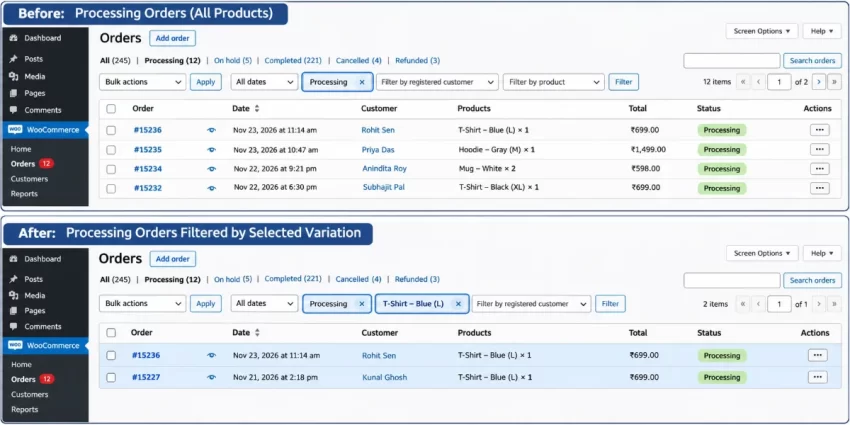
- Check one variation: Select a specific variation and verify that orders containing that variation appear, while orders containing only a different variation do not.
- Check no-match behavior: Select a valid product with no orders. The list should show no matching orders without a PHP warning or database error.
Next, combine the product selection with an order status, date range, and customer search. Confirm that each constraint remains active, the result count and pagination reflect the filtered set, and moving between pages does not bring unrelated orders back. Clear the product selection and apply the filters again; the normal order list should return. Finally, try an invalid or array-shaped pnet_product_id request value. It should be ignored safely, without breaking the screen.
Common Errors
The selector appears, but the order list does not change. This usually means the control is rendering on one screen while the query callback targets another. Confirm the active storage mode and admin screen ID, then verify that the matching hook runs for that screen in your installed WooCommerce version. Check the request URL to confirm that pnet_product_id contains the selected product ID.
Orders for a variation are missing. A parent product ID and a variation ID are different values in order line-item data. Parent-product filtering should match the parent ID and include its variations; selecting an individual variation should match its variation ID. Review the query behavior for both cases, especially if WooCommerce or the order-storage mode has changed.
Status or date filters disappear. The callback may be replacing the query arguments instead of extending them. Return the original arguments and add only the product criterion when a valid selection exists. Test the product filter together with status, date, and customer search to catch accidental resets.
Orders appear more than once, or counts and pagination look wrong. A direct join to line-item tables can produce duplicate order rows when an order has multiple matching items. In a legacy adapter, a correlated EXISTS condition checks for a match without multiplying rows. Keep that SQL limited to the legacy screen; HPOS must use its WooCommerce order-query integration.
The dropdown is empty or incomplete. A deliberate product-list limit can hide products outside the loaded range. Confirm the selected item is restored, and use a searchable, paginated selector for a large catalog rather than removing the limit indiscriminately.
A PHP error appears after an update. Check the site error log, confirm the exact Orders screen, and verify hook availability for the installed WooCommerce version before changing callbacks. Test adjustments on staging so a compatibility issue does not interrupt order management.
Summary
A product selector connected to the active WooCommerce order query gives staff a practical way to find orders containing a particular product without searching order details manually. Use WooCommerce order-query APIs for HPOS, keep any legacy posts-based adapter scoped to that screen, validate the selected product ID, and preserve the other order-list filters.
Test simple products, parent products, individual variations, and combined filters on staging before deployment. Keep the implementation in a small, maintainable site-specific plugin rather than theme-bound code. With those safeguards, you can Filter WooCommerce Orders reliably from the admin panel.