Editors often need to create and update content without having every permission assigned to the built-in role. This guide shows how to Remove Editor Role Capabilities precisely: use a small site-specific plugin to remove only the permissions your policy requires while preserving ordinary editing work. The change applies to every user assigned the Editor role on the relevant site, not just one account; a user with another role may still receive the same capability through that additional role.
Before changing permissions, identify the exact action to restrict and test the result with an Editor-only account. A focused capability list helps avoid disrupting publishing, media, or other routine workflows.
- A WordPress site running PHP 8.0 or newer.
- Administrator access to install or edit a site-specific plugin.
- A recent database and files backup, and a staging site for testing if available.
- A test account assigned only the Editor role.
- A clear list of capabilities to remove, confirmed against the site and its active plugins.
Confirm Which Editor Permissions Must Change
The built-in Editor role has the slug editor, and changing its capabilities affects every user assigned that role on this site. First write down the intended boundary: for example, Editors may create, edit, and publish pages, but may not delete them. This keeps the change focused on the action you need to restrict rather than disrupting ordinary content work.
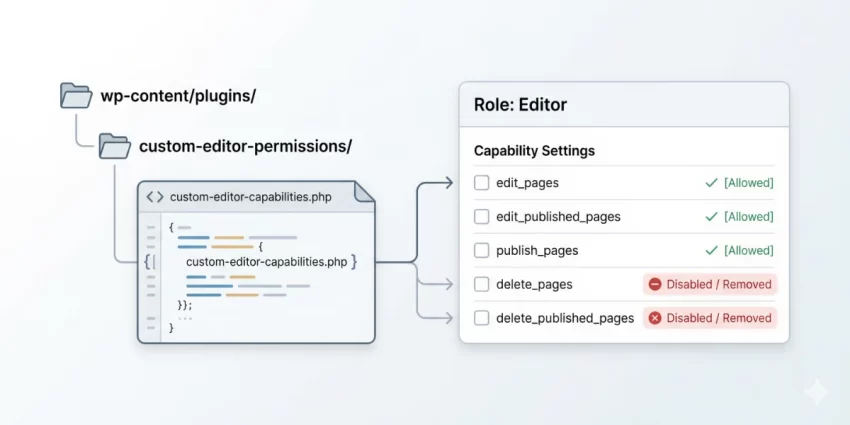
For the page example, WordPress has capabilities including edit_pages, publish_pages, and multiple delete_pages variants. Do not remove edit_pages or edit_posts simply to hide a delete action; those permissions control broader editing workflows. Plugins and custom role tools can add capabilities, so the actual role may differ from WordPress defaults.
Inspect the Capability and Its Effect
Choose capabilities based on the action to prevent, not just the label of an admin screen. Page deletion may involve delete_pages, delete_others_pages, delete_published_pages, and delete_private_pages. A meta capability such as edit_post is mapped by WordPress to primitive capabilities according to the content and user. Removing a capability from Editor does not delete content or change the Administrator role. Review the official WordPress Roles and Capabilities handbook when confirming what each permission controls.
Backup Required
You might also like:

Inspect the Capability and Its Effect
Match the permission to the action you want to restrict rather than relying on an admin-screen label. For example, preventing Editors from deleting pages requires checking the page deletion capabilities: delete_pages, delete_others_pages, delete_published_pages, and delete_private_pages. Which capabilities WordPress requires can depend on the page and the user attempting the action, so consider the full set rather than removing just one.
Role capabilities are generally primitive permissions, while a meta capability such as edit_post represents an action on a particular content item. WordPress maps that meta capability to the applicable primitive capabilities based on the content and user. Removing a capability from the Editor role changes the role permission; it does not delete existing pages or alter the Administrator role.
Confirm capability meanings in the official WordPress Roles and Capabilities developer handbook, then compare them with any custom post-type or plugin permissions on your site.
Remove Editor Role Capabilities in a Site-Specific Plugin
Keep permission changes in a small site-specific plugin rather than a parent theme. Theme changes or upgrades should not determine who can delete content, and a plugin makes the rule easier to review, version-control, and deploy independently. WordPress stores role capabilities in the database, so removing the plugin code later will not automatically restore permissions that have already been removed.
Create a uniquely named folder under wp-content/plugins and put the implementation in its PHP file, or add it to an existing site-specific plugin. The routine should run after WordPress has initialized its roles; the implementation in the next step uses the init hook and targets the built-in editor role. Before activation, confirm that you are working on the intended site and retain a record of the exact capabilities being changed.
You might also like:

Create the Plugin File
In your WordPress installation, create a uniquely named directory such as wp-content/plugins/pnet-editor-capability-controls, then create a PHP file inside it, for example pnet-editor-capability-controls.php. If your site already has a maintained site-specific plugin, you can place the routine in that plugin instead. Do not add permission logic to WordPress core files: core updates can overwrite those changes, and they make the access rule harder to review and deploy.
A valid plugin header allows WordPress to list the file on the Plugins screen so an administrator can activate it. The complete header and capability-removal routine belong together in the PHP file; the next step provides that code. Before activation, confirm that the plugin directory is in the intended WordPress installation, particularly if you manage staging and production sites side by side. Activate it from the site administration Plugins screen, then test the change using a dedicated account assigned only the Editor role.
Add an Idempotent Capability Removal Routine
Place this complete code in the site-specific plugin file you created. The plugin header identifies the file in WordPress, and the function targets only the built-in editor role. Its explicit list contains the four page-deletion capabilities; it does not remove editing or publishing permissions.
<?php
/**
 * Plugin Name: PixelNet Editor Capability Controls
 * Description: Removes selected page deletion capabilities from the Editor role.
 * Version: 1.0.0
 */

function pnet_remove_editor_role_capabilities() {
    $role = get_role('editor');

    if (!$role) {
        return;
    }

    $capabilities_to_remove = array(
        'delete_pages',
        'delete_others_pages',
        'delete_published_pages',
        'delete_private_pages',
    );

    foreach ($capabilities_to_remove as $capability) {
        if (isset($role->capabilities[$capability])) {
            $role->remove_cap($capability);
        }
    }
}
add_action('init', 'pnet_remove_editor_role_capabilities', 20);
The init hook runs after WordPress has initialized roles. The guard checks whether each capability is currently present before calling remove_cap(), avoiding unnecessary role-option writes on later requests. WordPress persists each removal in the database, so this guarded routine can run repeatedly without changing other capabilities. If your policy requires a different restriction, edit only the allowlist and test the result with an Editor-only account.
Did you know: If your server is constantly struggling with high resource usage and sluggish page load speeds, you can effectively disable WordPress image hotlinking to instantly block unauthorized domains and reclaim your stolen bandwidth?
Verify the Change With an Editor Account
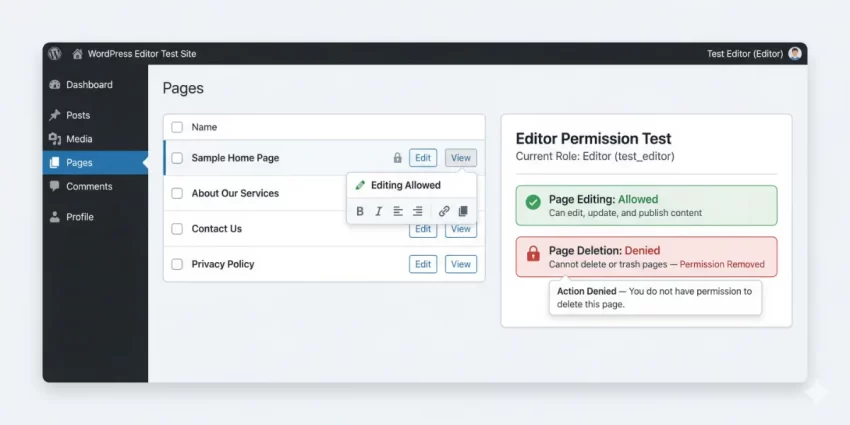
Sign out of the Administrator account, then sign in with a dedicated test account assigned only the Editor role. On a staging site, try deleting a test page that represents the restricted case. Confirm the action is denied, then create and edit a page and complete the publishing tasks Editors should retain. Test more than one page status if your policy covers drafts, published pages, or private pages.
A missing button or hidden admin menu is not proof of authorization: the underlying request must also be blocked. Custom code should make access decisions with capability checks such as current_user_can('delete_pages'), rather than identifying a user by role name. Repeat the checks in any plugin-specific screens that manage pages or custom post types.
Pro Tip
Keep a short record of the account, page status, attempted action, and result. That makes it easier to distinguish a real capability restriction from a test performed with the wrong account or on the wrong site.
You might also like:

Check Unaffected Workflows and Overlapping Grants
After confirming that page deletion is blocked, test the Editor tasks your site depends on: uploading media, editing existing posts and pages, publishing content, and using any custom post types. Check the relevant plugin workflows too, especially editorial review, forms, or content-management screens. A restriction can appear successful in one screen while an integration relies on a separate capability or authorization check.
WordPress combines permissions granted through a user’s assigned roles. If the test account has Editor plus another role that grants a removed capability, the action may remain available; verify the account’s complete role assignment before changing more permissions. Plugins may also define custom capabilities or perform their own access checks, so inspect those separately rather than removing unrelated core capabilities. Finally, treat capability checks as security controls: hiding a menu with CSS or a menu-removal plugin only changes what is displayed and does not reliably prevent a direct request or other route to the action.
Account for Multisite and Customized Roles
In WordPress Multisite, role definitions and their capabilities are stored separately for each site. The plugin routine changes the Editor role in the site context where it runs; applying it on one site does not automatically update every other site in the network. If the plugin is network-activated, plan how the routine will run on each relevant site. Sites that receive no requests may not be updated promptly, so include them in your deployment or maintenance process and verify each site separately.
Do not assume every site has an identical Editor role. A role-management or membership plugin, an administrator, or site-specific code may have added or changed capabilities. Custom roles may also use a different slug, even if their displayed name is Editor. Before interpreting a test, confirm the account is assigned the expected role on the target site, check the role slug and its capabilities there, and look for any additional roles assigned to that account. These checks help distinguish a failed restriction from a different site configuration or an overlapping permission grant.
Restore a Capability or Reverse the Change
Removing the plugin or deactivating it stops the removal routine from running, but it does not automatically restore capabilities already removed from the Editor role. WordPress stores role changes in the database. To reverse the change, first disable the removal routine so it does not remove the capabilities again, then temporarily deploy this restoration routine. The list should contain only the capabilities you intentionally removed and recorded before making the change.
<?php
function pnet_restore_editor_role_capabilities() {
    $role = get_role('editor');

    if (!$role) {
        return;
    }

    $capabilities_to_restore = array(
        'delete_pages',
        'delete_others_pages',
        'delete_published_pages',
        'delete_private_pages',
    );

    foreach ($capabilities_to_restore as $capability) {
        if (!isset($role->capabilities[$capability])) {
            $role->add_cap($capability);
        }
    }
}
add_action('init', 'pnet_restore_editor_role_capabilities', 20);
Deploy the function in your site-specific plugin, allow it to run, and verify the Editor role using a dedicated test account. The presence check avoids unnecessary database writes when the routine runs again. Once the intended capabilities are restored, remove or disable the temporary restoration routine. Do not add every capability that might exist in a default Editor role: restoring only the recorded permissions avoids overwriting deliberate customizations.
Common Errors
If the restriction does not behave as expected, check in this order: confirm the site-specific plugin is active, the role slug is editor, the capability names match the action, and you are testing with the correct account on the intended site. Then check for additional roles or plugin-specific permissions before changing the capability list.
The Editor Can Still Perform the Restricted Action
Confirm that the removed capabilities apply to the content type and action being tested. Page deletion may depend on more than one deletion capability, and a custom post type can use different capability mappings. Check whether the test account has another role granting access, and verify that it is not an Administrator account. If a plugin provides the action, inspect its capability checks; it may use a custom capability that the current removal list does not include.
The Editor Lost More Access Than Intended
Review the allowlist for broad permissions such as edit_posts, edit_pages, or publish_posts. Restore only any capability removed by mistake using the restoration routine above, then test both the restricted action and routine editing workflows. Check custom post-type mappings before removing a capability that appears generic.
Removing the Code Did Not Restore the Role
remove_cap() persists role changes in the database. Deleting or deactivating the plugin stops future removal calls but does not re-grant those permissions. Run the controlled add_cap() restoration routine for the exact capabilities recorded before the change, then verify access in a fresh Editor session.
The Editor Can Still Perform the Restricted Action
First confirm that the capability you removed matches the action and content type being tested. Page deletion can depend on several primitive capabilities, while a custom post type or plugin may use its own capability mapping. Check the account’s complete role assignments too: another role can still grant the permission you removed from Editor.
Finally, verify that the plugin is active on the site where the test account is assigned and that the account is not an Administrator. Repeat the test with an account assigned only the Editor role. If the action is provided by a plugin, inspect its authorization check for a custom or equivalent capability before changing the removal list.
The Editor Lost More Access Than Intended
Review the removal routine’s capability allowlist and compare each entry with the action you meant to restrict. Broad capabilities such as edit_posts, edit_pages, or publish_posts can disrupt everyday editing and publishing. For a page-deletion restriction, keep the list focused on the relevant deletion capabilities rather than removing permissions that control unrelated work.
If the list included a capability by mistake, first disable the removal routine so it does not remove that permission again. Use the restoration procedure above to re-add only the mistakenly removed capability, then test both the affected editing workflow and the action that should remain blocked with an Editor-only account. For custom post types, check their capability mappings before changing generic-looking permissions: a capability may govern more actions than its name suggests, or a post type may use a separate capability altogether.
Removing the Code Did Not Restore the Role
remove_cap() changes the Editor role data stored in the database. Deleting the plugin file or deactivating the plugin stops the removal routine from running, but it does not reverse that saved change. The missing permissions must be deliberately added back.
Use the restoration routine described above, keeping its list limited to the exact capabilities you removed. If the removal routine is still active, disable or adjust it first so it does not remove those capabilities again. Then allow the restoration routine to run and verify the result with a fresh session using an account assigned only the Editor role. Confirm both that the intended capability is restored and that unrelated role customizations remain unchanged.
If the role still appears unchanged, first confirm the restoration code ran on the correct site and that the role slug and capability names are correct. Only after checking that logic should you investigate a persistent object cache or stale browser session; clear or refresh those as appropriate, then test again.
Conclusion
A small site-specific plugin with a prefixed, guarded routine lets you remove only the capabilities required by your policy while leaving ordinary Editor work intact. For the page-deletion example, target the relevant deletion capabilities rather than broad permissions for editing or publishing. Because the change applies to the Editor role across the site, confirm the intended role and capability names before deployment.
Test both sides of the permission boundary with an account assigned only the Editor role: the restricted action should fail, while approved editing, publishing, and media workflows should continue to work. Check for overlapping grants from additional roles or plugins, and repeat verification on each relevant Multisite site. Keep a record of the capabilities changed; removing or deactivating the plugin does not restore database-persisted role permissions, so use a deliberate restoration routine when reversing the change. A careful implementation makes Remove Editor Role Capabilities a precise policy adjustment, not a broad reduction in editorial access.